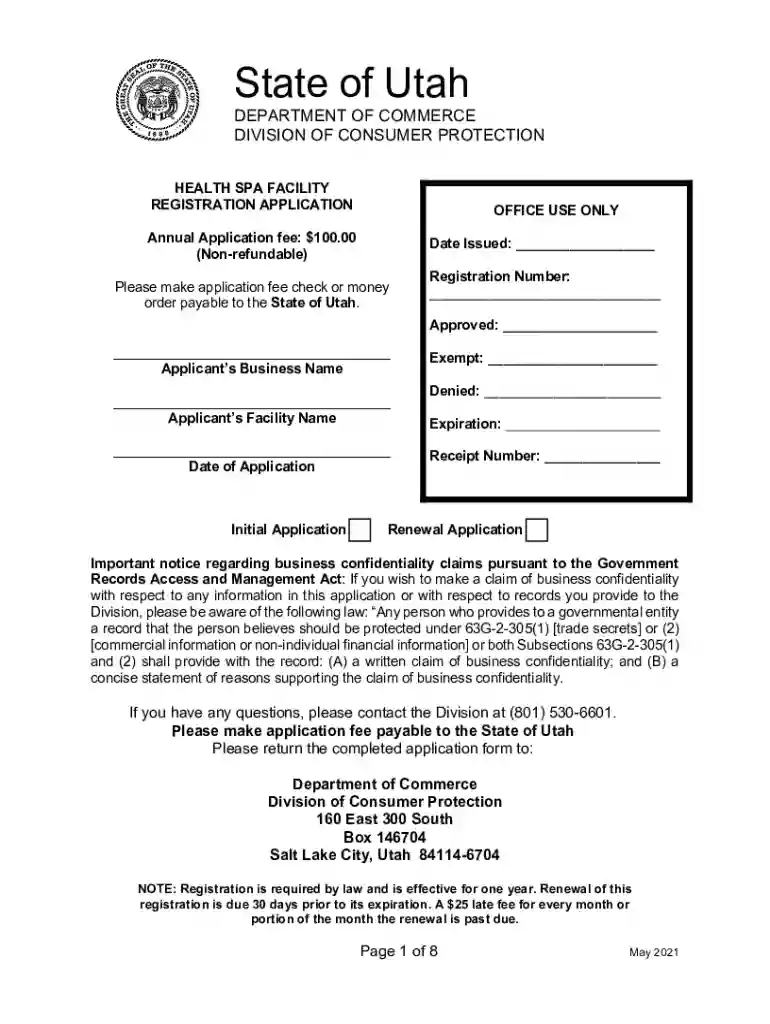
spa registration form Preview on Page 1

Health Spa Facility Registration Form 2026

Here's how it works

  • 01. Edit your spa registration form online

    Type text, add images, blackout confidential details, add comments, highlights and more.

  • 02. Sign it in a few clicks

    Draw your signature, type it, upload its image, or use your mobile device as a signature pad.

  • 03. Share your form with others

    Send spa form via email, link, or fax. You can also download it, export it or print it out.

How to use or fill out Health Spa Facility Registration Form with our platform

Form edit decoration
9.5
Ease of Setup
DocHub User Ratings on G2
9.0
Ease of Use
DocHub User Ratings on G2
  1. Click ‘Get Form’ to open the Health Spa Facility Registration Form in the editor.
  2. Begin by filling in the Applicant’s Business Name and Facility Name at the top of the form. Ensure that these names match your official business documents.
  3. Provide the Date of Application and select whether this is an Initial or Renewal Application by checking the appropriate box.
  4. Complete the Applicant’s Mailing Address section, including Street, City, State, Zip Code, and Telephone Number. This information is crucial for communication purposes.
  5. In the Applicant’s Location section, enter the Physical Location of your health spa facility. Include all relevant contact details.
  6. Fill out details for the Applicant’s Contact Person and Registered Agent sections. Make sure to include their email addresses for efficient correspondence.
  7. Attach any required documents such as a list of services offered, liability insurance proof, and contracts as specified in later sections of the form.
  8. Review all entered information for accuracy before submitting your application through our platform.

Start using our platform today to streamline your Health Spa Facility Registration process for free!

See more spa registration form versions

We've got more versions of the spa registration form form. Select the right spa registration form version from the list and start editing it straight away!

VersionsForm popularityFillable & printable
20214.8 Satisfied (134 Votes)
20194.3 Satisfied (109 Votes)
20134.2 Satisfied (66 Votes)

be ready to get more

Complete this form in 5 minutes or less

Got questions?

We have answers to the most popular questions from our customers. If you can't find an answer to your question, please contact us.

If you regularly deal with documents stored in your Google Drive, DocHub is an excellent solution for you to easily and quickly complete, edit, and approve them. This editor integrates well with Google services, so you can export your spa registration from your Google Drive to the editor without the need of downloading and re-uploading it. Right-click on your file, choose Open With → DocHub PDF Sign and Edit. In our editor, add and assign Signature Fields for all people involved, then click on the Menu button above → Send → select how you want to share your form.

Document editing with DocHub is equally convenient on desktop and mobile devices. You just need an internet browser to modify your Health Spa Facility Registration Form on Android. Open our website and sign in to access the tools you need. Add your file and introduce your intended changes. After that, you can keep your form in your file storage or send it out instantly.

/ˈhel ˌspɑː/ a place where you go to exercise and to take part in activities that are thought to be good for your health, such as massage: The retirement community has its own pool and health spa. (UK also health farm) a place where you go to stay for a vacation and eat healthy food, take exercise, etc.
In Texas, nurse practitioners, estheticians, and other non-physicians cannot own a med spa, also known as a medi-spa or medical spa. Nevertheless, a non-doctor may be involved in the day-to-day operations of a med spa via a management services organization (MSO).
An entity operated exclusively to provide physical rehabilitation activity related to an individuals injury or disease; A person engaged in an activity authorized under a state license; or.

Security and compliance

At DocHub, your data security is our priority. We follow HIPAA, SOC2, GDPR, and other standards, so you can work on your documents with confidence.

People also ask

Esthetician License Yes, unless statutorily exempted. A person must obtain a cosmetology license prior to performing a service regulated under the cosmetology statute, including facials, masks, general skin care, etc.; however, certain statutory exemptions apply.
Who Can Own a Med Spa in Texas? Only physicians can own med spas. While a physician assistant can own minority shares in a med spa or serve as a minority partner with a physician or physicians, other health care providers such as nurse practitioners and non-medical professionals cannot.
An entity operated exclusively to provide physical rehabilitation activity related to an individuals injury or disease; A person engaged in an activity authorized under a state license; or.
Who Can Own a Med Spa in Texas? Only physicians can own med spas. While a physician assistant can own minority shares in a med spa or serve as a minority partner with a physician or physicians, other health care providers such as nurse practitioners and non-medical professionals cannot.
Esthetician License Yes, unless statutorily exempted. A person must obtain a cosmetology license prior to performing a service regulated under the cosmetology statute, including facials, masks, general skin care, etc.; however, certain statutory exemptions apply.

Related links

KENTUCKY Health Spa Registration

You MUST submit a DocHubD annual registration statement and the $100 (Initial Registration) fee OR the $50 (Renewal Registration) fee each year,

Learn more
1 Tex. Admin. Code 102.10 - Procedure for Filing an

(f) The secretary of state provides a form for the application for registration or renewal as a health spa. The form can be obtained from the StatutoryRead more

Learn more
If you believe that this page should be taken down, please follow our DMCA take down process here