Type text, add images, blackout confidential details, add comments, highlights and more.

02. Sign it in a few clicks
Draw your signature, type it, upload its image, or use your mobile device as a signature pad.

03. Share your form with others
Send it via email, link, or fax. You can also download it, export it or print it out.

How to use or fill out ct agreement with our platform
Ease of Setup
DocHub User Ratings on G2
Ease of Use
DocHub User Ratings on G2
Click ‘Get Form’ to open the ct agreement in the editor.
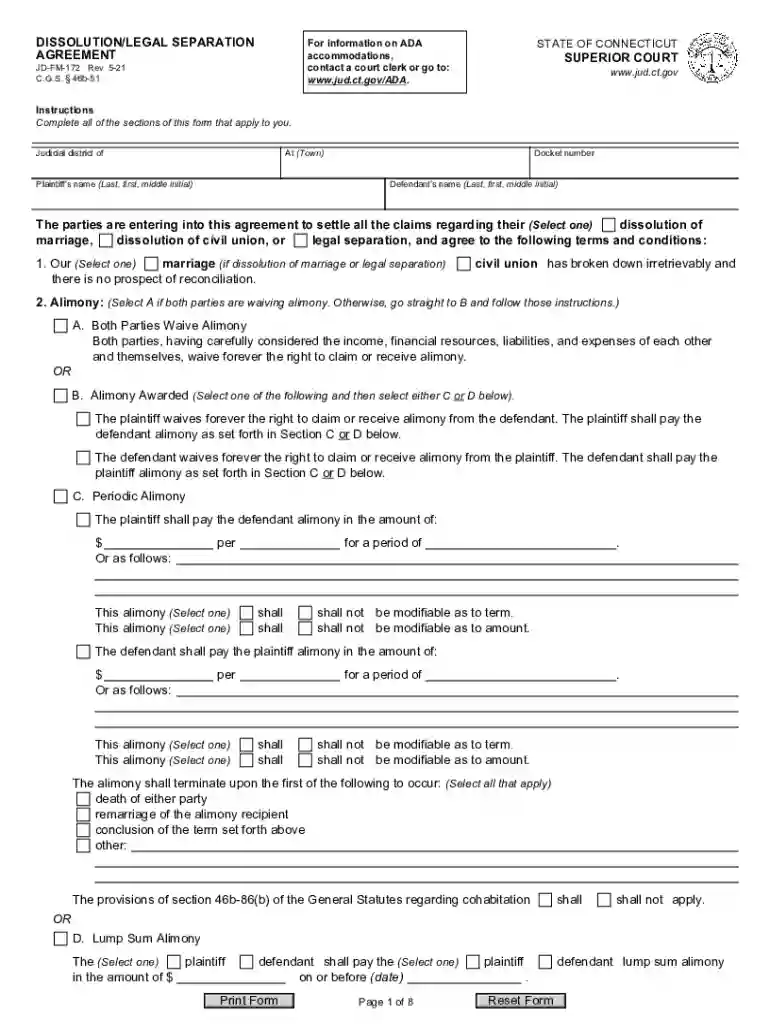
Begin by filling in the judicial district and docket number at the top of the form. This information is essential for identifying your case.
Enter the names of both parties involved, ensuring accuracy in spelling and order (Last, First, Middle Initial).
Select the appropriate option regarding the nature of your agreement: dissolution of marriage, civil union, or legal separation.
Proceed to fill out sections on alimony. Choose whether both parties waive alimony or if it will be awarded, and provide necessary details as prompted.
Complete sections related to real estate, motor vehicles, bank accounts, and other assets by selecting applicable options and providing required information.
Review all entries for accuracy before finalizing. Ensure that all necessary signatures are included at the end of the document.
Start using our platform today for free to streamline your ct agreement process!
A lawsuit is a formal case that has been filed in the appropriate court of law, while a tort claim is usually an informal notice of claim that may trigger an informal resolution without the cost of litigation.
What is a CT civil tort?
A Connecticut LLC Operating Agreement is a written contract between the LLC Members (LLC owners). It is the LLCs governing document. This legal document includes detailed information about LLC ownership structure, who owns the company and how the LLC is managed.
What is an example of a civil tort?
There are numerous specific torts including trespass, assault, battery, negligence, products liability, and intentional infliction of emotional distress. There are also separate areas of tort law including nuisance, defamation, invasion of privacy, and a category of economic torts.
What are the four types of tort cases?
4 types of torts that can harm your business Negligence torts: A slippery slope. Product liability: A fault in the assembly line. Intentional torts: Deliberate harm, unwanted consequences. Torts against property: Guarding against intrusions.
What is the tort law in CT?
Tort Law in Connecticut: What Is It? Connecticut tort law is the foundation upon which the court decides whether a party or entity is held liable for injuries that are caused to a claimant. Connecticut tort law is primarily governed by General Statutes Title 52 and Title 38a.
Related Searches
CT collective agreementct-fin-01 salaryct-fin-01 job descriptionct-fin-02 salaryct-iau rates of payCT EAV collective agreementCT-FIN rates of payct-fin-02 job description
Security and compliance
At DocHub, your data security is our priority. We follow HIPAA, SOC2, GDPR, and other standards, so you can work on your documents with confidence.
AGREEMENT FORM - Connecticut Judicial Branch - CT.gov
Complete form, make copies for yourself and give the original to the Court Clerk. ADA NOTICE. The Judicial Branch of the State of Connecticut complies with the
A click through agreement is an online purchase, often for software, where the buyer agrees to the vendors terms and conditions by clicking a box or signing
Cookie consent notice
This site uses cookies to enhance site navigation and personalize your experience.
By using this site you agree to our use of cookies as described in our Privacy Notice.
You can modify your selections by visiting our Cookie and Advertising Notice.