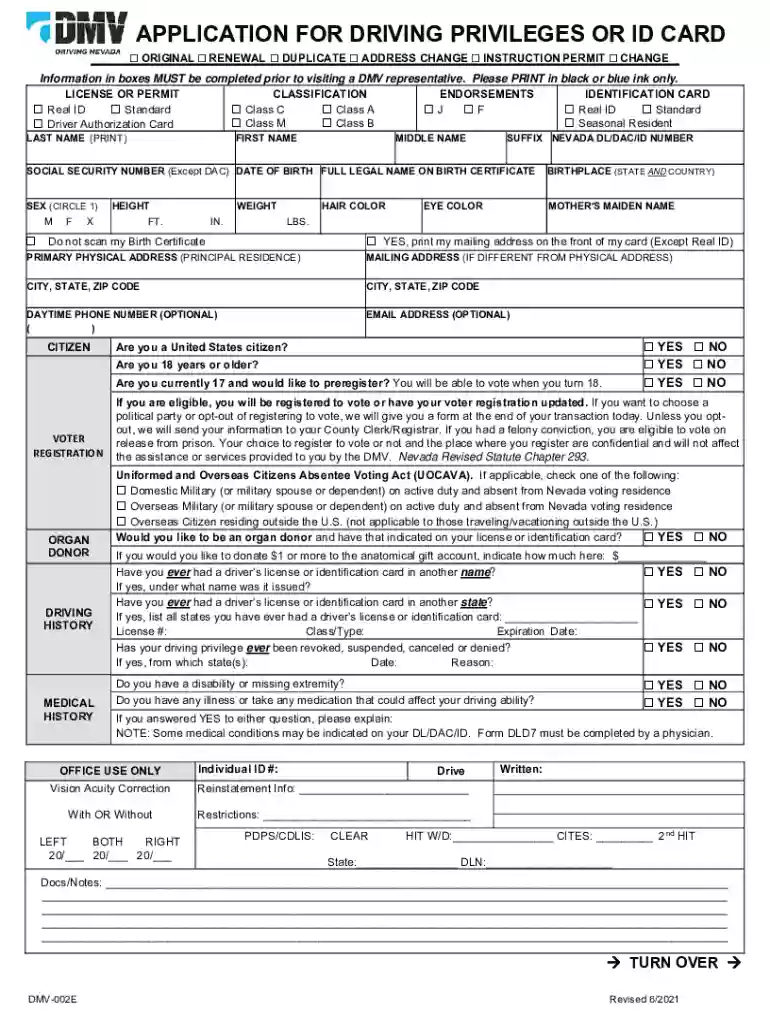
Nevada dmv form 2026

Get Form
nevada dmv forms Preview on Page 1

Here's how it works

01. Edit your nevada dmv forms online
Type text, add images, blackout confidential details, add comments, highlights and more.

02. Sign it in a few clicks
Draw your signature, type it, upload its image, or use your mobile device as a signature pad.

03. Share your form with others
Send dmv forms online via email, link, or fax. You can also download it, export it or print it out.

How to use or fill out Nevada DMV Form with Our Platform

Form edit decoration
9.5
Ease of Setup
DocHub User Ratings on G2
9.0
Ease of Use
DocHub User Ratings on G2
  1. Click ‘Get Form’ to open the Nevada DMV Application for Driving Privileges or ID Card in the editor.
  2. Begin by selecting the type of application you are submitting: Original, Renewal, Duplicate, Address Change, or Instruction Permit. Check the appropriate box.
  3. Fill in your personal information in the designated fields. This includes your last name, first name, middle name, suffix, and Nevada DL/DAC/ID number.
  4. Provide your Social Security Number (if applicable), date of birth, birthplace, sex, height, weight, hair color, and eye color. Ensure all entries are accurate.
  5. Complete your primary physical address and mailing address if different. Include city, state, and ZIP code for both addresses.
  6. Answer the citizenship questions regarding voter registration and organ donation preferences by checking 'Yes' or 'No' as applicable.
  7. Review all sections carefully before finalizing your form to ensure accuracy. Once completed, save your document for submission at the DMV.

Start using our platform today to fill out your Nevada DMV form easily and for free!

See more nevada dmv form versions

We've got more versions of the nevada dmv form form. Select the right nevada dmv form version from the list and start editing it straight away!
Versions Form popularity Fillable & printable
2021 4.8 Satisfied (202 Votes)
2019 4.4 Satisfied (92 Votes)
2017 3.8 Satisfied (29 Votes)
2017 5 Satisfied (30 Votes)
2014 4 Satisfied (36 Votes)
be ready to get more

Complete this form in 5 minutes or less

Get form

Got questions?

We have answers to the most popular questions from our customers. If you can't find an answer to your question, please contact us.
Contact us

A lot of software applications are available on the market for document modifying and signing. DocHub is one of the most widely used online solutions that comply with all security and compliance standards and guarantees your electronically signed documentation is legally enforceable. All you need to try it out is to sign up for an account, add your dmv form pdf, provide the necessary details, and click Sign. Generate your electronic signature by typing, drawing it, uploading its picture to your document, or scanning a unique QR code.

With DocHub, you have several convenient methods to edit your dmv forms online. You can drag and drop the form and modify it straight at the DocHub website or use our browser extension to fill out your form right away. On top of that, you can modify your PDF on your phone, as DocHub works with all the accessible mobile platforms.

You must present all of the following: Proof of Identity (one document) AND. If you have changed your name, Proof of All Name Change(s) AND. Proof of Social Security number (one document) AND. Proof of your Nevada residential address (two documents)
Proof of Nevada Residency: You must provide two documents proving your residency in Nevada. These documents must be original or certified copies and dated within the last 60 days. Examples include utility bills, lease agreements, bank statements, and other official documents showing your name and Nevada address.
What You Need Nevada Evidence of Insurance. Electronic Dealer Report of Sale (EDRS) Nevada Emission Vehicle Inspection Report. (If needed, this must be issued by the dealer) Current Odometer Reading. Application for Vehicle Registration (VP 222) (If a third party registers the vehicle on behalf of the owner)

Security and compliance

At DocHub, your data security is our priority. We follow HIPAA, SOC2, GDPR, and other standards, so you can work on your documents with confidence.

Learn more
ccpa2
pci-dss
gdpr-compliance
hipaa
soc-compliance

People also ask

Proof of Identity (one document) AND. If you have changed your name, Proof of All Name Change(s) AND. Proof of Social Security number (one document) AND. Proof of your Nevada residential address (two documents)
Your DMV Visit Make sure you have all of the required documents such as proof of identity, your existing drivers license and vehicle registration, Nevada Evidence of Insurance, smog check, current odometer reading, etc. Bring your existing license plates into the office with you. We do not have tools for you to use.
Yes, people with a valid and current drivers license issued from a foreign country may drive in Nevada. You do not need to apply for a Nevada drivers license unless your foreign license expires or you become eligible for a Nevada license.
VP 222 is a form used to register vehicles in Nevada. This application cannot be used for moving permits or application for title. VP 12 can be used to apply for a duplicate title. If a title is lost, stolen, or mutilated this is the form you need.

dmvnv forms