Oregon Driver & Motor Vehicle Services 2026

Get Form
oregon driver motor vehicle services Preview on Page 1

Here's how it works

01. Edit your oregon driver motor vehicle services online
Type text, add images, blackout confidential details, add comments, highlights and more.

02. Sign it in a few clicks
Draw your signature, type it, upload its image, or use your mobile device as a signature pad.

03. Share your form with others
Send it via email, link, or fax. You can also download it, export it or print it out.

How to use or fill out Oregon Driver & Motor Vehicle Services with DocHub

Form edit decoration
9.5
Ease of Setup
DocHub User Ratings on G2
9.0
Ease of Use
DocHub User Ratings on G2
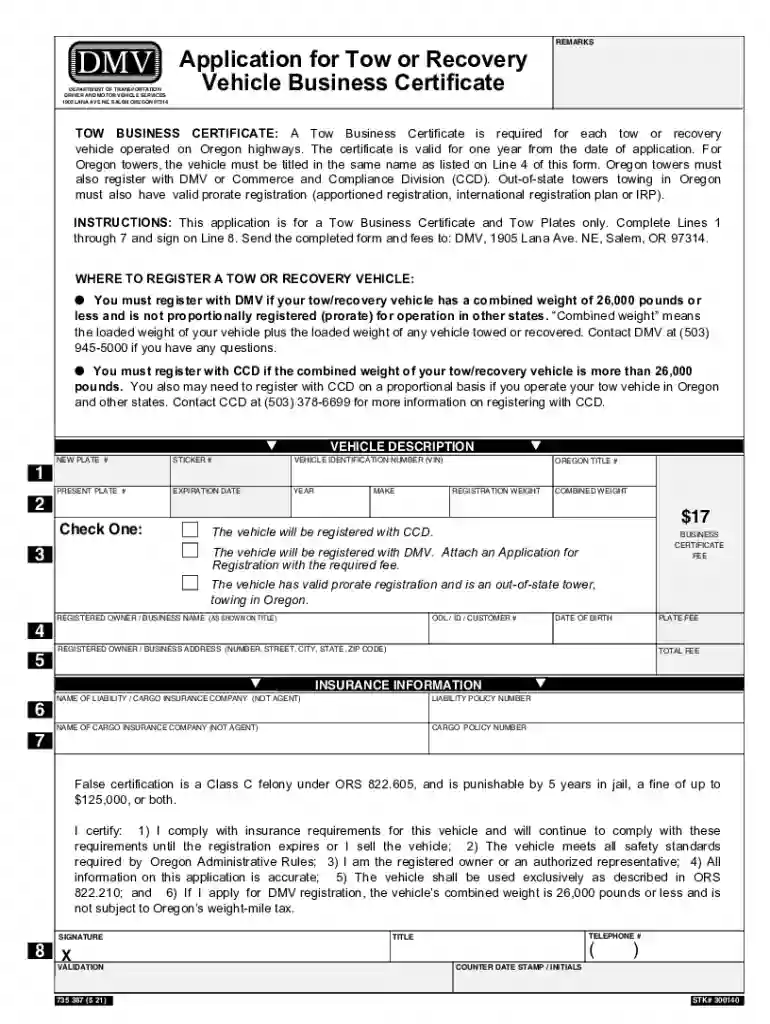
  1. Click ‘Get Form’ to open the Oregon Driver & Motor Vehicle Services application in our editor.
  2. Begin by filling out Line 1 with the vehicle description, including the new plate number and vehicle identification number (VIN). Ensure accuracy as this information is crucial for registration.
  3. On Line 2, select whether your vehicle will be registered with DMV or CCD. If applicable, attach any necessary registration applications and fees.
  4. Complete Lines 3 through 5 by providing details about the registered owner or business name, address, and insurance information. Make sure to include policy numbers for both liability and cargo insurance.
  5. Sign on Line 8 to certify that all information provided is accurate and that you comply with Oregon's regulations. This step is essential for processing your application.
  6. Once completed, save your form and submit it along with any required fees to the DMV at the specified address.

Start using our platform today to streamline your document editing and form completion for free!

See more Oregon Driver & Motor Vehicle Services versions

We've got more versions of the Oregon Driver & Motor Vehicle Services form. Select the right Oregon Driver & Motor Vehicle Services version from the list and start editing it straight away!
Versions Form popularity Fillable & printable
2022 4.8 Satisfied (51 Votes)
2021 4.8 Satisfied (131 Votes)
2020 4.3 Satisfied (93 Votes)
2016 3.6 Satisfied (29 Votes)
be ready to get more

Complete this form in 5 minutes or less

Get form

Got questions?

We have answers to the most popular questions from our customers. If you can't find an answer to your question, please contact us.
Contact us
Online Testing Requirements. You must use a desktop or laptop computer with a mouse and keyboard to complete the online knowledge test. You cannot complete the test using a touchscreen device including mobile phones or tablets. Your computer must have a functioning webcam to take the test.
For the first 6 months: No passengers under 20 years of age unless they are a member of your immediate family, AND no driving between midnight and 5 AM unless for a reason in the list of exceptions below.
Online renewal If you have a residence address in Oregon, you can renew vehicle registration online through DMV2U even if your mailing address is out of state. However, if your residence address is not in Oregon, you cannot renew through DMV2U. You can use any other option for renewal.
To renew at a DMV office, you need to: Determine if you need a REAL ID (there are additional requirements if this is your first REAL ID); Make an appointment​ or visit a DMV office​ for standby service; ​Show proof of physical address and identity (if you want your first REAL ID you must bring additional documents​);
All DMV offices are open to the public without an appointment.

Security and compliance

At DocHub, your data security is our priority. We follow HIPAA, SOC2, GDPR, and other standards, so you can work on your documents with confidence.

Learn more
ccpa2
pci-dss
gdpr-compliance
hipaa
soc-compliance
be ready to get more

Complete this form in 5 minutes or less

Get form