Petition inspect form 2026

Get Form
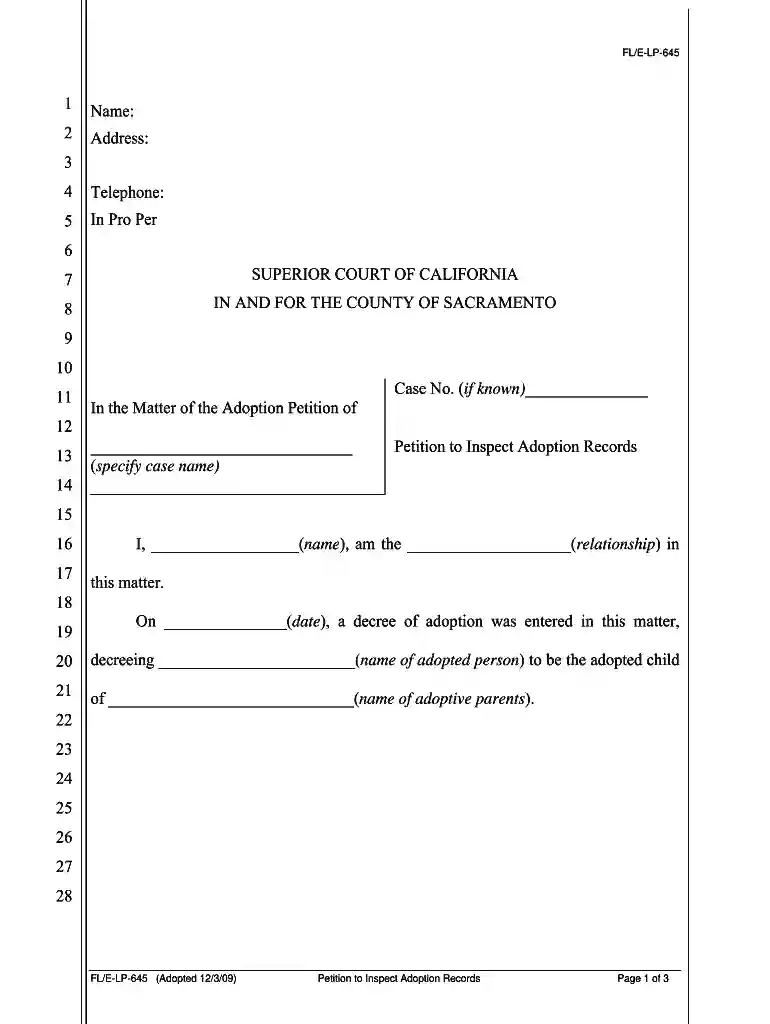
petition inspect form Preview on Page 1

Here's how it works

01. Edit your form online
Type text, add images, blackout confidential details, add comments, highlights and more.

02. Sign it in a few clicks
Draw your signature, type it, upload its image, or use your mobile device as a signature pad.

03. Share your form with others
Send it via email, link, or fax. You can also download it, export it or print it out.

How to use or fill out petition inspect form with our platform

Form edit decoration
9.5
Ease of Setup
DocHub User Ratings on G2
9.0
Ease of Use
DocHub User Ratings on G2
  1. Click ‘Get Form’ to open the Petition to Inspect Adoption Records in the editor.
  2. Begin by filling in your name and address at the top of the form. Ensure that all information is accurate and clearly legible.
  3. Provide your telephone number and indicate if you are representing yourself by checking 'In Pro Per'.
  4. In the section labeled 'In the Matter of the Adoption Petition of', specify the case name. If known, include the case number.
  5. Detail your relationship to the adopted person in the designated field, followed by entering the date when the decree of adoption was entered.
  6. Clearly state all facts establishing necessity for inspecting court records in multiple paragraphs as required.
  7. Conclude by signing and dating the petition at the bottom, ensuring that you have filled out all necessary fields before submission.

Start using our platform today to easily complete your petition inspect form for free!

See more petition inspect form versions

We've got more versions of the petition inspect form form. Select the right petition inspect form version from the list and start editing it straight away!
Versions Form popularity Fillable & printable
2020 4.8 Satisfied (51 Votes)
2018 4.2 Satisfied (69 Votes)
2009 4.2 Satisfied (42 Votes)
be ready to get more

Complete this form in 5 minutes or less

Get form

Got questions?

We have answers to the most popular questions from our customers. If you can't find an answer to your question, please contact us.
Contact us
Form 626, Block II requires inspection of all items marked UNSAT in the Origin column. This is because UNSAT signifies that the item was not inspected at the origin and hence requires inspection at the destination. During an inbound inspection, you see one of the door seals is damaged.
(This form provides a limited inspection of the general operation of the vehicle and is not to be confused with the more thorough vehicles periodic inspection. Read Instructions before completing this form.) This form applies to all vehicles which must be marked or placarded in accordance with Title 49 CFR.
When inspecting an AE transport vehicle using DD Form 626, the inspector must venty all brake lights are operational, intectfundemaged, and the correct color. not obscured by dirt or grease. waterproof larger than 4 inches in diameter.
Prior to ammunition pickup, the ASP will use DD Form 626 (Motor Vehicle Inspection (Transporting Hazardous Materials)) to verify the selected vehicles have passed a stringent safety inspection.
DD Form 626, also known as the Vehicle Inspection Checklist, is used by the U.S. military to ensure that vehicles transporting hazardous materials meet safety standards. This form is essential for preventing accidents and ensuring compliance with regulations.

Security and compliance

At DocHub, your data security is our priority. We follow HIPAA, SOC2, GDPR, and other standards, so you can work on your documents with confidence.

Learn more
ccpa2
pci-dss
gdpr-compliance
hipaa
soc-compliance

People also ask

An inspection request form is a document used to request inspections at various stages of a construction project. It provides essential details such as project information, location, type of inspection needed, and scheduling preferences.

Related links