Type text, add images, blackout confidential details, add comments, highlights and more.
02. Sign it in a few clicks
Draw your signature, type it, upload its image, or use your mobile device as a signature pad.
03. Share your form with others
Send it via email, link, or fax. You can also download it, export it or print it out.
How to use or fill out IMM 5620 E with our platform
Ease of Setup
DocHub User Ratings on G2
Ease of Use
DocHub User Ratings on G2
Click ‘Get Form’ to open the IMM 5620 E in the editor.
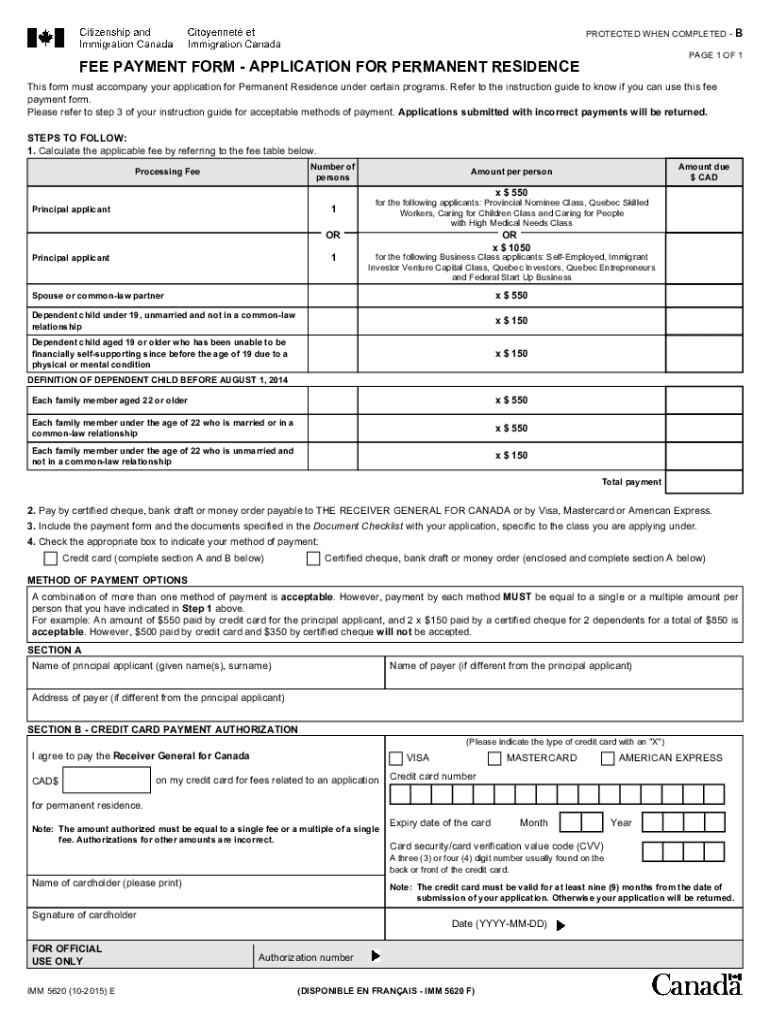
Begin by calculating the applicable fee based on the number of applicants. Refer to the fee table provided in the form for accurate amounts.
Select your method of payment. You can choose between certified cheque, bank draft, money order, or credit card. Ensure that you complete Section A if using a cheque or Section B for credit card payments.
Fill in your personal details in Section A, including the name and address of the principal applicant and payer if different.
If paying by credit card, complete Section B with your credit card information, ensuring that all fields are filled accurately to avoid any issues.
Review all entries for accuracy before submitting your application along with this payment form and any required documents.
Start editing your IMM 5620 E today for free on our platform!
The HS22 blade server includes an Integrated Management Module (IMM) to monitor server availability, perform Predictive Failure Analysis, etc., and trigger IBMRead more
LETTERS TO IMM/REF RE SSN, 1840, 06-12-2012, 504.10, 504.10-02(E)(04). 4561, 42.073 EXHIBIT IV, FORM DS-1810, NOTICE OF DUTY TO REGISTER WITH U.S. SELECTIVERead more
Cookie consent notice
This site uses cookies to enhance site navigation and personalize your experience.
By using this site you agree to our use of cookies as described in our Privacy Notice.
You can modify your selections by visiting our Cookie and Advertising Notice.