Doh 505 2026

Get Form
doh 505 Preview on Page 1

Here's how it works

01. Edit your form online
Type text, add images, blackout confidential details, add comments, highlights and more.

02. Sign it in a few clicks
Draw your signature, type it, upload its image, or use your mobile device as a signature pad.

03. Share your form with others
Send it via email, link, or fax. You can also download it, export it or print it out.

How to use or fill out doh 505 with our platform

Form edit decoration
9.5
Ease of Setup
DocHub User Ratings on G2
9.0
Ease of Use
DocHub User Ratings on G2
  1. Click ‘Get Form’ to open the doh 505 in the editor.
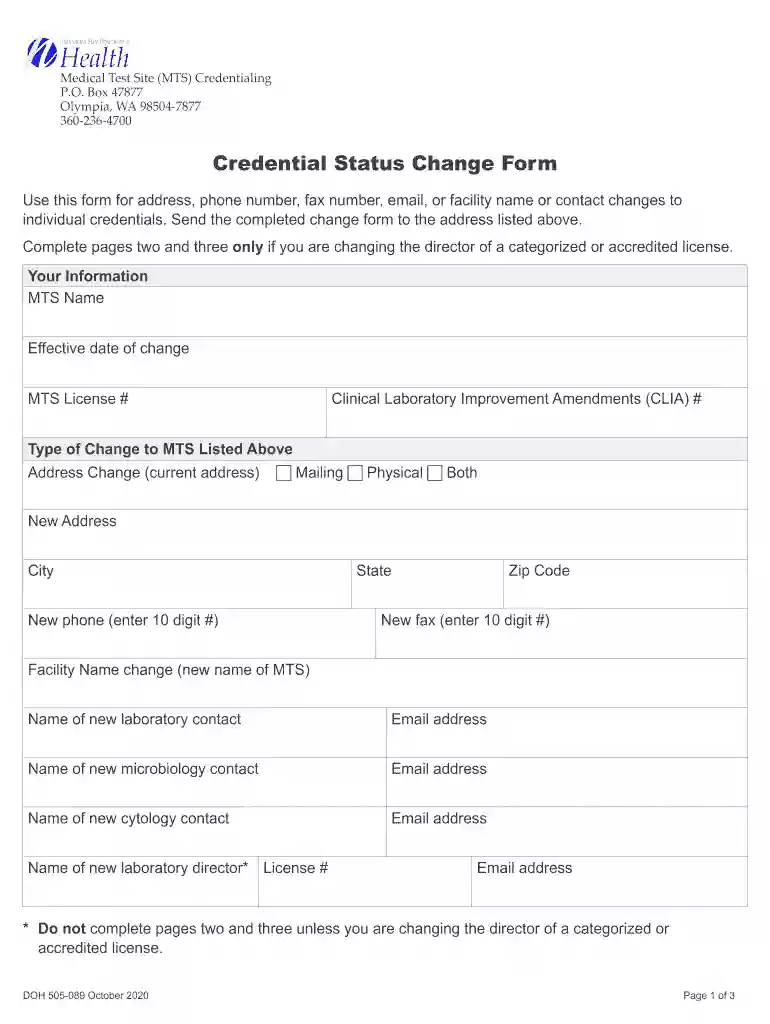
  2. Begin by entering your MTS Name and the effective date of change in the designated fields. Ensure accuracy as this information is crucial for processing.
  3. Fill in your MTS License # and CLIA #. These identifiers help verify your credentials and streamline updates.
  4. Select the type of change you are making (address, phone number, etc.) by checking the appropriate box. If changing the address, provide both mailing and physical addresses if applicable.
  5. For facility name changes, enter the new name along with contact details for new laboratory contacts. Make sure to include email addresses for all relevant personnel.
  6. If applicable, complete pages two and three regarding qualifications of personnel for moderate and high complexity testing. Check only one option per section as required.
  7. Finally, ensure that the Medical Test Site Director signs and dates the form to certify its accuracy before submission.

Start using our platform today to fill out your doh 505 form easily and efficiently!

See more doh 505 versions

We've got more versions of the doh 505 form. Select the right doh 505 version from the list and start editing it straight away!
Versions Form popularity Fillable & printable
2020 4.8 Satisfied (189 Votes)
2016 4.3 Satisfied (274 Votes)
2014 4.4 Satisfied (553 Votes)
2012 4.2 Satisfied (61 Votes)
be ready to get more

Complete this form in 5 minutes or less

Get form

Got questions?

We have answers to the most popular questions from our customers. If you can't find an answer to your question, please contact us.
Contact us
Consent form 1 Patient agreement to investigation or treatment. This form deals with people who have the capacity to consent to treatment and therefore is largely unaffected by the MCA. In the section statement of health professional, the wording about risks could be.
The act of giving consent means that a person intends to allow, approve, agree, or is willing to comply with something. A consent form is a document that is signed by a person (or on behalf of the person whom they are a guardian) to show that they are in agreement with the contents of the document.
Download WH-380-FFMLA-Form-for-Employee. The Family and Medical Leave Act (FMLA) provides that an employer may require an employee seeking FMLA protections because of a need for leave due to a serious health condition to submit a medical certification issued by the employees health care provider.
What are the three types of informed consent? Implied consent. Your provider explains why they recommend a procedure. Verbal consent. An example of verbal consent is when you agree to have tests or procedures. Written consent. Written informed consent applies when you accept a risk.
There are 3 types of Form 5500: Form 5500-EZfor one-participant plans only; Form 5500-SF for plans with fewer than 100 participants; and Form 5500for plans with 100 or more participants. Forms 5500 and 5500-SF must be filed electronically using the DOL ERISA Filing Acceptance System (EFAST2)Opens in a new window.

Security and compliance

At DocHub, your data security is our priority. We follow HIPAA, SOC2, GDPR, and other standards, so you can work on your documents with confidence.

Learn more
ccpa2
pci-dss
gdpr-compliance
hipaa
soc-compliance

People also ask

Form DS-5055 must be used for all regular and interim evaluations - for tenured and untenured Foreign Service (FS) employees. For periods under 120 days, employees have the option of using the DS-5055 or the DS-7768 short form. Personnel assigned to language training should use the DS-651.
The Form 5500 Series is part of ERISAs overall reporting and disclosure framework, which is intended to assure that employee benefit plans are operated and managed in ance with certain prescribed standards and that participants and beneficiaries, as well as regulators, are provided or have access to sufficient

Related links