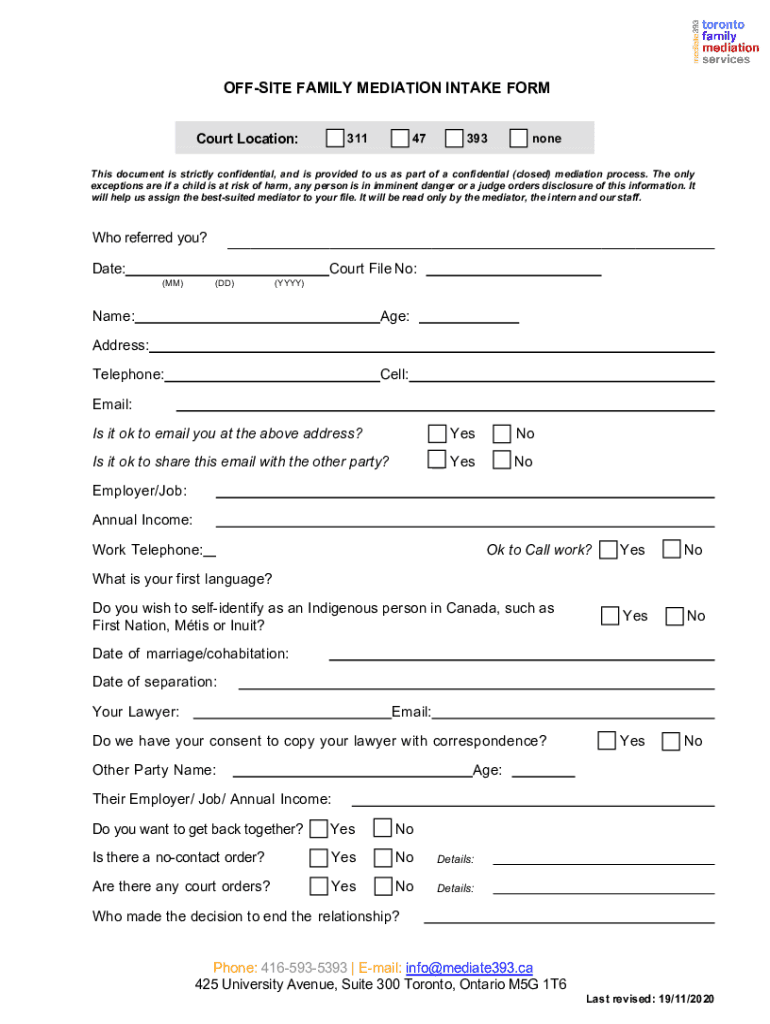
OFF-SITE FAMILY MEDIATION INTAKE FORM 2026

Get Form
mediation intake form template Preview on Page 1

Here's how it works

01. Edit your mediation intake form template online
Type text, add images, blackout confidential details, add comments, highlights and more.
02. Sign it in a few clicks
Draw your signature, type it, upload its image, or use your mobile device as a signature pad.
03. Share your form with others
Send child custody mediation illustration png via email, link, or fax. You can also download it, export it or print it out.

How to use or fill out OFF-SITE FAMILY MEDIATION INTAKE FORM with our platform

Form edit decoration
9.5
Ease of Setup
DocHub User Ratings on G2
9.0
Ease of Use
DocHub User Ratings on G2
  1. Click ‘Get Form’ to open the OFF-SITE FAMILY MEDIATION INTAKE FORM in the editor.
  2. Begin by filling in your personal details, including your name, age, address, and contact information. Ensure accuracy as this information is crucial for communication.
  3. Indicate who referred you and provide the date of your mediation request. This helps us understand your situation better.
  4. Complete the sections regarding your employment and income. This information assists in assessing your mediation needs.
  5. Answer questions about your relationship history, including dates of marriage and separation, as well as any children involved. This context is vital for effective mediation.
  6. Detail any concerns about being in the same room with the other party and specify issues you wish to discuss during mediation.
  7. Finally, review all entries for accuracy before submitting the form via email through our platform.

Start using our platform today to complete your OFF-SITE FAMILY MEDIATION INTAKE FORM easily and securely!

See more OFF-SITE FAMILY MEDIATION INTAKE FORM versions

We've got more versions of the OFF-SITE FAMILY MEDIATION INTAKE FORM form. Select the right OFF-SITE FAMILY MEDIATION INTAKE FORM version from the list and start editing it straight away!
Versions Form popularity Fillable & printable
2020 4.9 Satisfied (55 Votes)
2011 4.3 Satisfied (83 Votes)
be ready to get more

Complete this form in 5 minutes or less

Get form

Got questions?

We have answers to the most popular questions from our customers. If you can't find an answer to your question, please contact us.
Contact us

Sure, it is possible with DocHub. This safe and compliant online editor features a phone-based signing option. Once you log in to your DocHub account and add your mediation intake form to our editor, complete all necessary areas and use the Sign feature on the top barf. Click on Create your signature and choose Phone from the available options. Here, you scan a QR code with your smartphone and draw your signature on your phone screen, as you normally do when signing hard copies. If you access DocHub right from your mobile device, you can eSign your form by drawing your eSignature, uploading its picture, or simply with a typed name.

Document editing with DocHub is equally convenient on desktop and mobile devices. You only need an internet browser to edit your mediation form for court on Android. Open our site and sign in to access the tools you need. Add your document and introduce your intended modifications. After that, you can keep your form in your document storage or send it out right away.

What to say in child Arrangements (FKA Custody) mediation? Instead of dwelling on problems, focus on being solution oriented. Express a willingness to co-parent and create a supportive environment. Seek clarification rather than making assumptions. Be open to compromise and find common ground.
Mediation is often preferred for its benefits in terms of cost-effectiveness, maintaining relationships, and preserving privacy. However, litigation becomes necessary in cases with complex legal issues or a lack of agreement in mediation.
Mediation is a dispute resolution process in which an impartial third party - the mediator - facilitates negotiations between the parties to help them docHub a mutually acceptable settlement. The major distinction of mediation is that a mediator does not make a decision about the outcome of the case.

Security and compliance

At DocHub, your data security is our priority. We follow HIPAA, SOC2, GDPR, and other standards, so you can work on your documents with confidence.

Learn more
ccpa2
pci-dss
gdpr-compliance
hipaa
soc-compliance

People also ask

Family Mediation Does Not Always Work Complex emotional dynamics, deep-seated resentments, or imbalanced power dynamics between parties can undermine the process. When mediation fails, parties may end up resorting to traditional litigation. In some cases, the potential to incur more time and costs is there.
When it is safe to take place (in most cases where domestic abuse is not alleged or a feature of your relationship) a Mediation Information and Assessment Meeting (MIAM) is usually required before you can go to a family court. Your wellbeing and safety are always considered carefully before any meeting.
Before you go to mediation If youre trying to docHub an agreement about money or property, youll need to fill out a financial disclosure form when you go to mediation. Youll have to include all your financial information, for example: your income - for example, from work or benefits.
Get good results at your mediation by keeping these basic tenets in mind. Rule 1: The decision makers must participate. Rule 2: Important documents must be physically present. Rule 3: Be right, but only to a point. Rule 4: Build a deal. Rule 5: Treat the other party with respect. Rule 6: Be persuasive.
Mediation is generally a voluntary process that both parties have to agree to participate in unless it is court ordered. If you have changed your mind or have objections to mediation, you will likely have to provide a reason to the court.

Related links