Prc temporary permit 2026

Get Form
examination permit sample Preview on Page 1

Here's how it works

01. Edit your examination permit sample online
Type text, add images, blackout confidential details, add comments, highlights and more.

02. Sign it in a few clicks
Draw your signature, type it, upload its image, or use your mobile device as a signature pad.

03. Share your form with others
Send exam permit sample via email, link, or fax. You can also download it, export it or print it out.

How to use or fill out prc temporary permit with our platform

Form edit decoration
9.5
Ease of Setup
DocHub User Ratings on G2
9.0
Ease of Use
DocHub User Ratings on G2
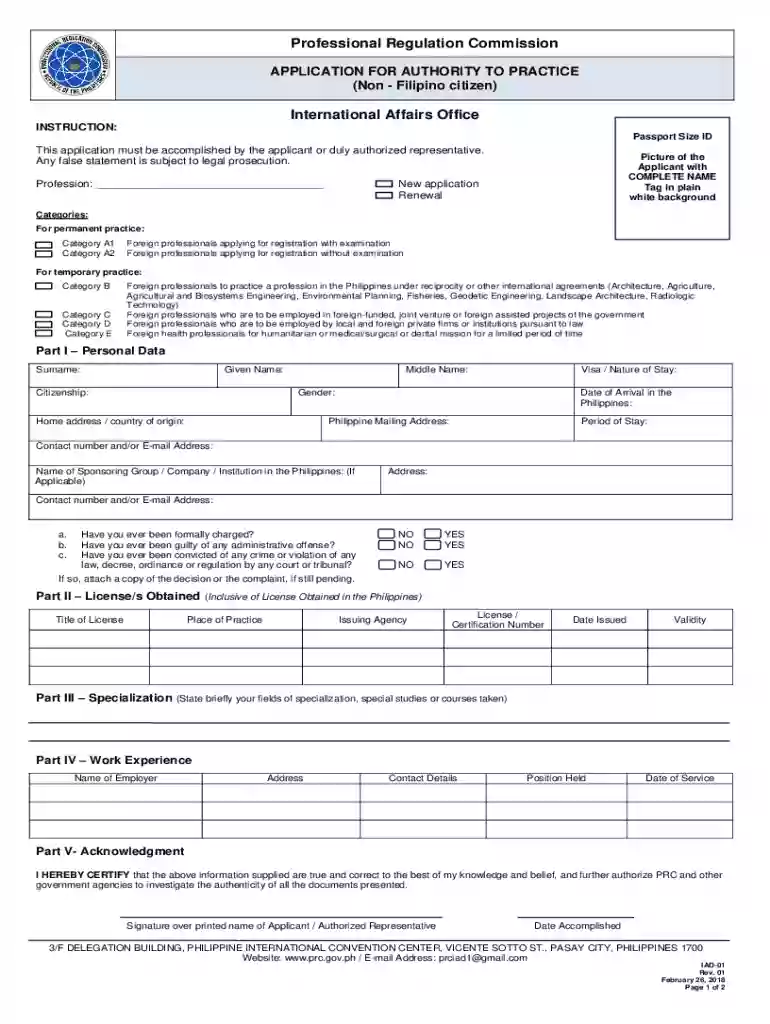
  1. Click ‘Get Form’ to open the prc temporary permit in the editor.
  2. Begin by filling out Part I – Personal Data. Enter your surname, given name, middle name, citizenship, and visa details. Ensure that your home address and Philippine mailing address are accurate.
  3. In Part II – License/s Obtained, list any licenses you hold, including the title, issuing agency, license number, date issued, and validity.
  4. For Part III – Specialization, briefly state your fields of specialization or any relevant courses taken.
  5. Complete Part IV – Work Experience by providing details about your previous employers, positions held, and duration of service.
  6. Finally, in Part V – Acknowledgment, certify that all information is true by signing over your printed name and indicating the date accomplished.

Start using our platform today for free to streamline your application process!

See more prc temporary permit versions

We've got more versions of the prc temporary permit form. Select the right prc temporary permit version from the list and start editing it straight away!
Versions Form popularity Fillable & printable
2018 4.8 Satisfied (34 Votes)
2013 4.4 Satisfied (237 Votes)
be ready to get more

Complete this form in 5 minutes or less

Get form

Got questions?

We have answers to the most popular questions from our customers. If you can't find an answer to your question, please contact us.
Contact us
How to Get Your PRC ID Online: A Step-by-Step Guide (LERIS PRC) Step 1: Check Eligibility. Step 2: Create an Account on LERIS PRC. Step 3: Log In to Your LERIS PRC Account. Step 4: Select Your Service in LERIS PRC. Step 5: Pay the Fees via LERIS PRC. Step 6: Submit Required Documents on LERIS PRC.
𝐒𝐭𝐞𝐩 𝟖: 𝐖𝐚𝐢𝐭 𝐟𝐨𝐫 𝐭𝐡𝐞 𝐃𝐞𝐥𝐢𝐯𝐞𝐫𝐲 After submitting all required documents. Kindly wait for approximately 5 working days for your ID to be delivered. Your compliance ensures a smooth and timely delivery of your PRC ID. You will be receiving an email confirming the release of your PRC ID to FSI for shipping.
Register for a Temporary Sellers Permit Obtaining a temporary sellers permit is easy and free. Please visit our Online Services webpage, select the Registrations tab and follow the steps to register a business activity with the California Department of Tax and Fee Administration (CDTFA).
- All PRC IDs shall be valid for five (5) 10 years, subject to the compliance with all the legal and procedural requirements for its 11 issuance, and provided that the PRC finds that the professional possesses the 12 necessary qualifications, unless sooner revoked or suspended. 13 Sec. 4. ConditionalRequirement.

Security and compliance

At DocHub, your data security is our priority. We follow HIPAA, SOC2, GDPR, and other standards, so you can work on your documents with confidence.

Learn more
ccpa2
pci-dss
gdpr-compliance
hipaa
soc-compliance