



01. Edit your form online
Type text, add images, blackout confidential details, add comments, highlights and more.

Type text, add images, blackout confidential details, add comments, highlights and more.

Draw your signature, type it, upload its image, or use your mobile device as a signature pad.

Send it via email, link, or fax. You can also download it, export it or print it out.
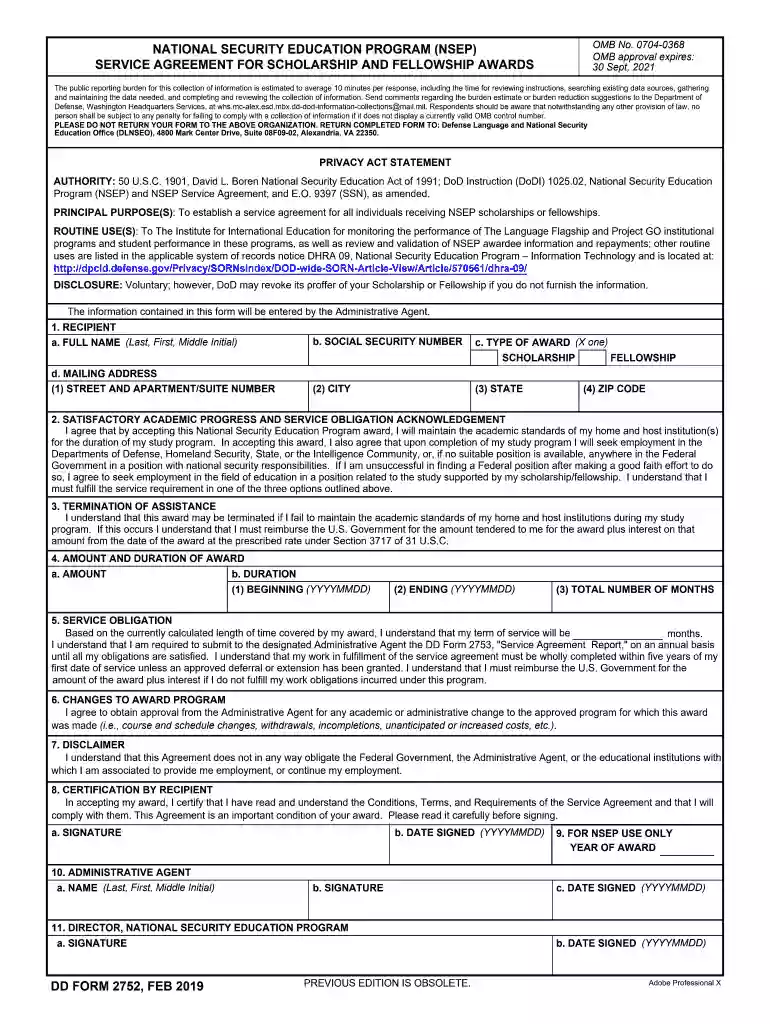
DD Form 2752, titled "NSEP Service Agreement for Scholarship and Fellowship Awards," is a legally binding document used by recipients of the National Security Education Program (NSEP) scholarships and fellowships. This form delineates the service agreement obligations for award recipients. It requires recipients to agree to specific terms, including work in a qualifying national security position. By adhering to these terms, recipients contribute to meeting the national security workforce needs of the United States.
Navigating DD Form 2752 can be intricate due to its specific requirements. Here's a step-by-step guide:
Completing DD Form 2752 effectively is crucial for compliance. Follow these steps for accuracy:
The form contains several critical elements that ensure compliance with NSEP requirements:
The primary users of DD Form 2752 are recipients of the NSEP scholarships and fellowships. The form is a mandatory requirement designed to ensure that U.S. national security interests are met through educational programs.
The legal aspects of DD Form 2752 are integral to its role as a binding agreement:
To access and complete DD Form 2752, recipients typically follow these pathways:
Understanding key terminology associated with this form is crucial:
Each of these sections caters to a comprehensive understanding of DD Form 2752, providing an exhaustive resource for users engaged with the form in any capacity.
We've got more versions of the DD Form 2752, NSEP Service Agreement for Scholarship and Fellowship Awards, November 2014 form. Select the right DD Form 2752, NSEP Service Agreement for Scholarship and Fellowship Awards, November 2014 version from the list and start editing it straight away!
Many software applications are available on the market for document editing and signing. DocHub is one of the most widely used online solutions that comply with all security and compliance standards and guarantees your eSigned documentation is legally enforceable. All you need to give it a try is to register an account, add your DD Form 2752, NSEP Service Agreement for Scholarship and Fellowship Awards, November 2014, fill out the requested information, and click Sign. Generate your eSignature by typing, drawing it, uploading its picture to your document, or scanning a unique QR code.
If your go-to electronic mail service is Gmail, it is simple to incorporate your DocHub editor in your work. Modify your DD Form 2752, NSEP Service Agreement for Scholarship and Fellowship Awards, November 2014 with DocHub tools and connect it to your drafts in Gmail. See how easy it can be to exchange documents and work together having a swift PDF editing solution at hand.
At DocHub, your data security is our priority. We follow HIPAA, SOC2, GDPR, and other standards, so you can work on your documents with confidence.


