Type text, add images, blackout confidential details, add comments, highlights and more.
02. Sign it in a few clicks
Draw your signature, type it, upload its image, or use your mobile device as a signature pad.
03. Share your form with others
Send it via email, link, or fax. You can also download it, export it or print it out.
How to use or fill out order dincel form with our platform
Ease of Setup
DocHub User Ratings on G2
Ease of Use
DocHub User Ratings on G2
Click ‘Get Form’ to open the order dincel form in the editor.
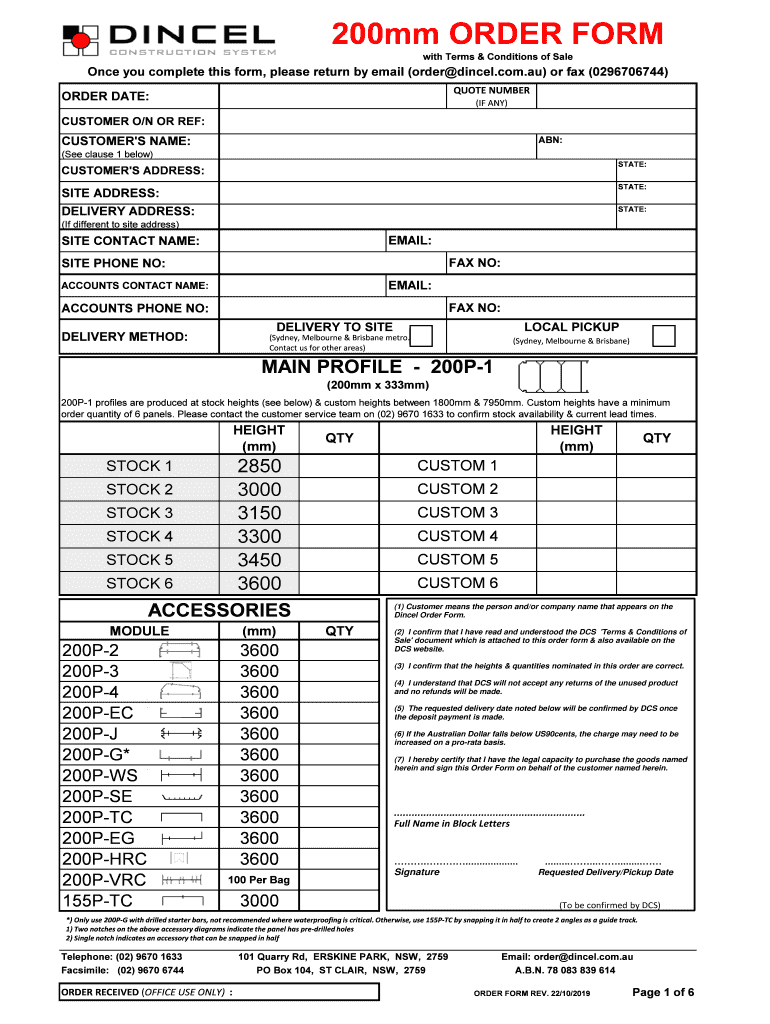
Begin by entering the QUOTE NUMBER and ORDER DATE at the top of the form. If applicable, include your CUSTOMER O/N or REF for easy reference.
Fill in your CUSTOMER'S NAME and ABN. Ensure that you provide accurate details as this information is crucial for processing your order.
Complete the CUSTOMER'S ADDRESS and SITE ADDRESS fields. If they differ, make sure to specify the DELIVERY ADDRESS as well.
Select your DELIVERY METHOD from options like LOCAL PICKUP or specify other arrangements if necessary.
In the MAIN PROFILE section, indicate the desired HEIGHT and QTY for each profile type you wish to order. Be mindful of stock availability and minimum order quantities.
Review all entered information carefully before signing at the bottom of the form. Confirm that you have read and understood the Terms & Conditions of Sale.
Start filling out your order dincel form today for a seamless experience!
Rendering Dincel Walls Process Coloured Rendering System Step 1: Clean Wall and Apply Primer. Step 2: Apply Polymer Modified Acrylic Render with Mesh. Step 3: Apply Anti Efflorescent Primer. Step 4: Apply Colour Render with Sealer.
How do I create my own order form?
In Word, you can create a form that others can fill out and save or print. To do this, you will start with baseline content in a document, potentially via a form template. Then you can add content controls for elements such as check boxes, text boxes, date pickers, and drop-down lists.
Is Dincel cheaper than Blockwork?
Cheaper Stronger Dincel Structural Walling is the smarter, faster more economical alternative to conventional masonry blockwork, particularly in the multi-residential space.
Does Dincel need to be waterproofed?
Its a common misconception when choosing dincel walls that they dont need to be waterproofed but its necessary to prevent water ingress and damage.
Can I create an order form in Word?
Information to include on an order form template. Customers name and contact info (phone number and/or email address) Delivery address (for physical products) Payment information. Product order information (name/SKU, quantity, pricing, etc.)
Related Searches
Order dincel form pdfOrder dincel form onlineDincel 200mm Order FormDincel 155 order formDincel Construction ManualDincel columnsDincel guide trackDincel installers
Security and compliance
At DocHub, your data security is our priority. We follow HIPAA, SOC2, GDPR, and other standards, so you can work on your documents with confidence.
How to create fillable PDF files: Open Acrobat: Click on the Tools tab and select Prepare Form. Select a file or scan a document: Acrobat will automatically analyze your document and add form fields. Add new form fields: Use the top toolbar and adjust the layout using tools in the right pane. Save your fillable PDF:
How do I make an order form?
Steps to Create an Order Form Decide what to sell. Choose a form builder tool. Customize the template with proper fields. Add photos of the products. Customize the order form with branding. Set up a payment method. Set up a success message. Share the order form.
Related links
Decision
I enter into this Stipulated Settlement and Disciplinary Order voluntarily, knowingly, and intelligently, and agree to be bound by the. Decision and Order of
Recognition and identification of form document layouts
by K Luo 2003 Cited by 2 The index order of lines extracted from the form is from top to down and from left to right. 4.2.1 Definitions. Here the definition of the
Cookie consent notice
This site uses cookies to enhance site navigation and personalize your experience.
By using this site you agree to our use of cookies as described in our Privacy Notice.
You can modify your selections by visiting our Cookie and Advertising Notice.