Michigan agreement addendum 2026

Get Form
michigan agreement addendum Preview on Page 1

Here's how it works

01. Edit your form online
Type text, add images, blackout confidential details, add comments, highlights and more.

02. Sign it in a few clicks
Draw your signature, type it, upload its image, or use your mobile device as a signature pad.

03. Share your form with others
Send it via email, link, or fax. You can also download it, export it or print it out.

How to use or fill out michigan agreement addendum with our platform

Form edit decoration
9.5
Ease of Setup
DocHub User Ratings on G2
9.0
Ease of Use
DocHub User Ratings on G2
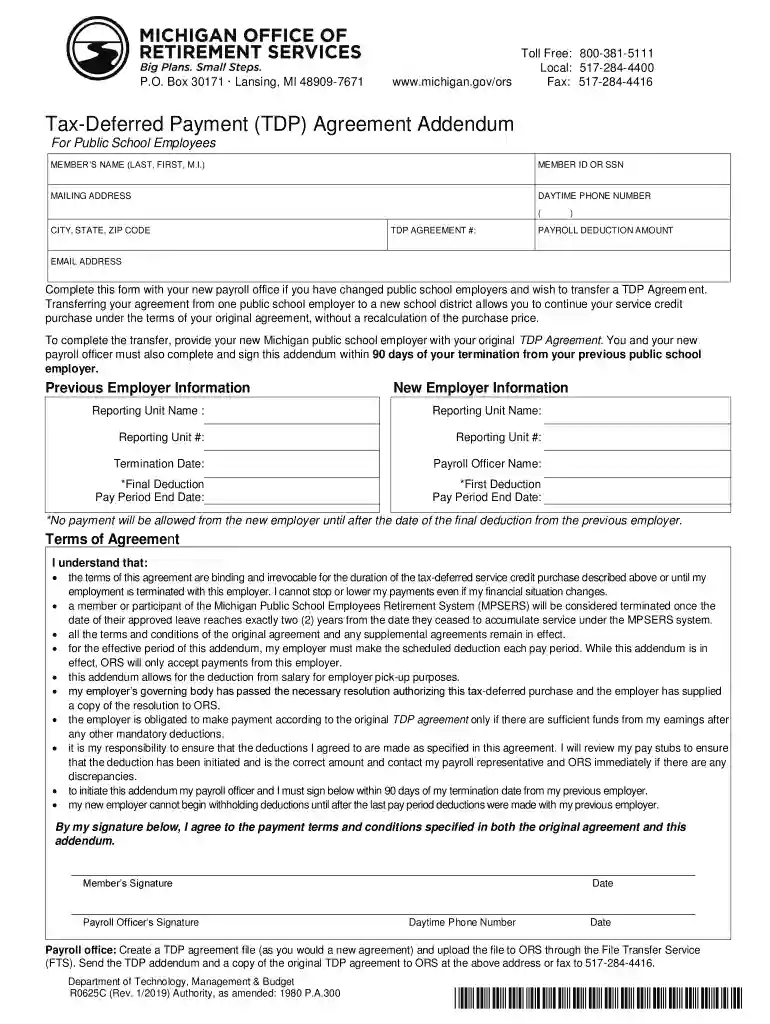
  1. Click ‘Get Form’ to open the Michigan Agreement Addendum in the editor.
  2. Begin by entering your personal information in the designated fields, including your name, member ID or SSN, mailing address, daytime phone number, and email address.
  3. Fill in the TDP Agreement number and specify the payroll deduction amount you wish to transfer.
  4. Provide details about your previous employer and new employer. This includes reporting unit names and numbers, as well as termination dates.
  5. Review the terms of agreement carefully. Ensure you understand that these terms are binding and irrevocable for the duration of your service credit purchase.
  6. Both you and your payroll officer must sign and date the form within 90 days of your termination from the previous employer.
  7. Once completed, save your document and follow instructions to upload it to ORS through the File Transfer Service (FTS) or fax it as required.

Start using our platform today to easily complete your Michigan Agreement Addendum online for free!

See more michigan agreement addendum versions

We've got more versions of the michigan agreement addendum form. Select the right michigan agreement addendum version from the list and start editing it straight away!
Versions Form popularity Fillable & printable
2022 4.5 Satisfied (72 Votes)
2019 4.3 Satisfied (34 Votes)
2016 4.3 Satisfied (140 Votes)
2011 4.3 Satisfied (286 Votes)
be ready to get more

Complete this form in 5 minutes or less

Get form

Got questions?

We have answers to the most popular questions from our customers. If you can't find an answer to your question, please contact us.
Contact us
An addendum is used primarily for the purpose of adding new conditions or clarifying terms in an agreement; hence, it is very apt in those scenarios when more information or terms have to be provided subsequent to signing the contract. An addendum is not a new contract, but an addition to the existing one.
How to write an addendum to a contract Mirror the language of the original contract. Choose an addendum title. Specify the parties. Clarify the part of the original contract the addendum refers to. Ensure compliance with the original contract and all other relevant regulations. Add any additional elements.
4. Do addenda and amendments need to be docHubd? Not always. While notarization can enhance legal enforceability, it is generally required only if the original contract mandates it.
As an addendum is an attachment to a contract, there are many different types of addendums. For example, if you have written a will but dont want to redo the will but only change certain parts, you can make an addendum to the will.

Security and compliance

At DocHub, your data security is our priority. We follow HIPAA, SOC2, GDPR, and other standards, so you can work on your documents with confidence.

Learn more
ccpa2
pci-dss
gdpr-compliance
hipaa
soc-compliance