G:F&&A PUBFORMS...B232B232E.FRP Printing 2026

Get Form
G:F&&A PUBFORMS...B232B232E.FRP Printing Preview on Page 1

Here's how it works

01. Edit your form online
Type text, add images, blackout confidential details, add comments, highlights and more.

02. Sign it in a few clicks
Draw your signature, type it, upload its image, or use your mobile device as a signature pad.

03. Share your form with others
Send it via email, link, or fax. You can also download it, export it or print it out.

How to use or fill out G:F&&A PUBFORMS...B232B232E.FRP Printing

Form edit decoration
9.5
Ease of Setup
DocHub User Ratings on G2
9.0
Ease of Use
DocHub User Ratings on G2
  1. Click ‘Get Form’ to open it in the editor.
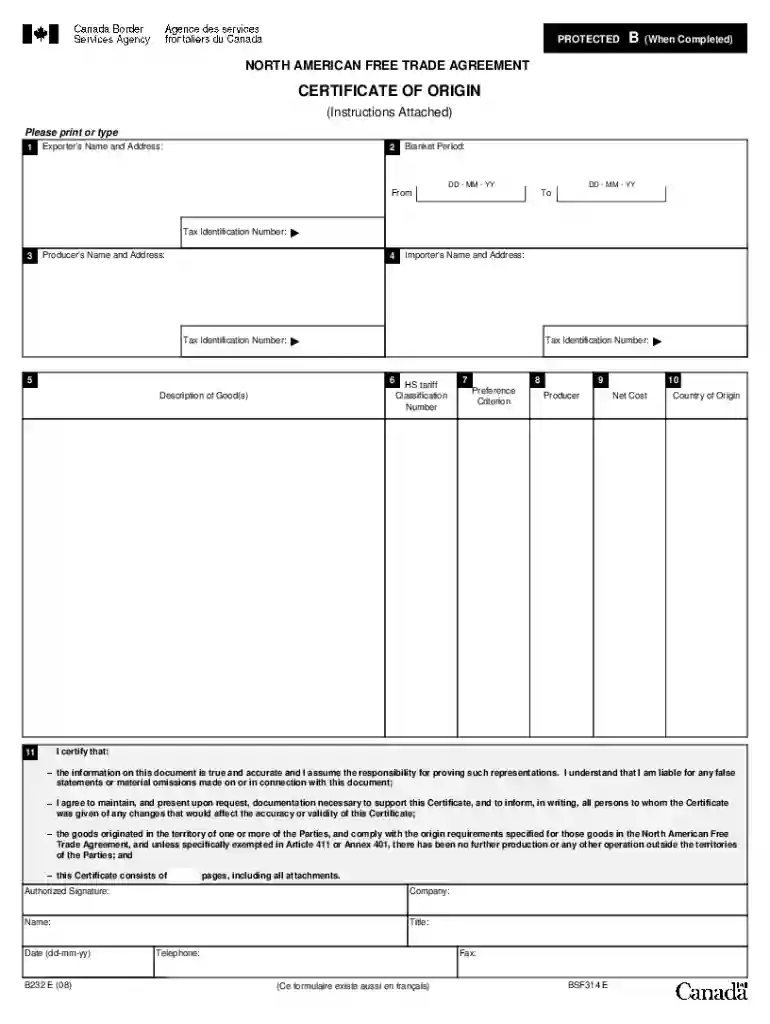
  2. Begin with Field 1 by entering the Exporter's Name and Address, along with the Tax Identification Number. Ensure all details are accurate and legible.
  3. In Field 2, specify the Blanket Period by filling in the 'From' and 'To' dates if applicable. This indicates the duration for which this certificate is valid.
  4. Proceed to Field 3 to provide the Producer's Name and Address, including their Tax Identification Number. If there are multiple producers, attach a list.
  5. Fill out Field 4 with the Importer's Name and Address, ensuring to include their Tax Identification Number as well.
  6. In Field 5, describe each good clearly, relating it to invoice descriptions and HS classifications.
  7. Complete Fields 6 through 10 by providing necessary classification numbers, preference criteria, net costs, and country of origin as required.
  8. Finally, sign and date Field 11 to certify that all information provided is true and accurate before submitting your form.

Start using our platform today for free to streamline your document editing and form completion!

See more G:F&&A PUBFORMS...B232B232E.FRP Printing versions

We've got more versions of the G:F&&A PUBFORMS...B232B232E.FRP Printing form. Select the right G:F&&A PUBFORMS...B232B232E.FRP Printing version from the list and start editing it straight away!
Versions Form popularity Fillable & printable
2016 4.8 Satisfied (150 Votes)
2008 4.3 Satisfied (52 Votes)
2005 4.4 Satisfied (57 Votes)
1998 4 Satisfied (37 Votes)
be ready to get more

Complete this form in 5 minutes or less

Get form

Got questions?

We have answers to the most popular questions from our customers. If you can't find an answer to your question, please contact us.
Contact us

eSignatures are a great replacement for traditional signing, as they save time, effort, and costs people spend on printing, scanning, and paper delivery. You can electronically sign your G:F&&A PUBFORMS...B232B232E.FRP Printing using a trustworthy and powerful online document processing services like DocHub. It complies with primary eSignature standards (ESIGN and UETA), so all documents approved there are legally binding and have the same validity as manually signed ones.

As a comprehensive document modifying platform, DocHub is available on smart phones. Open DocHub in your choice of mobile internet browser and employ our intelligent mobile-friendly toolset to fill out your G:F&&A PUBFORMS...B232B232E.FRP Printing.

Double-click the desired file to open it. Select File Print. The Print dialog box will appear, along with a preview of your file on the right. Choose the desired options, then click Print.
The bypass tray alert often stems from a faulty paper sensor or misaligned sensor lever. Inspect the bypass tray cover and sensor area for dust or debris blocking the sensor. Gently clean the sensor with compressed air or a soft cloth. Ensure the tray is properly seated and the cover fully closed.
Turn on the Bluetooth feature on your phone, register then sign in your account on the Phomemo App. Click Add Device and select your printer from the device list or connect the device by scanning the QR code. Start to print.

Security and compliance

At DocHub, your data security is our priority. We follow HIPAA, SOC2, GDPR, and other standards, so you can work on your documents with confidence.

Learn more
ccpa2
pci-dss
gdpr-compliance
hipaa
soc-compliance

People also ask

Use the operator panel on the printer to enter the menus. Locate the Paper Menu and select that menu. Locate the Paper Source setting and select that. Find and select MP Feeder or Multipurpose Feeder. The current paper size setting should be listed. The current paper type setting should now be listed.

Related links