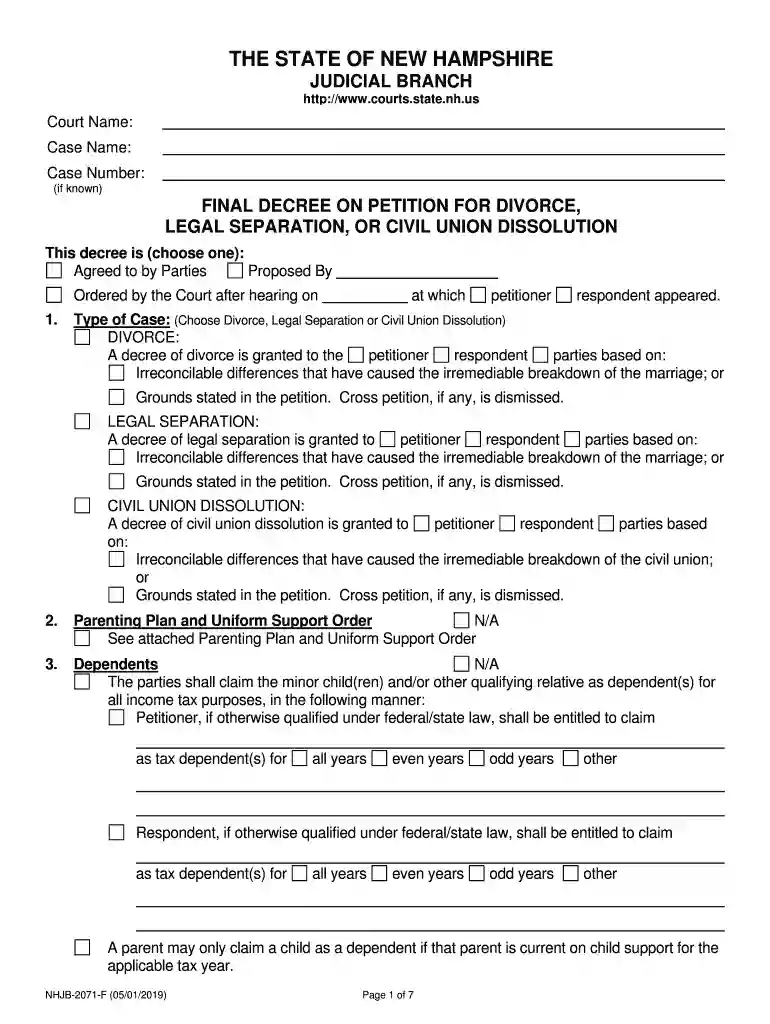
Nh decree divorce 2026

Get Form
nh divorce checklist Preview on Page 1

Here's how it works

01. Edit your nh divorce checklist online
Type text, add images, blackout confidential details, add comments, highlights and more.

02. Sign it in a few clicks
Draw your signature, type it, upload its image, or use your mobile device as a signature pad.

03. Share your form with others
Send nh divorce forms via email, link, or fax. You can also download it, export it or print it out.

How to use or fill out nh decree divorce with our platform

Form edit decoration
9.5
Ease of Setup
DocHub User Ratings on G2
9.0
Ease of Use
DocHub User Ratings on G2
  1. Click ‘Get Form’ to open the nh decree divorce in the editor.
  2. Begin by entering the Court Name, Case Name, and Case Number at the top of the form. This information is essential for identifying your case.
  3. In Section 1, select whether the decree is agreed to by parties, proposed by one party, or ordered by the court after a hearing. Fill in details about the petitioner and respondent as required.
  4. Choose the type of case: Divorce, Legal Separation, or Civil Union Dissolution. Indicate whether it’s based on irreconcilable differences or other grounds stated in the petition.
  5. Complete Sections 2 through 20 as applicable. For each section, provide necessary details such as parenting plans, dependents for tax purposes, alimony agreements, and division of assets and debts.
  6. Review all entries for accuracy. Ensure that both parties sign where indicated and that any additional documents are attached as needed.

Start using our platform today to streamline your nh decree divorce process for free!

See more nh decree divorce versions

We've got more versions of the nh decree divorce form. Select the right nh decree divorce version from the list and start editing it straight away!
Versions Form popularity Fillable & printable
2020 4.8 Satisfied (148 Votes)
2019 4.4 Satisfied (136 Votes)
2013 4.3 Satisfied (30 Votes)
be ready to get more

Complete this form in 5 minutes or less

Get form

Got questions?

We have answers to the most popular questions from our customers. If you can't find an answer to your question, please contact us.
Contact us

If you often work with documents stored in your Google Drive, DocHub is a perfect solution for you to easily and quickly complete, edit, and approve them. This editor integrates well with Google apps, so you can export your can you get an online divorce in nh from your Google Drive to the editor without downloading and re-uploading it. Right-click on your file, choose Open With → DocHub PDF Sign and Edit. In our editor, add and assign Signature Fields for all people involved, then click on the Menu option above → Send → select how you want to share your paperwork.

You can quickly fill out, modify, and even eSign your what does a decree of divorce look like using DocHub. Create a new account and start your free trial. After that, you may add the file with the form and simply make all the needed edits. No need to print on paper or use a third-party application to sign it, as you can put your electronic signature on your document faster via DocHub.

A Final Decree is a Court Order which typically is issued at the same time as the Decree of Divorce. However, the Final Decree is a much more detailed Court Order which addresses the division of the partys assets and debts, alimony, health insurance, and life insurance.
Final decree (also called a final judgement) closes an adjudication, deciding all issues of fact and law on the rights of the parties. The only thing after a final decree to be settled usually is the execution of the decisions such as the amount of damages and whether to appeal the decision.
However, the Final Decree is a much more detailed Court Order which addresses the division of the partys assets and debts, alimony, health insurance, and life insurance. Every Final Decree is different and is tailored by the Court to address the specific assets, debts and other needs of the parties.

Security and compliance

At DocHub, your data security is our priority. We follow HIPAA, SOC2, GDPR, and other standards, so you can work on your documents with confidence.

Learn more
ccpa2
pci-dss
gdpr-compliance
hipaa
soc-compliance
be ready to get more

Complete this form in 5 minutes or less

Get form

People also ask

The divorce certificate is available from the New Hampshire Division of Vital Records Administration (DVRA), New Hampshire town or city clerks, or the New Hampshire Superior Court or Family Division courts. A certified divorce decree is available from the Superior or Family Division courts.
A divorce decree is final 30 days after the date on the clerks notice of decision, unless a party files a Motion for Reconsideration or an Appeal to the NH Supreme Court.
The civil High Court, where your divorce was filed, is where copies of divorce decrees are stored in electronic and hardcopy formats.
The final order is the document that ends the union in the eyes of the law. However, there are some other things you need to know about divorce final orders.

Related links