Fam012 form 2026

Get Form
fam012 form Preview on Page 1

Here's how it works

01. Edit your form online
Type text, add images, blackout confidential details, add comments, highlights and more.

02. Sign it in a few clicks
Draw your signature, type it, upload its image, or use your mobile device as a signature pad.

03. Share your form with others
Send it via email, link, or fax. You can also download it, export it or print it out.

How to use or fill out fam012 form with our platform

Form edit decoration
9.5
Ease of Setup
DocHub User Ratings on G2
9.0
Ease of Use
DocHub User Ratings on G2
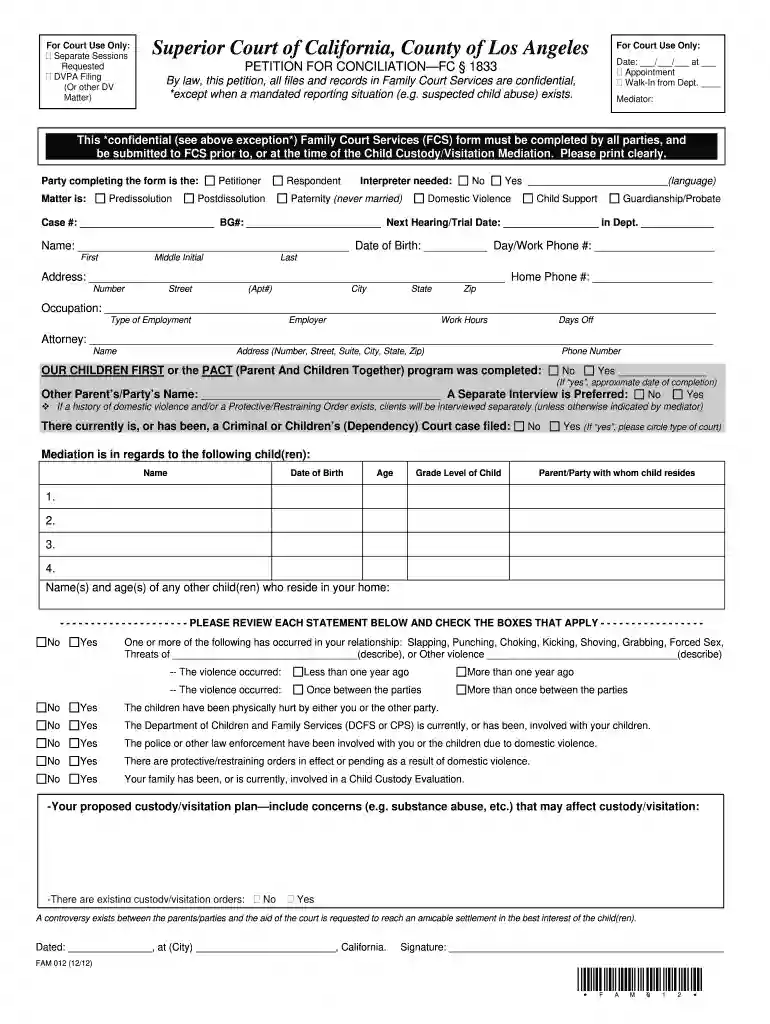
  1. Click ‘Get Form’ to open the fam012 form in the editor.
  2. Begin by filling in your personal information, including your name, date of birth, and contact details. Ensure that all entries are clear and legible.
  3. Indicate your relationship to the matter by selecting whether you are the Petitioner or Respondent. This helps clarify your role in the mediation process.
  4. Complete the section regarding children involved. List their names, dates of birth, ages, and grade levels. Specify which parent or party they reside with.
  5. Review the statements regarding domestic violence and check applicable boxes. This is crucial for ensuring safety during mediation.
  6. Finally, sign and date the form at the bottom before submitting it to Family Court Services through our platform.

Start using our editor today to fill out your fam012 form easily and for free!

See more fam012 form versions

We've got more versions of the fam012 form form. Select the right fam012 form version from the list and start editing it straight away!
Versions Form popularity Fillable & printable
2020 4.8 Satisfied (132 Votes)
2018 4.4 Satisfied (243 Votes)
2012 4.3 Satisfied (34 Votes)
be ready to get more

Complete this form in 5 minutes or less

Get form

Got questions?

We have answers to the most popular questions from our customers. If you can't find an answer to your question, please contact us.
Contact us
I am the [MOTHER/FATHER/LEGAL GUARDIAN] of [CHILDS NAME], born on [BIRTH DATE]. I have been the primary caregiver for [CHILDS NAME] since [DATE], and I have a close and loving relationship with [CHILDS NAME]. I am financially stable and able to provide for [CHILDS NAME]s physical and emotional needs.
Whether you are presenting an informal statement or an affidavit, here are the top five things you should not include in your written statement: Do not use offensive language or make any statements that could be considered libel. Do not make any statements that you cannot back up with facts or evidence.
On your Memorandum of Costs After Judgment (MC-012), you must include the exact amount of all allowable costs, the payments credited toward the principal and interest, and the amount of accrued interest. This means you are responsible for calculating these amounts.
The short answer is it depends. Not all custody agreements need to be docHubd. However, having a custody agreement docHubd adds extra assurance that both parties fully understand and are committed to the arrangement. A docHubd agreement custody carries more weight in court and is less likely to be disputed.
If you are the Respondent (a petition was filed against you) and you fail to appear as ordered, the judge may take your default and grant the petition without further hearings. Sometimes the court can have people arrested if they do not come to court when they are told.

Security and compliance

At DocHub, your data security is our priority. We follow HIPAA, SOC2, GDPR, and other standards, so you can work on your documents with confidence.

Learn more
ccpa2
pci-dss
gdpr-compliance
hipaa
soc-compliance
be ready to get more

Complete this form in 5 minutes or less

Get form

People also ask

How to Write an Affidavit of Paternity Step 1 Add Parents Names. Step 2 List the Childs Information. Step 3 Give the Birth Registration Details. Step 4 Affirm Paternity Unmarried Status. Step 5 Sign docHub. Step 6 File with the Appropriate Body.

Related links