Type text, add images, blackout confidential details, add comments, highlights and more.

02. Sign it in a few clicks
Draw your signature, type it, upload its image, or use your mobile device as a signature pad.

03. Share your form with others
Send ivari cancellation form via email, link, or fax. You can also download it, export it or print it out.

How to use or fill out ivari form with our platform
Ease of Setup
DocHub User Ratings on G2
Ease of Use
DocHub User Ratings on G2
Click ‘Get Form’ to open the ivari form in the editor.
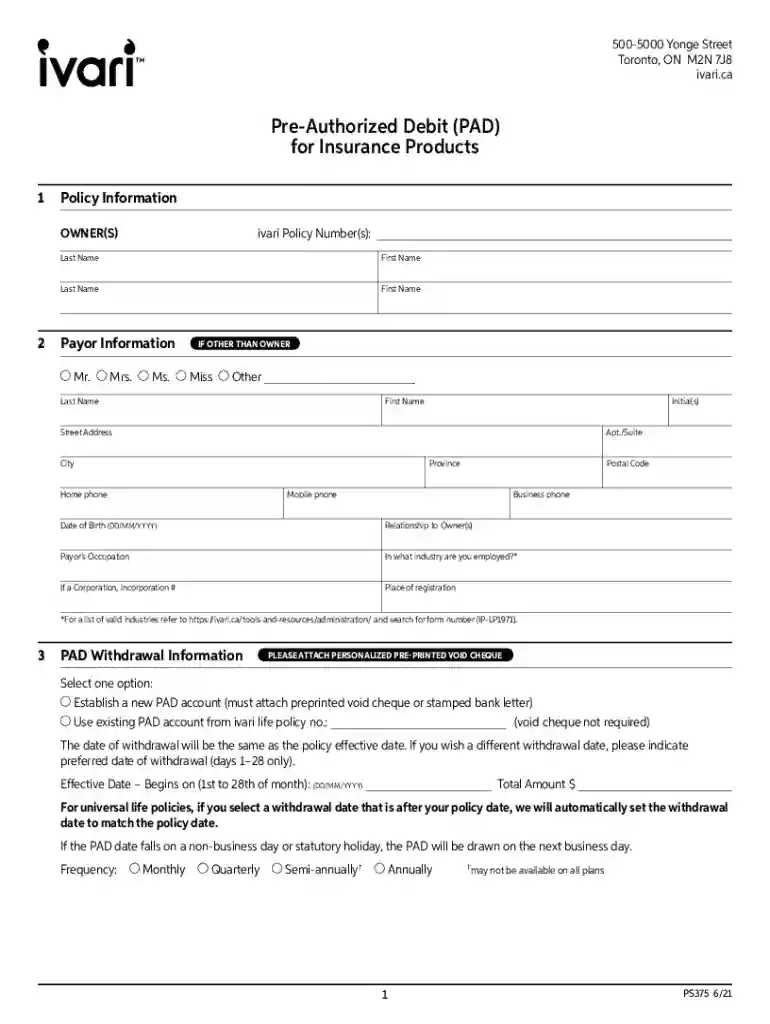
Begin by entering the Policy Information. Fill in the ivari Policy Number(s) and provide the last and first names of all owners.
Next, complete the Payor Information section. If the payor is different from the owner, select their title (Mr., Mrs., Ms., etc.) and fill in their personal details including address, phone numbers, date of birth, and occupation.
In the PAD Withdrawal Information section, choose whether to establish a new PAD account or use an existing one. Attach a personalized pre-printed void cheque if establishing a new account.
Specify your preferred withdrawal date and total amount. Select the frequency of withdrawals (Monthly, Quarterly, Semi-annually, Annually).
Finally, review and sign in the Acknowledgement/Authorization section. Ensure all signatures are dated correctly before submitting.
Start using our platform today for free to streamline your ivari form completion!
Ivari cancellation form pdf downloadIvari form pdfIvari form onlinePolicy Service Application ivariHow to cancel ivari insurance onlineIvari policy change formIvari send DocumentsIvari advisor login
Security and compliance
At DocHub, your data security is our priority. We follow HIPAA, SOC2, GDPR, and other standards, so you can work on your documents with confidence.
Cookie consent notice
This site uses cookies to enhance site navigation and personalize your experience.
By using this site you agree to our use of cookies as described in our Privacy Notice.
You can modify your selections by visiting our Cookie and Advertising Notice.