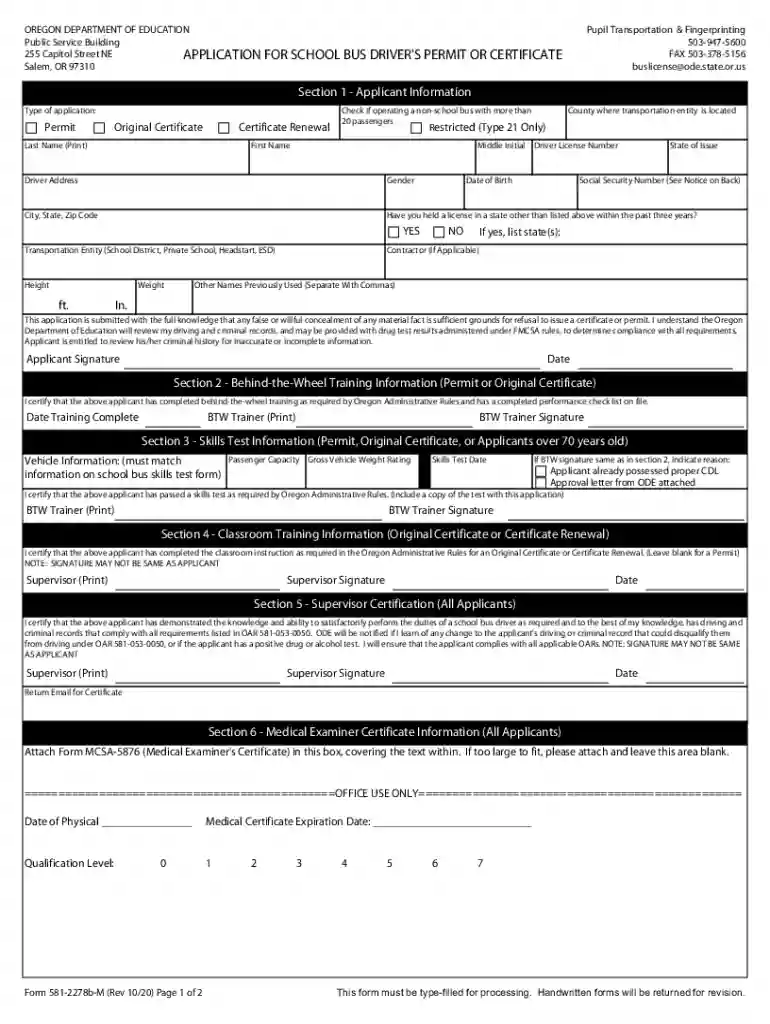
Oregon Department of Education Public Service Building ... Preview on Page 1

Oregon Department of Education Public Service Building ... 2026

Here's how it works

  • 01. Edit your form online

    Type text, add images, blackout confidential details, add comments, highlights and more.

  • 02. Sign it in a few clicks

    Draw your signature, type it, upload its image, or use your mobile device as a signature pad.

  • 03. Share your form with others

    Send it via email, link, or fax. You can also download it, export it or print it out.

How to use or fill out Oregon Department of Education Public Service Building Application for School Bus Driver's Permit or Certificate

Form edit decoration
9.5
Ease of Setup
DocHub User Ratings on G2
9.0
Ease of Use
DocHub User Ratings on G2
  1. Click ‘Get Form’ to open it in the editor.
  2. Begin with Section 1 - Applicant Information. Fill in your last name, first name, and middle initial. Select the type of application: Permit, Original Certificate, or Certificate Renewal.
  3. Provide your driver license number, date of birth, and state of issue. Complete your address details including city, state, and zip code.
  4. Indicate if you have held a license in another state within the past three years and provide any other names previously used.
  5. Proceed to Section 2 for Behind-the-Wheel Training Information. Ensure your trainer fills out this section accurately.
  6. In Section 3, complete the Skills Test Information by providing vehicle information and ensuring the trainer's signature matches the skills test form.
  7. For Section 4, ensure that a supervisor certifies classroom training completion if applicable.
  8. Complete Sections 5 and 6 as required before submitting your application for processing.

Start using our platform today to fill out your application online for free!

See more Oregon Department of Education Public Service Building ... versions

We've got more versions of the Oregon Department of Education Public Service Building ... form. Select the right Oregon Department of Education Public Service Building ... version from the list and start editing it straight away!

VersionsForm popularityFillable & printable
20214.8 Satisfied (155 Votes)
20204.3 Satisfied (149 Votes)
20164.2 Satisfied (36 Votes)

be ready to get more

Complete this form in 5 minutes or less

Got questions?

We have answers to the most popular questions from our customers. If you can't find an answer to your question, please contact us.

Most eSignature services require users to have a paid subscription. With DocHub, there are two options for you to add an electronic signature to your Oregon Department of Education Public Service Building ... free of charge:

  • You can do it during a 7-day trial period;
  • You can subscribe to a free plan.

The second option, however, has restrictions on the number of signatures, sign requests, emails, and documents for editing available per month. You can check for full information here.

As a comprehensive document modifying service, DocHub is available on mobile phones. Open DocHub in your choice of mobile browser and employ our smart mobile-friendly toolset to complete your Oregon Department of Education Public Service Building ....

Security and compliance

At DocHub, your data security is our priority. We follow HIPAA, SOC2, GDPR, and other standards, so you can work on your documents with confidence.

Related links

A Decision Framework for Applying Monitored Natural

by CUN Cu 2010 Established in 1995, the Interstate Technology Regulatory Council (ITRC) is a state-led, national coalition of personnel from the environmental regulatoryRead more

Learn more
College of Education | University of Oregon

Oregon College of Education. We are a premier provider of educational and related clinical services to local communities and the state of Oregon.

Learn more
If you believe that this page should be taken down, please follow our DMCA take down process here