




Here's how it works

01. Edit your c4 form workers comp online
Type text, add images, blackout confidential details, add comments, highlights and more.

02. Sign it in a few clicks
Draw your signature, type it, upload its image, or use your mobile device as a signature pad.

03. Share your form with others
Send c4 form via email, link, or fax. You can also download it, export it or print it out.
How to use or fill out c 4 0 with our platform

- Click ‘Get Form’ to open the C-4 form in the editor.
- Begin by filling out Section A, which includes the patient's information. Ensure you provide the patient's name, Social Security number, and contact details accurately.
- Proceed to Section B for employer information. Enter the employer's name and address where the injury occurred.
- In Section C, input your details as the treating doctor, including your name, WCB authorization number, and office address.
- Complete Section D by detailing billing information and diagnosis codes related to the patient's condition.
- Fill out Sections E through H with relevant medical history, examination findings, and proposed treatment plans.
- Finally, review all sections for completeness before submitting the form electronically through our platform for prompt processing.
Start using our platform today to streamline your document editing and form completion!
Fill out c 4 0 online
It's free
It's free
Security and compliance
At DocHub, your data security is our priority. We follow HIPAA, SOC2, GDPR, and other standards, so you can work on your documents with confidence.
Learn more


Related forms

IN THE SUPREME COURT OF MISSOURI STATE OF MISSOURI, Appellant, vs - courts mo
The document is a legal brief submitted to the Supreme Court of Missouri in the case of State of Missouri vs. Gail Daws. ...

IN THE MISSOURI SUPREME COURT EN BANC ) ) ) PETITIONER, ) ) No
The document is a legal brief submitted to the Missouri Supreme Court by Charles Simshauser, who is petitioning for a wr ...

Of AMEND House Committee Substitute for Senate Substitute for Senate Committee Substitute for Senate
Of AMEND House Committee Substitute for Senate Substitute for Senate Committee Substitute for Senate
The document outlines amendments to a Senate bill concerning the establishment and regulation of reorganized common sewe ...

September 2010 Women's Edition February March 2011 Women's - womenscouncil
The document outlines the activities and resources provided by the Missouri Women’s Council, including a featured board ...

DRAFT FI Apportionment Amendments - Multistate Tax Commission - mtc
The document outlines draft amendments proposed by the Multistate Tax Commission's Financial Institutions Working Group ...

For Discussion Purposes Only November 23, 2009 Section 1 - mtc
The document outlines the recommended formula for the apportionment and allocation of net income for financial instituti ...
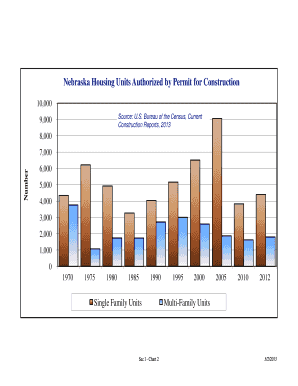
Nebraska Housing Units Authorized by Permit for Construction
The document presents data on the number of housing units authorized for construction in Nebraska, highlighting trends i ...

CORP-2004
The document provides instructions for completing and submitting the G-1003 form to the Georgia Department of Revenue. I ...