Ct advertising form online 2026

Get Form
ct advertising form online Preview on Page 1

Here's how it works

01. Edit your form online
Type text, add images, blackout confidential details, add comments, highlights and more.
02. Sign it in a few clicks
Draw your signature, type it, upload its image, or use your mobile device as a signature pad.
03. Share your form with others
Send it via email, link, or fax. You can also download it, export it or print it out.

How to use or fill out ct advertising form online with DocHub

Form edit decoration
9.5
Ease of Setup
DocHub User Ratings on G2
9.0
Ease of Use
DocHub User Ratings on G2
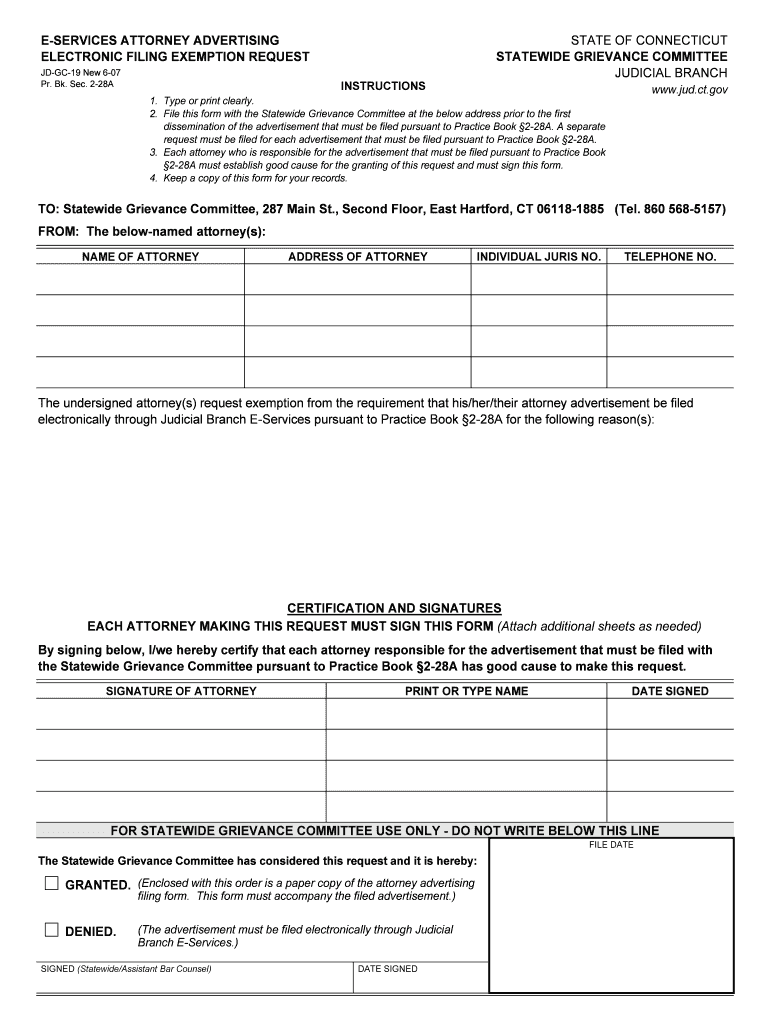
  1. Click ‘Get Form’ to open the ct advertising form in our platform's editor.
  2. Begin by entering your name and address in the designated fields. Ensure that all information is typed clearly for easy readability.
  3. Provide your individual jurisdiction number and telephone number in the respective sections. This information is crucial for identification purposes.
  4. In the section requesting exemption reasons, clearly articulate why you are seeking this exemption from electronic filing. Be concise yet thorough.
  5. Each attorney responsible for the advertisement must sign the form. Use our platform’s signature feature to add your digital signature easily.
  6. Finally, review all entered information for accuracy before submitting. Keep a copy of the completed form for your records.

Start filling out your ct advertising form online today for free with our platform!

See more ct advertising form online versions

We've got more versions of the ct advertising form online form. Select the right ct advertising form online version from the list and start editing it straight away!
Versions Form popularity Fillable & printable
2017 4.9 Satisfied (56 Votes)
2007 4.4 Satisfied (158 Votes)
be ready to get more

Complete this form in 5 minutes or less

Get form

Got questions?

We have answers to the most popular questions from our customers. If you can't find an answer to your question, please contact us.
Contact us
Divisions of Superior Court - CT Judicial Branch. The Superior Court hears civil, criminal, family and juvenile matters. Civil Division hears cases in which someone is being sued to protect civil, personal or property rights.
Penalties for Late Payments If the ticket is not paid within 15 calendar dates after ticket issuance, the said fine will double. Failure to pay within 30 days of ticket issuance will result in the said fine tripling.
Paying a speeding ticket is a guilty plea, which results in fines, demerit points on your license, and higher insurance costs. Going to court can reduce or eliminate penalties, such as lowering fines, reducing points, or even dismissing charges with the help of an attorney.
You have a right to represent yourself in all court cases. When you represent yourself, you are called a self-represented party. In some cases, like landlord/tenant and family, the court has developed easy-to-read court forms to help non-lawyers.
Arrest Warrant Lookup in Connecticut Searching the Most Wanted lists or arrest logs maintained by local police departments. Contact the Office of Policy and Management (OPM) by phone at (877)312-7807 or by email. Visiting local police departments or superior courts in person.

Security and compliance

At DocHub, your data security is our priority. We follow HIPAA, SOC2, GDPR, and other standards, so you can work on your documents with confidence.

Learn more
ccpa2
pci-dss
gdpr-compliance
hipaa
soc-compliance

People also ask

Connecticut Judicial Branch: Case Look-Up. Supreme and Appellate Court. Civil, Family, Housing, Small Claims. Requesting Divorce Records. Criminal (Convictions) Criminal (Pending) Housing Court Cases Filed Before 3/1/16. Small Claims Cases Filed Before 9/1/17. Violation of Probation (Arrest Warrants)
You may pay your ticket or plead not guilty online at .jud.ct.gov. You may also call the Centralized Infractions Bureau at (860) 263-2750 to pay your ticket or plead not guilty.
The State of Connecticut Centralized Infractions Bureau now allows you to pay infractions online. The link below will take you to the State of Connecticut Judicial Branch to pay your infraction.

Related links