Request have gv online 2026

Get Form
request have gv online Preview on Page 1

Here's how it works

01. Edit your form online
Type text, add images, blackout confidential details, add comments, highlights and more.

02. Sign it in a few clicks
Draw your signature, type it, upload its image, or use your mobile device as a signature pad.

03. Share your form with others
Send it via email, link, or fax. You can also download it, export it or print it out.

How to use or fill out request have gv online with our platform

Form edit decoration
9.5
Ease of Setup
DocHub User Ratings on G2
9.0
Ease of Use
DocHub User Ratings on G2
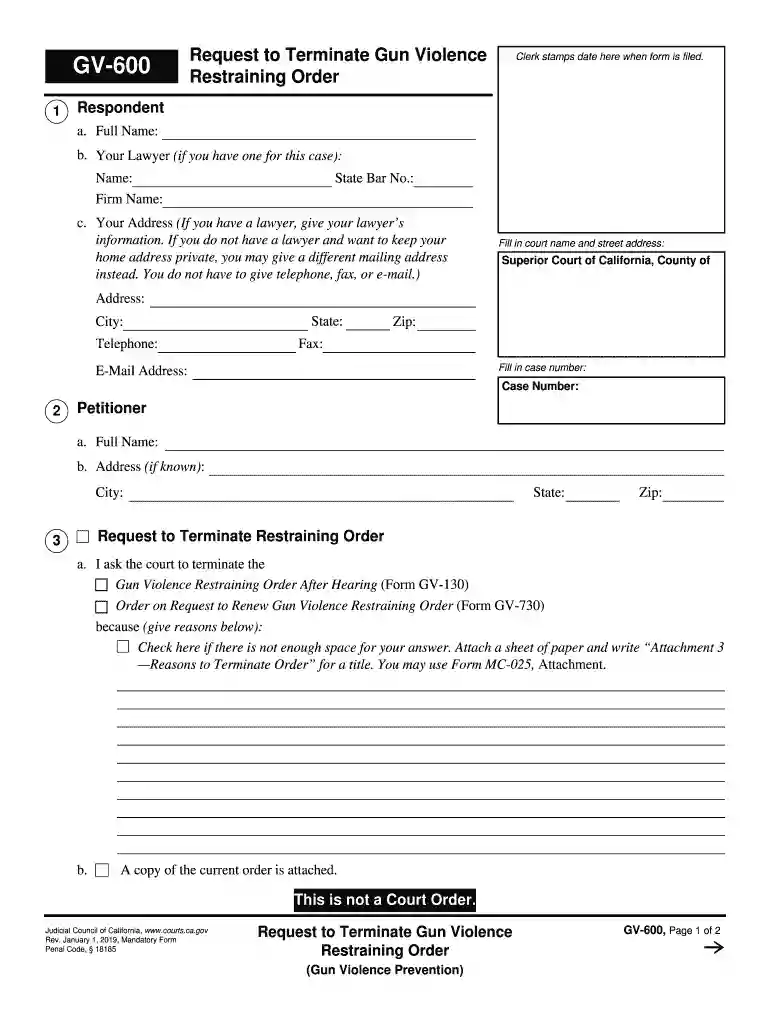
  1. Click ‘Get Form’ to open it in the editor.
  2. Begin by filling in the Respondent's full name, and if applicable, your lawyer's details including their name, firm name, and State Bar number.
  3. Provide your address. If you prefer privacy, you can enter a different mailing address instead of your home address.
  4. Fill in the court name and street address for the Superior Court of California, along with the case number.
  5. In the Petitioner section, enter their full name and address if known.
  6. State your reasons for requesting termination of the Gun Violence Restraining Order. If more space is needed, attach a separate sheet titled 'Attachment 3 — Reasons to Terminate Order.'
  7. Indicate whether a copy of the current order is attached and confirm that you have not previously requested termination of this order.
  8. Finally, declare under penalty of perjury that all information provided is true and correct. Type or print your name and sign before submitting.

Start using our platform today to easily fill out your request have gv online form for free!

See more request have gv online versions

We've got more versions of the request have gv online form. Select the right request have gv online version from the list and start editing it straight away!
Versions Form popularity Fillable & printable
2020 4.8 Satisfied (132 Votes)
2019 4.4 Satisfied (228 Votes)
2016 4.3 Satisfied (280 Votes)
be ready to get more

Complete this form in 5 minutes or less

Get form

Got questions?

We have answers to the most popular questions from our customers. If you can't find an answer to your question, please contact us.
Contact us
Alphabet Inc. Google / Parent organization
Launched as Google Ventures in 2009, GV originated as an independent venture capital firm for innovative founders, and today were formally known as GV. With Alphabet as our sole limited partner, we focus all our energy on meeting and supporting founders at every stage of company-building.
Google Capital is similar to GV in that its investments are not directly connected to Googles objectives and its mission is purely financial returns. But it does put more of an emphasis on offering portfolio companies access to Google people and resources and focuses on later-stage startups than GV.
Launched as Google Ventures in 2009, GV is the venture capital arm of Alphabet, Inc. GV helps startups interface with Google, providing unique access to the worlds best technology and talent.
Alphabet Inc. (GOOGL), the parent company of Google, owns several other companies in addition to the search engine giant. Seven major companies owned by Alphabet are YouTube, Waze, DoubleClick, Nest, Looker, Fitbit, and Mandiant.

Security and compliance

At DocHub, your data security is our priority. We follow HIPAA, SOC2, GDPR, and other standards, so you can work on your documents with confidence.

Learn more
ccpa2
pci-dss
gdpr-compliance
hipaa
soc-compliance
be ready to get more

Complete this form in 5 minutes or less

Get form