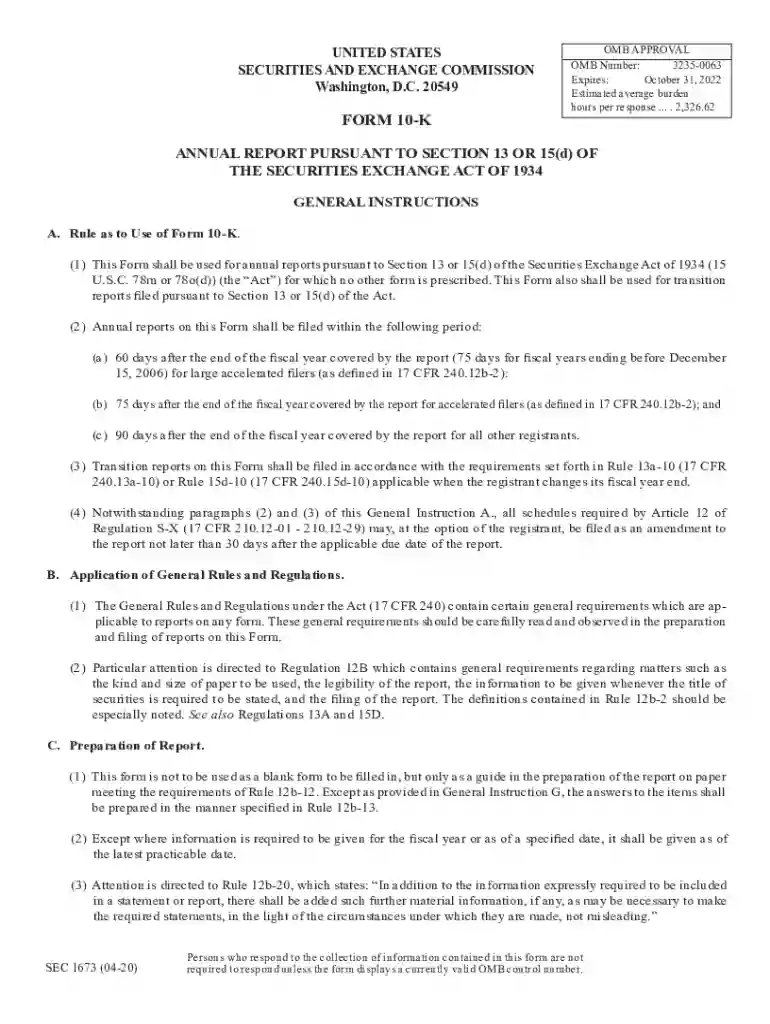
SEC Form 10-K Details and Latest FilingsGENERAL FORM FOR REGISTRATION OF SECURITIES Pursuant to SectiGENERAL FORM FOR REGISTRATION OF SECURITIES Pursuant to SectiSEC.gov Forms List 2026

Get Form
SEC Form 10-K Details and Latest FilingsGENERAL FORM FOR REGISTRATION OF SECURITIES Pursuant to SectiGENERAL FORM FOR REGISTRATION OF SECURITIES Pursuant to SectiSEC.gov Forms List Preview on Page 1

Here's how it works

01. Edit your form online
Type text, add images, blackout confidential details, add comments, highlights and more.

02. Sign it in a few clicks
Draw your signature, type it, upload its image, or use your mobile device as a signature pad.

03. Share your form with others
Send it via email, link, or fax. You can also download it, export it or print it out.

How to use or fill out SEC Form 10-K Details and Latest Filings with our platform

Form edit decoration
9.5
Ease of Setup
DocHub User Ratings on G2
9.0
Ease of Use
DocHub User Ratings on G2
  1. Click ‘Get Form’ to open it in the editor.
  2. Begin by filling out the basic information section, including the registrant's name, fiscal year end date, and commission file number.
  3. Proceed to Part I, where you will provide details about the business, risk factors, and unresolved staff comments. Ensure that each item is addressed clearly.
  4. In Part II, complete the financial data section. This includes market information and management’s discussion on financial condition. Use our platform's tools to easily input numerical data.
  5. Move to Part III for disclosures regarding directors and executive officers. Make sure to include all required signatures as specified in General Instruction D.
  6. Finally, review your entries for accuracy before submitting. Utilize our platform’s features for easy editing and signing.

Start using our platform today for free to streamline your SEC Form 10-K filing process!

See more SEC Form 10-K Details and Latest FilingsGENERAL FORM FOR REGISTRATION OF SECURITIES Pursuant to SectiGENERAL FORM FOR REGISTRATION OF SECURITIES Pursuant to SectiSEC.gov Forms List versions

We've got more versions of the SEC Form 10-K Details and Latest FilingsGENERAL FORM FOR REGISTRATION OF SECURITIES Pursuant to SectiGENERAL FORM FOR REGISTRATION OF SECURITIES Pursuant to SectiSEC.gov Forms List form. Select the right SEC Form 10-K Details and Latest FilingsGENERAL FORM FOR REGISTRATION OF SECURITIES Pursuant to SectiGENERAL FORM FOR REGISTRATION OF SECURITIES Pursuant to SectiSEC.gov Forms List version from the list and start editing it straight away!
Versions Form popularity Fillable & printable
2023 4.8 Satisfied (51 Votes)
2021 4.8 Satisfied (69 Votes)
2020 4.3 Satisfied (118 Votes)
be ready to get more

Complete this form in 5 minutes or less

Get form

Got questions?

We have answers to the most popular questions from our customers. If you can't find an answer to your question, please contact us.
Contact us
Form 10-K is a Securities and Exchange Commission (SEC) periodic report that public companies file to disclose the material results of their business operation for their past fiscal year.
A Form 10-K is an annual report required by the U.S. Securities and Exchange Commission (SEC), that gives a comprehensive summary of a companys financial performance.
Publicly traded companies and other entities are required by the SEC or Securities and Exchange Commission to file certain disclosure forms. These different types of SEC filings not only ensure regulatory compliance, but they also provide need-to-know information to the public.
Any religious or charitable trust or institution in India can file Form 10 for: Claiming income tax exemption under Sections 10(23C), 11 and 12AA of the Income Tax Act. Accumulate or set apart income for future charitable or religious purposes within the guidelines set by the Income Tax Act.
Documents you may need to provide Proof of the workers death; Birth certificate or other proof of birth; Proof of U.S. citizenship or lawful alien status if you were not born in the United States [More Info]; U.S. military discharge paper(s) if you had military service before 1968;

Security and compliance

At DocHub, your data security is our priority. We follow HIPAA, SOC2, GDPR, and other standards, so you can work on your documents with confidence.

Learn more
ccpa2
pci-dss
gdpr-compliance
hipaa
soc-compliance