




Here's how it works

01. Edit your juvenile waiver online
Type text, add images, blackout confidential details, add comments, highlights and more.

02. Sign it in a few clicks
Draw your signature, type it, upload its image, or use your mobile device as a signature pad.

03. Share your form with others
Send juvenile application via email, link, or fax. You can also download it, export it or print it out.
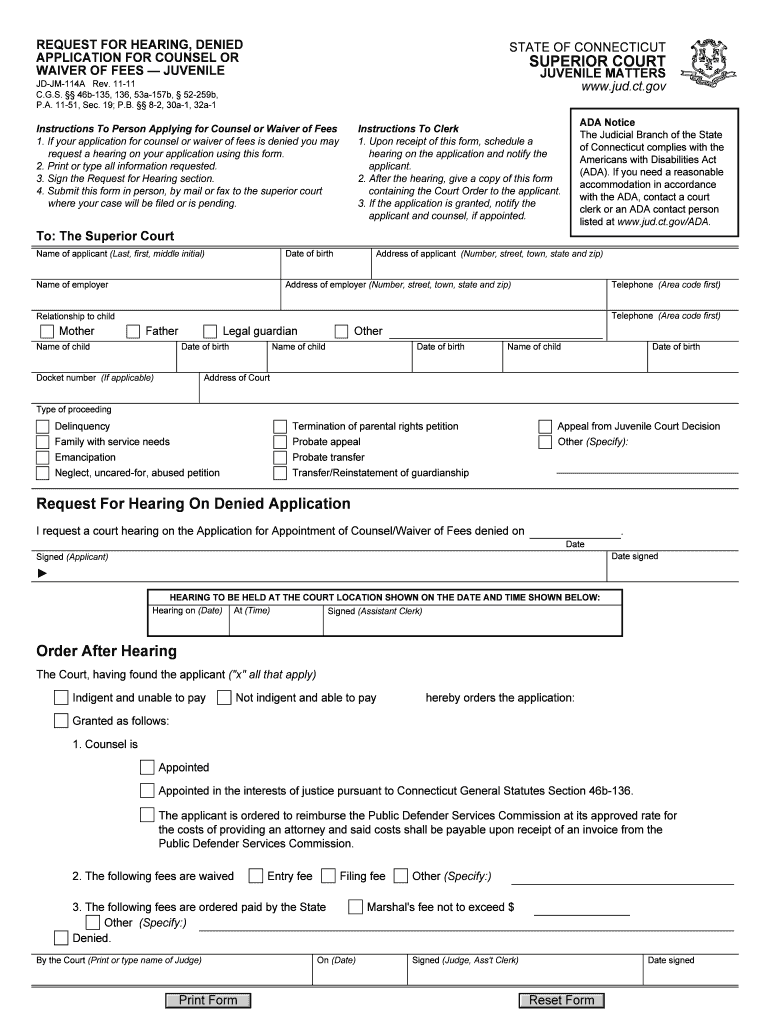
How to use or fill out application juvenile with our platform

- Click ‘Get Form’ to open the application juvenile in the editor.
- Begin by entering your personal information, including your name, date of birth, and address. Ensure all details are accurate and clearly typed.
- Fill in the section regarding your relationship to the child. Select from options such as Mother, Father, Legal Guardian, or Other.
- Provide details for each child involved in the application, including their names and dates of birth.
- Indicate the type of proceeding by selecting from the provided options like Delinquency or Emancipation.
- In the Request For Hearing section, specify the date your application was denied and sign where indicated.
- Review all entered information for accuracy before submitting. You can submit this form via our platform directly or print it for mailing.
Start filling out your application juvenile today for free using our platform!
Fill out application juvenile online
It's free
Security and compliance
At DocHub, your data security is our priority. We follow HIPAA, SOC2, GDPR, and other standards, so you can work on your documents with confidence.
Learn more


Related forms

Reduce Reheat Measure - California Energy Commission - energy ca
The document outlines the 'Reduce Reheat' initiative as part of the 2013 California Building Energy Efficiency Standards ...

2012-06-13 Item 11 City of Riverside
The document outlines a grant request from the City of Riverside to the California Energy Commission for $200,000 to con ...

Southern California Edison's Data Request on Nuclear Power Plants - energy ca
The document is a comprehensive data request set from Southern California Edison (SCE) to the California Energy Commissi ...

Page viii - Table of Contents - California Energy Commission - energy ca
The document is the 2005 Residential Compliance Manual, which outlines energy efficiency standards and compliance requir ...

Meeting Transcript - California Energy Commission - State of - energy ca
The document outlines the proceedings of the California Energy Commission's Advisory Committee Meeting regarding the 201 ...

Purchasetncrash gov
The document outlines the guidelines for businesses using PurchaseTNCrash.gov to obtain crash reports in Tennessee. It s ...

RALLY OBEDIENCE SCORE SHEETS 1 Point 3 Points b10 Pointsb 1
The document is a Rally Obedience Judge's Score Sheet from the Canadian Kennel Club, detailing scoring guidelines and de ...

R HE - nobidaorg
The document outlines the details of the 26th Annual Dyslexia Symposium organized by the Northern Ohio Branch of the Int ...