2017 NC MVR-37-2026

Get Form
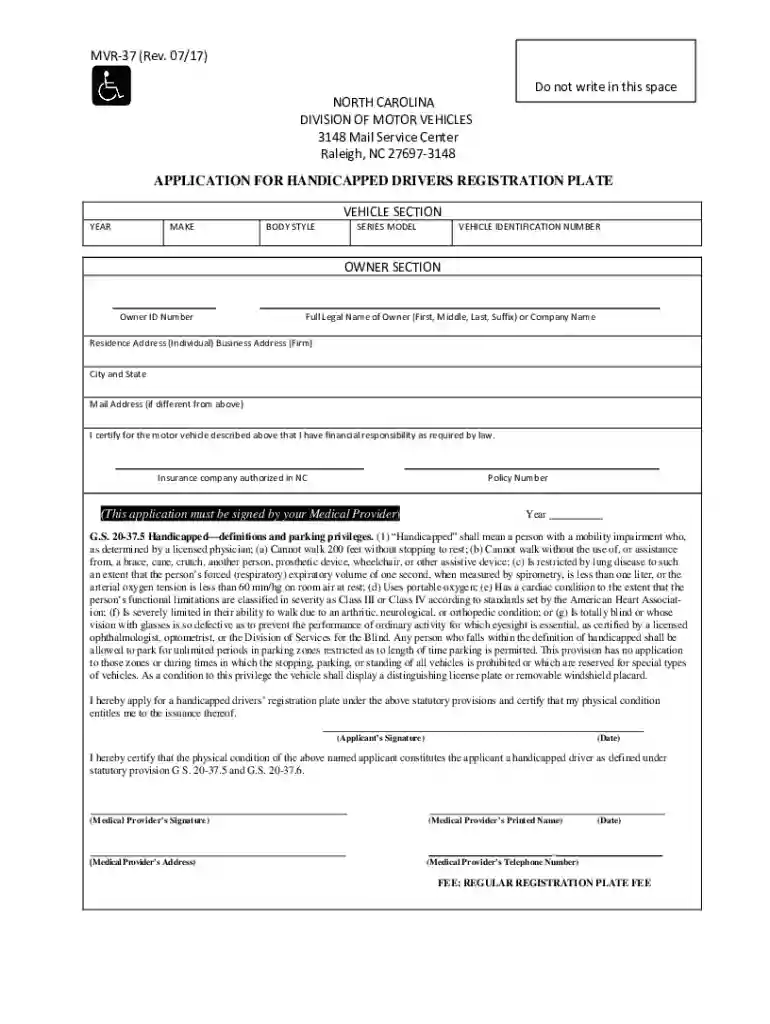
mvr 37 Preview on Page 1

Here's how it works

01. Edit your mvr 37 online
Type text, add images, blackout confidential details, add comments, highlights and more.

02. Sign it in a few clicks
Draw your signature, type it, upload its image, or use your mobile device as a signature pad.

03. Share your form with others
Send it via email, link, or fax. You can also download it, export it or print it out.

How to use or fill out 2017 NC MVR-37 with DocHub

Form edit decoration
9.5
Ease of Setup
DocHub User Ratings on G2
9.0
Ease of Use
DocHub User Ratings on G2
  1. Click ‘Get Form’ to open the 2017 NC MVR-37 in our editor.
  2. Begin by filling out the Vehicle Section. Enter the Year, Make, Body Style, Series Model, and Vehicle Identification Number (VIN) accurately.
  3. Proceed to the Owner Section. Input your Owner ID Number and Full Legal Name (First, Middle, Last, Suffix) or Company Name.
  4. Complete your Residence Address and Business Address if applicable. Ensure that the City and State are correctly filled in.
  5. If your mailing address differs from your residence address, provide it in the designated field.
  6. Certify financial responsibility by entering your Insurance Company authorized in NC and Policy Number.
  7. Ensure that you sign the application and include the date. Remember that a Medical Provider must also sign this application.
  8. Finally, review all entries for accuracy before submitting your completed form through our platform.

Start using our editor today to fill out your 2017 NC MVR-37 for free!

See more 2017 NC MVR-37 versions

We've got more versions of the 2017 NC MVR-37 form. Select the right 2017 NC MVR-37 version from the list and start editing it straight away!
Versions Form popularity Fillable & printable
2020 4.8 Satisfied (102 Votes)
2017 4.2 Satisfied (75 Votes)
2008 4.2 Satisfied (33 Votes)
be ready to get more

Complete this form in 5 minutes or less

Get form

Got questions?

We have answers to the most popular questions from our customers. If you can't find an answer to your question, please contact us.
Contact us
Requesting Driving Records. North Carolina drivers can request records online, by mail or in person at the Vehicle Registration office​ at 4121 New Bern Ave.​, Raleigh​ or 12101 Mt. Holly-Huntersville Road, Huntersville​​.
Division of Motor Vehicles issues disability placards and license plates for vehicle owners who need parking assistance and are certified as: Being unable to walk without assistance. Having mobility impairments caused by lung disease, defective vision or cardiac, arthritic, neurological or orthopedic conditions.
Understanding Your MVR Report and What It Means Box 1 This box indicates the type of driving record in front of you. Box 2 This box lists your identification information such as your name, address, and drivers license number. Box 3 This section tells you the current status of your North Carolina Drivers License.
1 Notarization is required.

Security and compliance

At DocHub, your data security is our priority. We follow HIPAA, SOC2, GDPR, and other standards, so you can work on your documents with confidence.

Learn more
ccpa2
pci-dss
gdpr-compliance
hipaa
soc-compliance