Ro 101 2026

Get Form
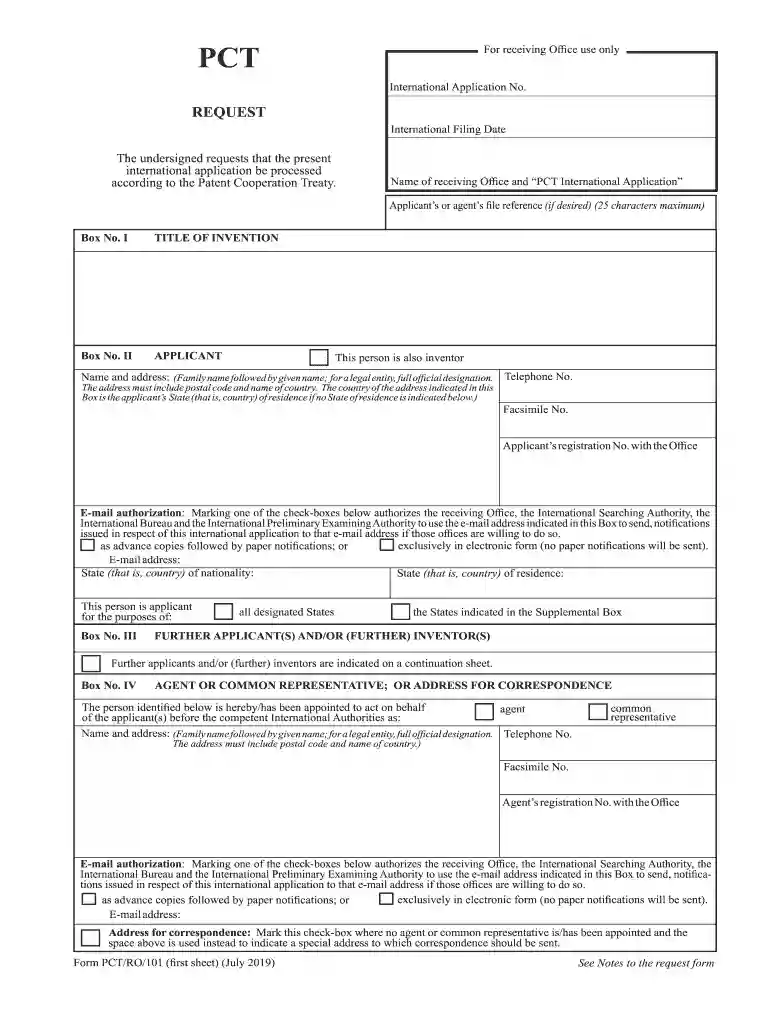
pct ro 101 Preview on Page 1

Here's how it works

01. Edit your pct ro 101 online
Type text, add images, blackout confidential details, add comments, highlights and more.

02. Sign it in a few clicks
Draw your signature, type it, upload its image, or use your mobile device as a signature pad.

03. Share your form with others
Send ro 101 via email, link, or fax. You can also download it, export it or print it out.

How to use or fill out ro 101 with DocHub

Form edit decoration
9.5
Ease of Setup
DocHub User Ratings on G2
9.0
Ease of Use
DocHub User Ratings on G2
  1. Click ‘Get Form’ to open the ro 101 document in our platform's editor.
  2. Begin by filling in Box No. I with the title of your invention. Ensure it is concise and accurately reflects your submission.
  3. In Box No. II, provide the applicant's name and address. If applicable, check the box indicating that this person is also an inventor.
  4. Complete Box No. III by selecting whether the individual is an applicant for all designated states or specific ones as indicated in the supplemental box.
  5. If there are additional applicants or inventors, list them in Box No. IV using a continuation sheet if necessary.
  6. Fill out Boxes V through VIII as required, ensuring all declarations are completed accurately to avoid processing delays.
  7. Review all entries for accuracy before saving and submitting your form through our platform.

Start using our platform today to streamline your ro 101 form completion!

See more ro 101 versions

We've got more versions of the ro 101 form. Select the right ro 101 version from the list and start editing it straight away!
Versions Form popularity Fillable & printable
2020 4.8 Satisfied (118 Votes)
2019 4.4 Satisfied (64 Votes)
2012 4 Satisfied (34 Votes)
2010 4.3 Satisfied (59 Votes)
be ready to get more

Complete this form in 5 minutes or less

Get form

Got questions?

We have answers to the most popular questions from our customers. If you can't find an answer to your question, please contact us.
Contact us
The required page size for a PCT international application filed via EFS-Web in pdf format is A4. See PCT Rule 11.5. All pdf documents submitted via EFS-Web must have a minimum resolution of 300 dpi. Additional documents must not be added to the PCT Easy zip file.
Note: Publication of a PCT application is the responsibility of the World Intellectual Property Organization (WIPO). International applications are published by WIPO 18 months from the international filing date or the earliest priority date.
Any international patent application must contain the following elements: request, description, claim or patent claims, one or more drawings, and abstract.
Form PCT/RO/101 (declaration sheet (iv)) (July 2022) Declaration of inventorship (Rules 4.17(iv) and 51bis. 1(a)(iv)) for the purposes of the designation of the United States of America: I hereby declare that I believe I am the original inventor or an original joint inventor of a claimed invention in the application.
The title in Box No. I of the Request is considered to be the title of the application. The title appearing on the first page of the description (PCT Rule 5.1(a)) and on the page containing the abstract should be consistent with the title indicated in Box No. I of the Request form.

Security and compliance

At DocHub, your data security is our priority. We follow HIPAA, SOC2, GDPR, and other standards, so you can work on your documents with confidence.

Learn more
ccpa2
pci-dss
gdpr-compliance
hipaa
soc-compliance

People also ask

You can file an international patent application, in most cases, with your national patent Office, or directly with WIPO if permitted by your States national security provisions. Both of those Offices act as PCT receiving Offices.

Related links