



Here's how it works



How to use or fill out hfs 1409 form with our platform

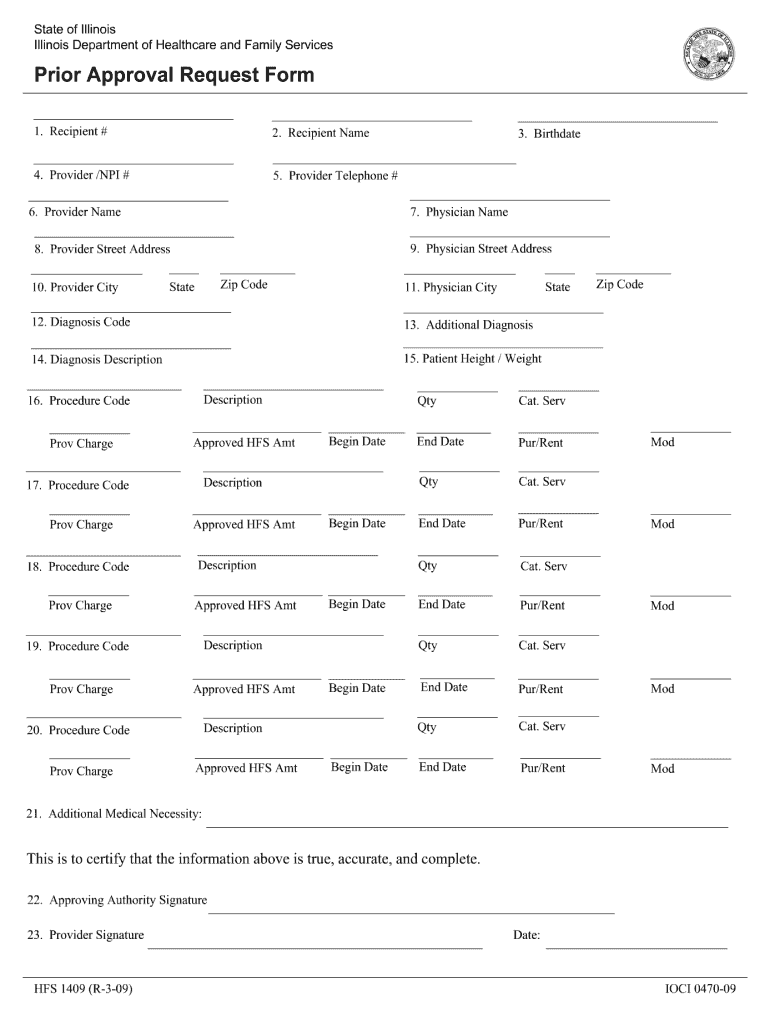
- Click ‘Get Form’ to open the hfs 1409 form in the editor.
- Begin by entering the Recipient # and Recipient Name in the designated fields. Ensure accuracy as this information is crucial for identification.
- Fill in the Provider details, including Provider/NPI #, Provider Telephone #, and Provider Name. This section is essential for linking services to the correct provider.
- Input the Physician's information: Name, Street Address, City, State, and Zip Code. This ensures that all medical professionals involved are properly documented.
- Complete the Diagnosis section by entering Diagnosis Code, Additional Diagnosis, and a brief Diagnosis Description. This helps clarify the medical necessity of services requested.
- For each procedure being requested, fill out Procedure Code, Provider Charge, Approved HFS Amount, Begin Date, End Date, and any additional details required. Repeat this for all applicable procedures.
- Finally, ensure that both the Approving Authority Signature and Provider Signature fields are completed along with the date to certify that all information provided is accurate.
Start using our platform today to easily fill out your hfs 1409 form online for free!
It's free
See more hfs 1409 form versions
| Versions | Form popularity | Fillable & printable |
|---|---|---|
| 2009 | 4.9 Satisfied (40 Votes) |
Got questions?
Can I complete and sign my approval request online?
Sure, and it’s really easy! DocHub is a web-based PDF editor with advanced document management features that allow you promptly modify your paperwork, complete empty fields and add new ones for others to fill out, and create electronic signatures in several ways. Upload your approval request, provide information as required, and choose how you want to eSign your document - by typing your name, drawing your signature, uploading its picture, or using a QR code.
How do you modify download hfs from Google Drive?
If you store your documents in Google Drive, there is no need to download your download hfs on your computer and upload it back to our editor. A significantly simpler way is to set up a browser extension created by DocHub to simplify this flow. The extension allows editing PDFs in your browser. Alternatively, you may integrate your DocHub and Gmail accounts for more efficient editing.
How do I check my Medicaid status in Illinois?
What is the income limit for medical card in Illinois?
How do I verify my Medicaid eligibility in Illinois?
Security and compliance
At DocHub, your data security is our priority. We follow HIPAA, SOC2, GDPR, and other standards, so you can work on your documents with confidence.
Learn more