Type text, add images, blackout confidential details, add comments, highlights and more.
02. Sign it in a few clicks
Draw your signature, type it, upload its image, or use your mobile device as a signature pad.
03. Share your form with others
Send it via email, link, or fax. You can also download it, export it or print it out.
How to use or fill out form 2555 causing a NOL on line 21 of 1040 - Accountants...
Ease of Setup
DocHub User Ratings on G2
Ease of Use
DocHub User Ratings on G2
Click ‘Get Form’ to open it in the editor.
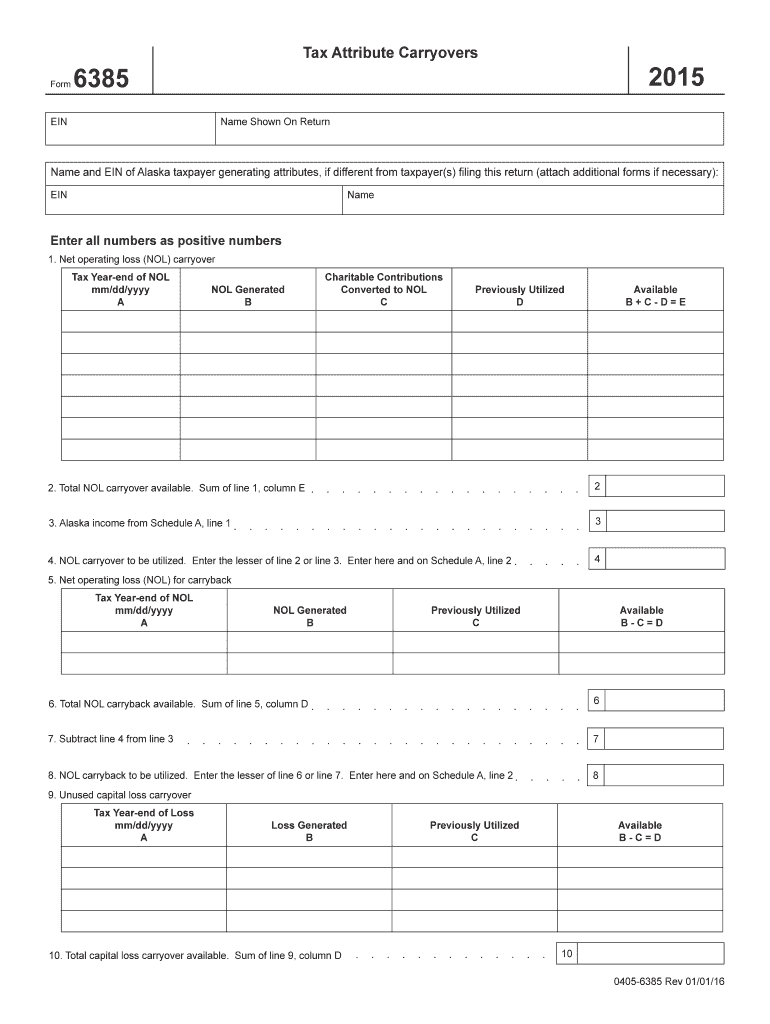
Begin with Section 1, where you will enter the Net Operating Loss (NOL) carryover. Fill in the tax year-end date and provide the NOL generated amount. Ensure all numbers are entered as positive values.
In Section 2, calculate the total NOL carryover available by summing up the values from column E of Section 1.
Proceed to Section 3 and input your Alaska income from Schedule A, line 1. This figure is crucial for determining how much of your NOL can be utilized.
In Section 4, enter the lesser value between line 2 and line 3. This amount will be carried over to Schedule A, line 2.
Continue through Sections 5 to 20, following similar steps for calculating carrybacks and capital losses as outlined in each section.
Start using our platform today to simplify your form completion process for free!
Fill out form 2555 causing a NOL on line 21 of 1040 - Accountants... online It's free
See more form 2555 causing a NOL on line 21 of 1040 - Accountants... versions
We've got more versions of the form 2555 causing a NOL on line 21 of 1040 - Accountants... form. Select the right form 2555 causing a NOL on line 21 of 1040 - Accountants... version from the list and start editing it straight away!
Sample form 2555 causing a nol on line 21 of 1040 accountantsForm 2555 instructionsForm 2555 line 50Form 2555 PDFIrs Form 4563Form 2555 2023Form 2555-EZIRS Form 2555 for 2025 PDF
Security and compliance
At DocHub, your data security is our priority. We follow HIPAA, SOC2, GDPR, and other standards, so you can work on your documents with confidence.
If the debt is a nonbusiness debt, report the canceled amount on line 21 of Form 1040. to self-employment tax. You file Form 2555 or Form 2555EZ (relatingRead more
3.38.147 International Notices | Internal Revenue Service
Sep 18, 2025 Line 21 of Form 1040, for 2017 and prior years. The housing deduction amount on line 50 of Form 2555 is included on: Schedule 1, line 24jRead more
Cookie consent notice
This site uses cookies to enhance site navigation and personalize your experience.
By using this site you agree to our use of cookies as described in our Privacy Notice.
You can modify your selections by visiting our Cookie and Advertising Notice.