




01. Edit your 2003 california tax online
Type text, add images, blackout confidential details, add comments, highlights and more.

Type text, add images, blackout confidential details, add comments, highlights and more.

Draw your signature, type it, upload its image, or use your mobile device as a signature pad.

Send 2003 form return via email, link, or fax. You can also download it, export it or print it out.
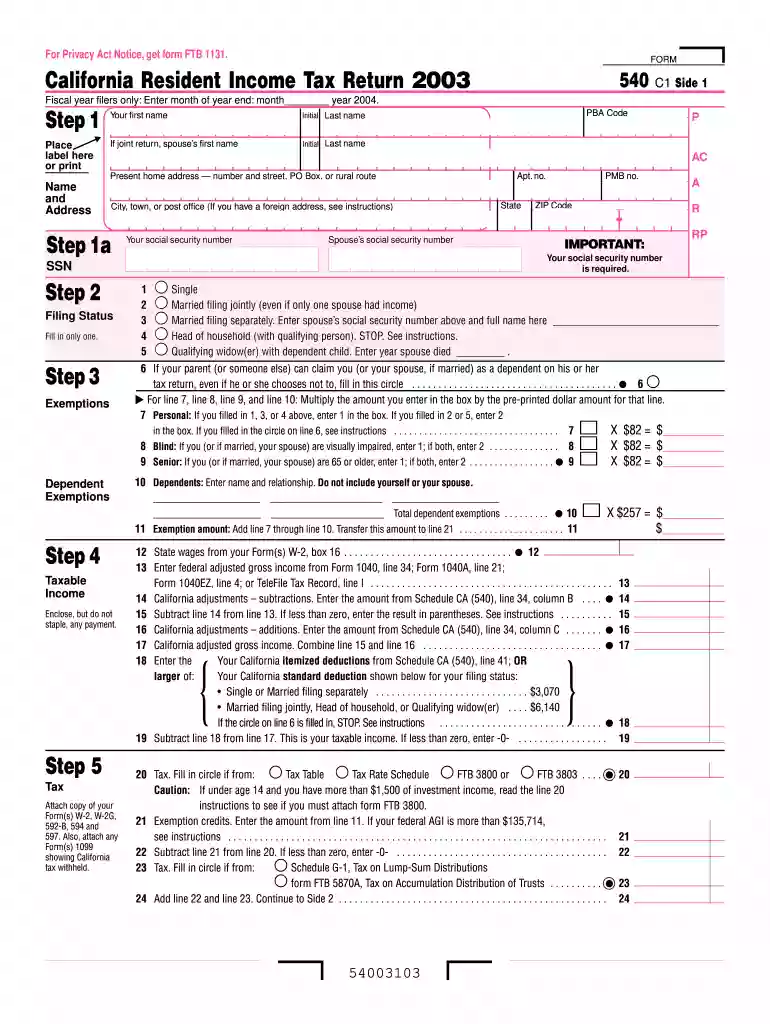
The 2003 California tax form pertains to the California Resident Income Tax Return, which was used by residents to file their state tax returns for the year 2003. This form is designed to capture comprehensive details about a taxpayer’s financial activities within the state, such as income, deductions, and exemptions, to accurately calculate the state income tax owed. The form consists of several sections that require information on filing status, personal details, income sources, and applicable tax credits. Understanding the components of this form is crucial for accurate and timely filing.
To effectively use the 2003 California tax form, one must first gather pertinent financial documents from the 2003 tax year. These documents may include W-2 forms, 1099 forms, and records of any other income sources. The form requires meticulous entry of income details, followed by calculating deductions, exemptions, and credits to determine the taxable income. The taxpayer will then use this information to compute the tax liability or refund owed. This form serves as an essential tool for ensuring compliance with state tax regulations and optimizing potential refunds or minimizing liability.
Although the form was most accessible in 2003, individuals needing to access it now can typically find it through the California Franchise Tax Board (FTB) website or through inquiry at a local FTB office. Some online tax preparation services may also archive older forms for user convenience. By ensuring they obtain the correct version, taxpayers can accurately report their financial details and adhere to historical tax filing requirements.
Gather Required Materials: Collect all relevant documents, including income statements, deduction records, and tax credit documentation.
Personal Information Entry: Begin by filling out personal details, including name, address, and Social Security number.
Select Filing Status: Determine and select the appropriate filing status, such as single, married filing jointly, or head of household.
Report Income: Enter all sources of taxable income earned during the year, referencing W-2 and 1099 forms for accuracy.
Calculate Deductions and Credits: List applicable deductions and tax credits to lower the total tax liability.
Determine Taxable Income: Subtract deductions and credits from total income to find taxable income.
Compute Tax Liability or Refund: Use the tax tables provided to calculate the tax owed or refund due.
Review and Submit: Double-check all entries for accuracy before submitting the form, either electronically or via mail, to ensure compliance and efficiency.
The 2003 California tax form remains a legal document representing a taxpayer’s financial situation for that year. While it was originally submitted to report and pay state taxes in 2003, the form may be referenced for audits, amendments, or record-keeping purposes. Taxpayers must retain copies of filed forms for several years, as required by the California FTB, to substantiate their financial declarations and support any retrospective reviews or claims adjustments.
For the 2003 tax year, the deadline to file the California Resident Income Tax Return was April 15, 2004. Taxpayers who missed this deadline were required to file for an extension to avoid penalties. Understanding these time frames was essential to ensure compliance and avoid any potential late fees or interest charges.
Different taxpayer scenarios influence the use of the 2003 form:


In 2003, taxpayers could choose between filing a digital or paper version of the form. Electronically filing the form provided conveniences such as faster processing times and reduced errors due to software validation. In contrast, paper filing required manual entry and mailing, which was more time-consuming and prone to errors. However, both methods required adherence to the content and accuracy standards essential for tax compliance. The choice depended on the individual’s preference for speed, convenience, and the resources available at the time of filing.
We've got more versions of the 2003 california tax form. Select the right 2003 california tax version from the list and start editing it straight away!
| Versions | Form popularity | Fillable & printable |
|---|---|---|
| 2025 | 4.9 Satisfied (32 Votes) | |
| 2024 | 4.5 Satisfied (41 Votes) | |
| 2023 | 4.8 Satisfied (57 Votes) | |
| 2022 | 4.4 Satisfied (58 Votes) | |
| 2021 | 4.8 Satisfied (196 Votes) | |
| 2020 | 4.4 Satisfied (68 Votes) | |
| 2019 | 4.3 Satisfied (176 Votes) | |
| 2018 | 4.3 Satisfied (120 Votes) | |
| 2017 | 4.3 Satisfied (127 Votes) | |
| 2016 | 4.4 Satisfied (234 Votes) | |
| 2015 | 4.3 Satisfied (243 Votes) | |
| 2014 | 4 Satisfied (31 Votes) | |
| 2013 | 4 Satisfied (47 Votes) | |
| 2012 | 4.3 Satisfied (54 Votes) | |
| 2011 | 4 Satisfied (35 Votes) |
At DocHub, your data security is our priority. We follow HIPAA, SOC2, GDPR, and other standards, so you can work on your documents with confidence.
The following Tax Forms, Instructions, and Information are now available in Microsoft Excel 2000, Word 2000 and/or in DocHubs Portable Document Format (PDF).Read more
The effective tax rate for the three months ended March 31, 2009, differs from the federal statutory rate of 35% and the rate for the same period in 2008.Read more
Payments to tax-deferred pension and savings plans (paid directly or withheld from earnings) including amounts on your W-2 Form in Box12a through 12d,


