Type text, add images, blackout confidential details, add comments, highlights and more.
02. Sign it in a few clicks
Draw your signature, type it, upload its image, or use your mobile device as a signature pad.
03. Share your form with others
Send it via email, link, or fax. You can also download it, export it or print it out.
How to use or fill out ak carryovers with our platform
Ease of Setup
DocHub User Ratings on G2
Ease of Use
DocHub User Ratings on G2
Click ‘Get Form’ to open the ak carryovers document in the editor.
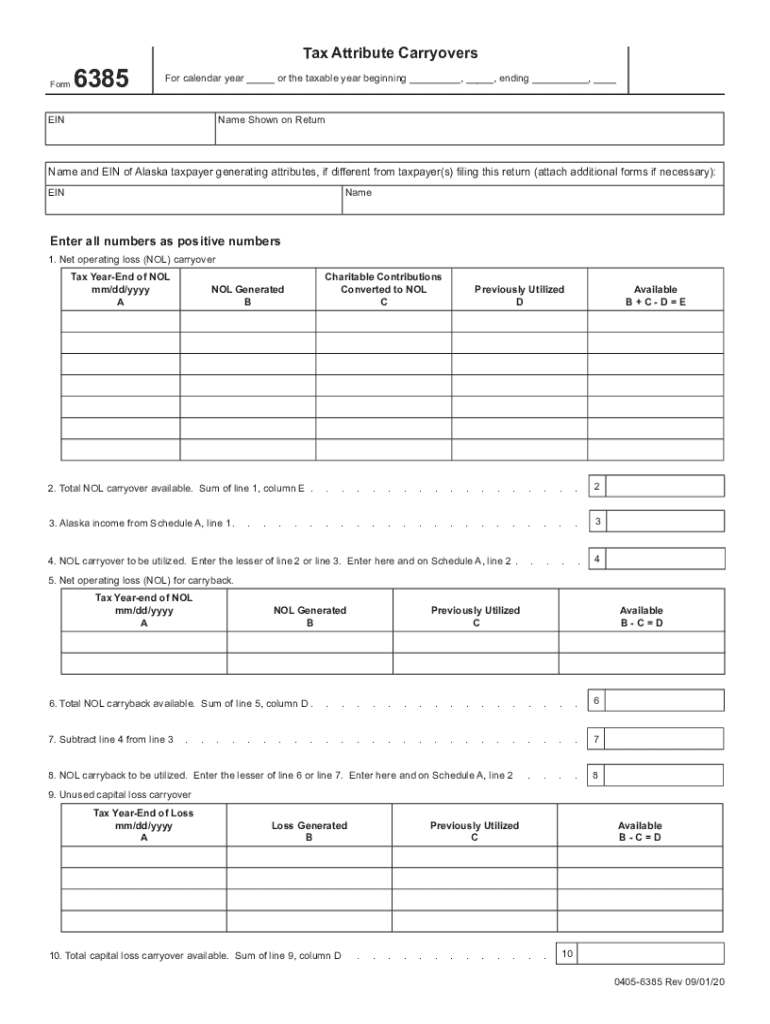
Begin by entering the calendar year or taxable year details at the top of the form. Ensure that you provide accurate information for your EIN and name shown on return.
For section 1, input your Net Operating Loss (NOL) carryover details. Fill in the tax year-end date, NOL generated, previously utilized amounts, and calculate available NOL using the formula provided.
Continue to section 2 where you will sum up all available NOL carryovers from line 1. This total will be used in subsequent calculations.
In section 3, enter your Alaska income from Schedule A. This figure is crucial for determining how much of your NOL can be utilized.
Proceed to sections regarding capital loss carryovers and charitable contributions, following similar steps as above: input relevant dates, amounts generated, and previously utilized figures.
Review all entries for accuracy before finalizing your form. Utilize our platform’s features to save or export your completed document seamlessly.
Start filling out your ak carryovers form today for free using our platform!
AlaskaCare Employee Health Plan - State of Alaska DRB
The carryover is limited to the maximum deductible of their selected AlaskaCare plan. Employees are responsible for securing documentation from their formerRead more
Alaska INBRE is seeking proposals for one-time biomedical research-related expenses. A man in a white lab, safety glasses and rubber gloves places a glassRead more
Cookie consent notice
This site uses cookies to enhance site navigation and personalize your experience.
By using this site you agree to our use of cookies as described in our Privacy Notice.
You can modify your selections by visiting our Cookie and Advertising Notice.