CARGO DECLARATION US Customs and Border Protection - cbp 2026

Get Form
manifest of cargo form Preview on Page 1

Here's how it works

01. Edit your manifest of cargo form online
Type text, add images, blackout confidential details, add comments, highlights and more.

02. Sign it in a few clicks
Draw your signature, type it, upload its image, or use your mobile device as a signature pad.

03. Share your form with others
Send the cargo declaration pictures via email, link, or fax. You can also download it, export it or print it out.

How to use or fill out CARGO DECLARATION US Customs and Border Protection - cbp with DocHub

Form edit decoration
9.5
Ease of Setup
DocHub User Ratings on G2
9.0
Ease of Use
DocHub User Ratings on G2
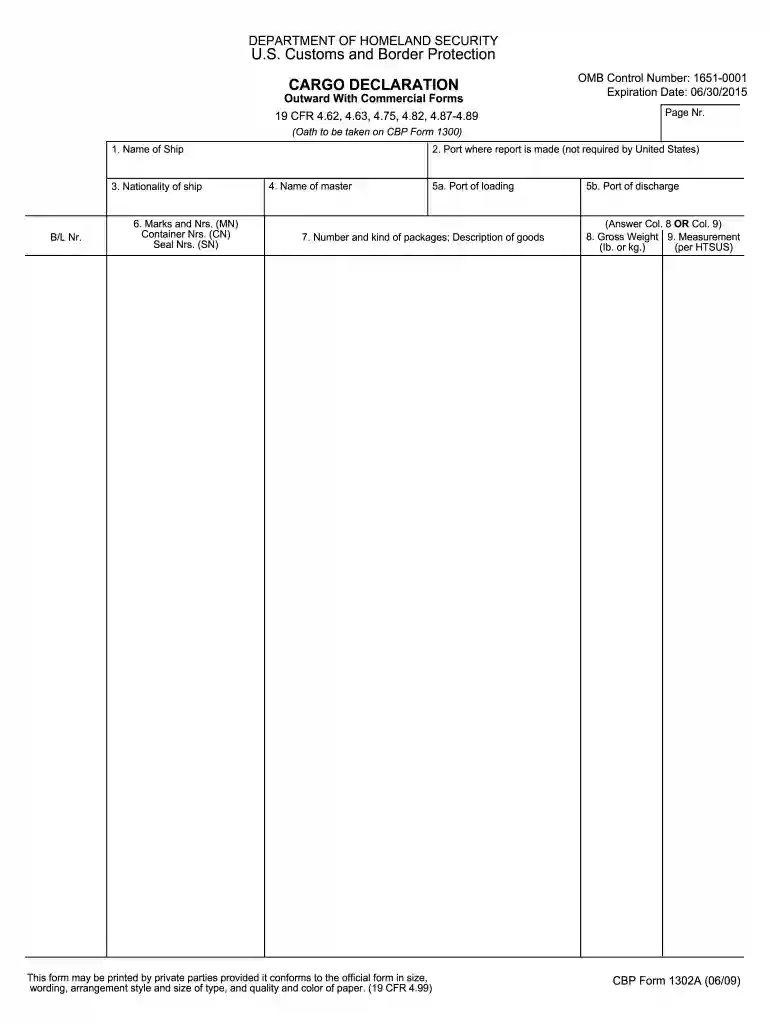
  1. Click ‘Get Form’ to open the CARGO DECLARATION in our editor.
  2. Begin by entering the 'Name of Ship' and 'Nationality of Ship' in the designated fields. This information is crucial for identifying the vessel.
  3. Fill in the 'B/L Number' and provide details for 'Marks and Numbers', 'Container Numbers', and 'Seal Numbers'. Ensure accuracy as these are vital for tracking cargo.
  4. Indicate the 'Port where report is made', followed by the 'Name of Master' and 'Port of Loading'. These sections help establish the journey's origin.
  5. Complete the 'Number and Kind of Packages' along with a brief 'Description of Goods'. This section provides essential details about what is being transported.
  6. Finally, specify the 'Gross Weight' and 'Measurement'. Choose either column 8 or column 9 based on your cargo specifics.

Start using our platform today to streamline your CARGO DECLARATION process for free!

See more CARGO DECLARATION US Customs and Border Protection - cbp versions

We've got more versions of the CARGO DECLARATION US Customs and Border Protection - cbp form. Select the right CARGO DECLARATION US Customs and Border Protection - cbp version from the list and start editing it straight away!
Versions Form popularity Fillable & printable
2020 4.8 Satisfied (195 Votes)
2018 4.4 Satisfied (213 Votes)
2009 4.2 Satisfied (54 Votes)
be ready to get more

Complete this form in 5 minutes or less

Get form

Got questions?

We have answers to the most popular questions from our customers. If you can't find an answer to your question, please contact us.
Contact us
Filling Out Customs Forms Online You can print just a customs form and save time at the Post Office with Customs Form Online, or use Click-N-Ship service to pay for postage and print an international shipping label and customs form.
U.S. ResidentsDeclare all articles that you have acquired abroad and are bringing into the United States. Visitors (Non-Residents)Declare the value of all articles that will remain in the United States. Declare all articles on this declaration form and show the value in U.S. dollars.
All travelers must complete a CBP Declaration Form 6059B itemizing all purchased merchandise and agricultural products. Here are your options: Complete a paper form that may be obtained at the port of entry or on the flight or cruise. Complete the online form at an Automated Passport Control kiosk.

Security and compliance

At DocHub, your data security is our priority. We follow HIPAA, SOC2, GDPR, and other standards, so you can work on your documents with confidence.

Learn more
ccpa2
pci-dss
gdpr-compliance
hipaa
soc-compliance
be ready to get more

Complete this form in 5 minutes or less

Get form