Type text, add images, blackout confidential details, add comments, highlights and more.
02. Sign it in a few clicks
Draw your signature, type it, upload its image, or use your mobile device as a signature pad.
03. Share your form with others
Send it via email, link, or fax. You can also download it, export it or print it out.
How to use or fill out l 152 with our platform
Ease of Setup
DocHub User Ratings on G2
Ease of Use
DocHub User Ratings on G2
Click ‘Get Form’ to open it in the editor.
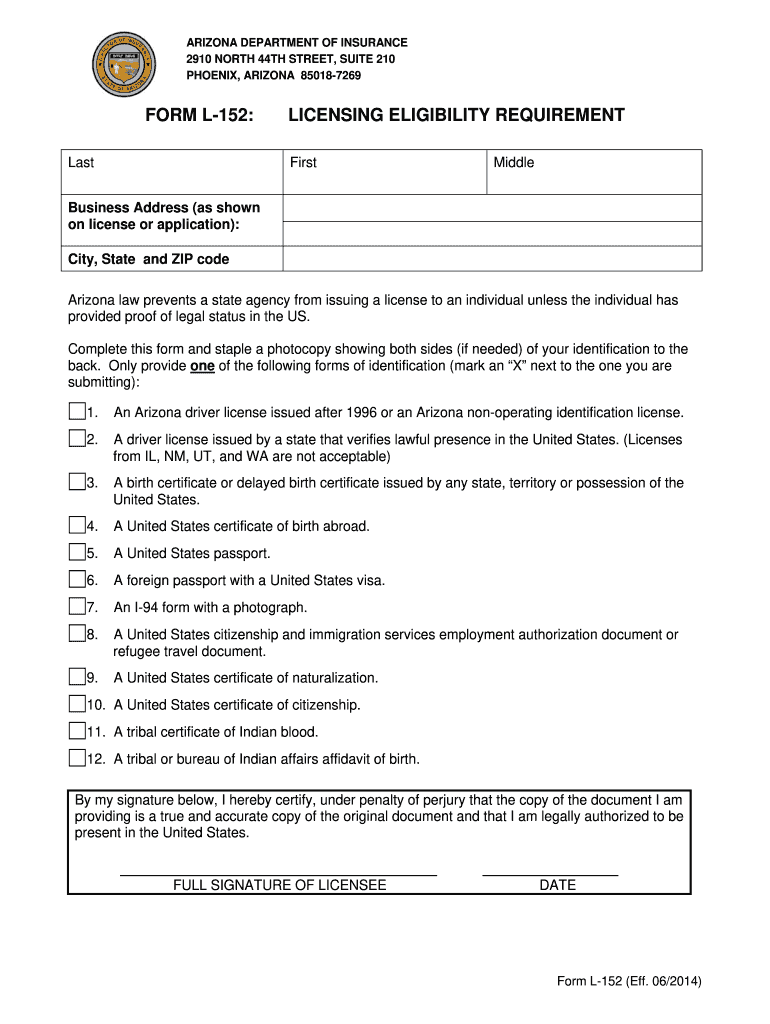
Begin by entering your last name, first name, and middle name in the designated fields.
Fill in your business address as it appears on your license or application, including city, state, and ZIP code.
Review the identification requirements carefully. Mark an 'X' next to the form of identification you are submitting from the provided list.
Ensure you have a photocopy of your identification ready. If necessary, staple it to the back of the form.
Sign and date the form at the bottom to certify that all information is accurate and that you are legally authorized to be present in the United States.
Start filling out your l 152 form online for free today!
L-152 meeting room is equipped with a computer, flat panel LED
L-152 meeting room is equipped with a computer, flat panel LED wall display. Web camera and an Audio/ Video system controller. If after turning the display
L-152 Revised June 2018. FORM L-152: LICENSING ELIGIBILITY REQUIREMENT. Last Name. First Name. Middle Name. Residence Address (as shown on license or licenseRead more
Cookie consent notice
This site uses cookies to enhance site navigation and personalize your experience.
By using this site you agree to our use of cookies as described in our Privacy Notice.
You can modify your selections by visiting our Cookie and Advertising Notice.