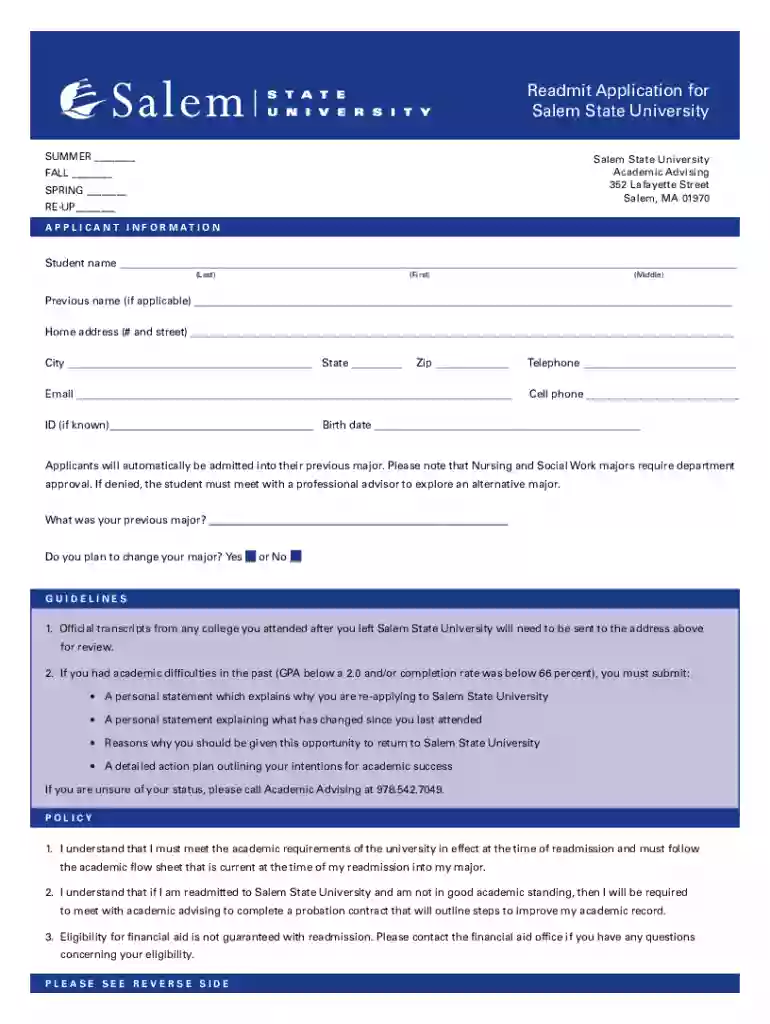
Readmit Application for Salem State University 2026

Get Form
Readmit Application for Salem State University Preview on Page 1

Here's how it works

01. Edit your form online
Type text, add images, blackout confidential details, add comments, highlights and more.

02. Sign it in a few clicks
Draw your signature, type it, upload its image, or use your mobile device as a signature pad.

03. Share your form with others
Send it via email, link, or fax. You can also download it, export it or print it out.

How to use or fill out Readmit Application for Salem State University with our platform

Form edit decoration
9.5
Ease of Setup
DocHub User Ratings on G2
9.0
Ease of Use
DocHub User Ratings on G2
  1. Click ‘Get Form’ to open the Readmit Application in the editor.
  2. Begin by filling out your personal information in the 'APPLICANT INFORMATION' section. Enter your last name, first name, and middle name as required.
  3. Provide your previous name if applicable, followed by your home address, city, state, zip code, email, and telephone numbers.
  4. Indicate your ID number if known and enter your birth date. Specify your previous major and whether you plan to change it by selecting 'Yes' or 'No'.
  5. Review the guidelines carefully. If you had academic difficulties previously, prepare the necessary personal statements and action plan as outlined.
  6. In the 'AUTHORIZATION' section, read through the policies and provide your signature along with the date to confirm understanding and compliance.
  7. List any institutions attended after leaving Salem State University in the designated area.

Start using our platform today to complete your Readmit Application for free!

See more Readmit Application for Salem State University versions

We've got more versions of the Readmit Application for Salem State University form. Select the right Readmit Application for Salem State University version from the list and start editing it straight away!
Versions Form popularity Fillable & printable
2022 4.5 Satisfied (29 Votes)
2012 4.3 Satisfied (46 Votes)
be ready to get more

Complete this form in 5 minutes or less

Get form

Got questions?

We have answers to the most popular questions from our customers. If you can't find an answer to your question, please contact us.
Contact us
Salem State University Admissions Requirements RequirementDetails High School GPA 3.0-3.24 SAT Scores 1038-1173 ACT Scores Test-Optional Application Fee $504 more rows
Free Tuition and Mandatory Fees Close to 50% of undergraduate students attend for FREE. As a public university, Salem State provides all students with access to funding programs that may help them earn their bachelors degree for little or no cost.
If sending electronically, each previously attended institution must email transcripts directly to Ohio State at gpadocs@osu.edu via an encrypted email or by attaching a password protected PDF.
Transcripts can be sent via your high school Naviance, Parchment or SCOIR portal. We will also accept a PDF version of your transcript if it is emailed directly from your guidance counselor to admissions@salemstate.edu.
Submit Your Transcripts Naviance. SCOIR. TranscriptsForSDSU@sdsu.edu (SDSU will not accept transcripts that are emailed by the student or general inquiries at this address).

Security and compliance

At DocHub, your data security is our priority. We follow HIPAA, SOC2, GDPR, and other standards, so you can work on your documents with confidence.

Learn more
ccpa2
pci-dss
gdpr-compliance
hipaa
soc-compliance

People also ask

Complete the online application and submit the $50 application fee (non-refundable).
If you require additional financial assistance and need to defer your enrollment deposit, please complete the Application to Defer Enrollment Deposit and email it to our admissions team at admissions@salemstate.edu.

Related links