




Here's how it works

01. Edit your https form jotform com 200776603410043 online
Type text, add images, blackout confidential details, add comments, highlights and more.

02. Sign it in a few clicks
Draw your signature, type it, upload its image, or use your mobile device as a signature pad.

03. Share your form with others
Send it via email, link, or fax. You can also download it, export it or print it out.
How to use or fill out benefits life attending physician statement with our platform

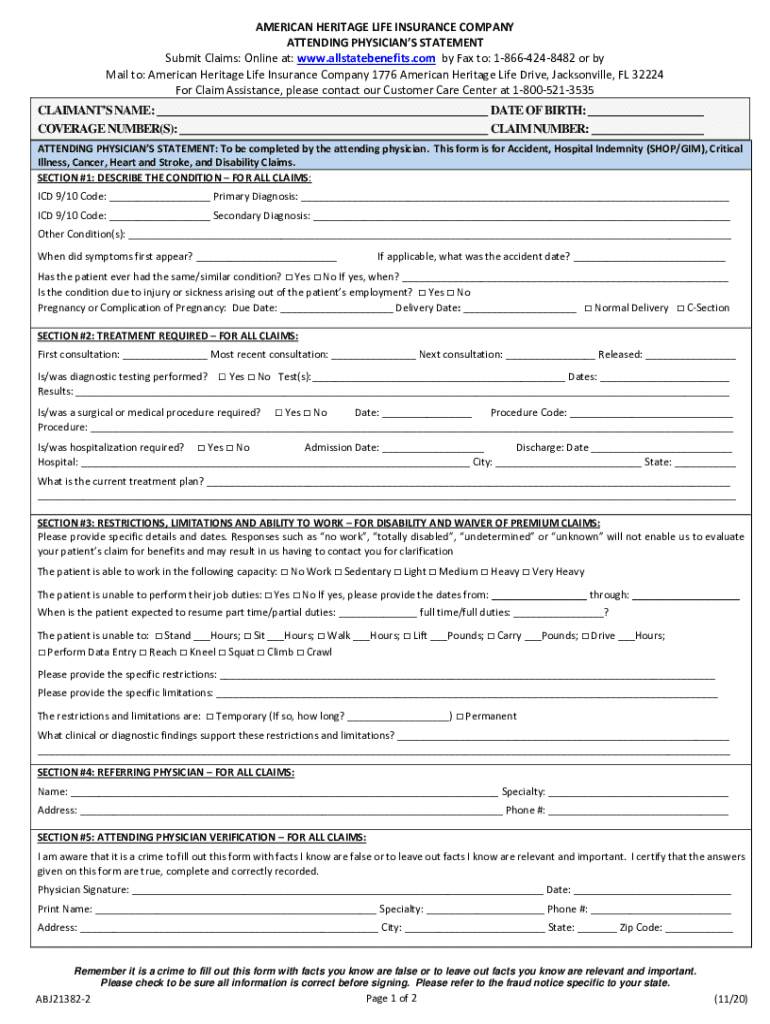
- Click ‘Get Form’ to open the benefits life attending physician statement in the editor.
- Begin by filling in the claimant’s name, coverage number(s), date of birth, and claim number at the top of the form. Ensure accuracy as this information is crucial for processing.
- In Section #1, describe the patient's condition. Enter the ICD 9/10 codes and provide details on primary and secondary diagnoses. Include when symptoms first appeared and any relevant accident dates.
- Move to Section #2 to outline treatment required. Document consultation dates, diagnostic tests performed, and any surgical procedures needed. Be thorough in detailing the current treatment plan.
- For disability claims in Section #3, specify restrictions and limitations regarding the patient’s ability to work. Clearly indicate any expected return-to-work dates and provide supporting clinical findings.
- Complete Sections #4 and #5 by providing information about the referring physician and verifying your statements with a signature, ensuring all details are accurate before submission.
Start using our platform today for free to streamline your document editing and submission process!
Fill out benefits life attending physician statement online
It's free
It's free
See more benefits life attending physician statement versions
We've got more versions of the benefits life attending physician statement form. Select the right benefits life attending physician statement version from the list and start editing it straight away!
Security and compliance
At DocHub, your data security is our priority. We follow HIPAA, SOC2, GDPR, and other standards, so you can work on your documents with confidence.
Learn more


Related forms

Your 2023 return and payment for the full amount of tax due must be mailed by the due date of your f
Your 2023 return and payment for the full amount of tax due must be mailed by the due date of your f
The document is an Individual Income Tax Payment Voucher (Form 40V) from the Alabama Department of Revenue for the year ...

Spouses deceased date (mm dd yyyy)
The document is the Alabama Individual Nonresident Income Tax Return form for 2023, which requires personal information, ...
Form M-942 Rev 908 Instructions for Monthly Tax Return
Form M-942 is a monthly tax return for employers in Massachusetts who withhold income taxes between $1,201 and $25,000 a ...
Praf form
The document outlines the Pregnancy Risk Assessment Communication (PRAF) form for Medicaid patients in Ohio, detailing r ...

New york mental hygiene
The document outlines the procedures and requirements for referring clients to the Wayne Behavioral Health Network's Sin ...

New york beneficiary form
The document provides a detailed guide for updating beneficiary designations for insurance policies with New York Life. ...

Health History Form & Lifestyle Questionnaire
The document is a Health History Form and Lifestyle Questionnaire designed for patients to provide essential personal, m ...
Va child support application
The document is a Direct Deposit Authorization form from the Commonwealth of Virginia's Department of Social Services, s ...