Coursehero 2-Volunteer-Application2 Volunteer Application - HEALTH ESSENTIALS VOLUNTEER 2026

Get Form
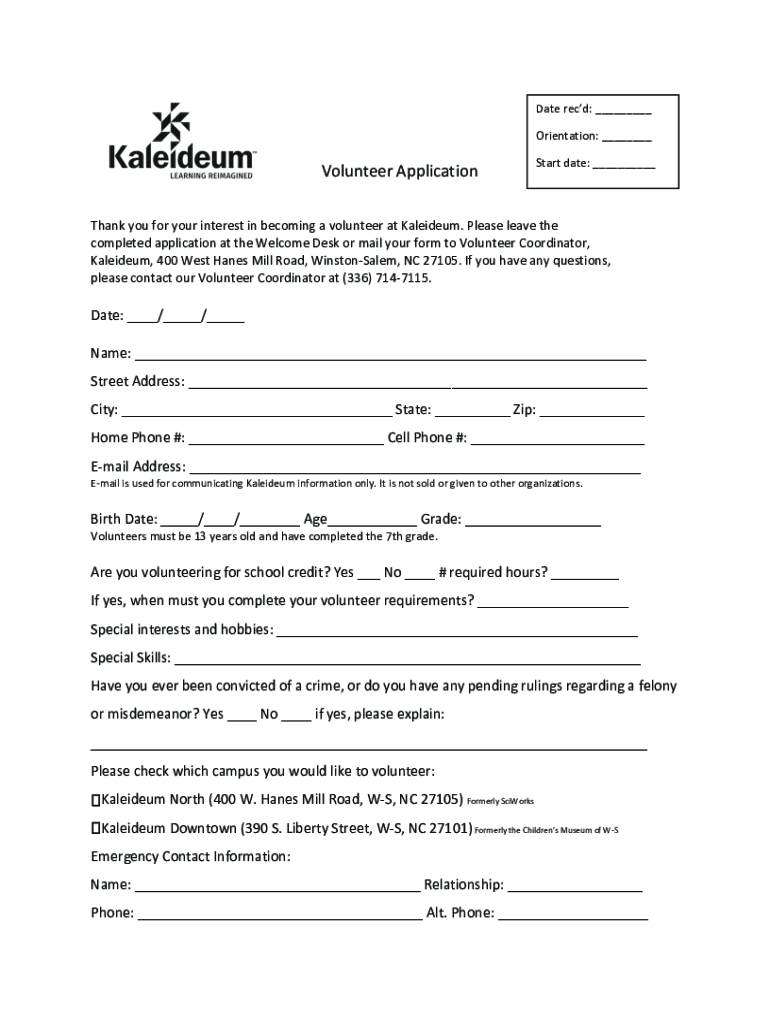
coursehero 2-Volunteer-Application2 Volunteer Application - HEALTH ESSENTIALS VOLUNTEER Preview on Page 1

Here's how it works

01. Edit your form online
Type text, add images, blackout confidential details, add comments, highlights and more.
02. Sign it in a few clicks
Draw your signature, type it, upload its image, or use your mobile device as a signature pad.
03. Share your form with others
Send it via email, link, or fax. You can also download it, export it or print it out.

How to use or fill out coursehero 2-Volunteer-Application2 Volunteer Application - HEALTH ESSENTIALS VOLUNTEER with our platform

Form edit decoration
9.5
Ease of Setup
DocHub User Ratings on G2
9.0
Ease of Use
DocHub User Ratings on G2
  1. Click ‘Get Form’ to open the Volunteer Application in the editor.
  2. Begin by entering the 'Date rec’d' and 'Orientation' at the top of the form. This helps track your application process.
  3. Fill in your personal information, including your name, address, phone numbers, and email. Ensure accuracy as this will be used for communication.
  4. Provide your birth date and age. Remember, volunteers must be at least 13 years old and have completed the 7th grade.
  5. Indicate if you are volunteering for school credit and specify any required hours or deadlines.
  6. List any special interests, hobbies, or skills that may enhance your volunteer experience.
  7. Answer the question regarding any criminal convictions honestly. If applicable, provide explanations in the space provided.
  8. Select your preferred campus for volunteering by checking the appropriate box.
  9. Complete the emergency contact section with accurate details of a person we can reach in case of an emergency.
  10. Check areas of interest under Volunteer Job Descriptions to indicate where you would like to contribute.
  11. Finally, indicate your availability by filling out the day/time section accurately to help us schedule effectively.

Start using our platform today to complete your application effortlessly and join us in making a difference!

See more coursehero 2-Volunteer-Application2 Volunteer Application - HEALTH ESSENTIALS VOLUNTEER versions

We've got more versions of the coursehero 2-Volunteer-Application2 Volunteer Application - HEALTH ESSENTIALS VOLUNTEER form. Select the right coursehero 2-Volunteer-Application2 Volunteer Application - HEALTH ESSENTIALS VOLUNTEER version from the list and start editing it straight away!
Versions Form popularity Fillable & printable
2018 4.7 Satisfied (28 Votes)
2012 4 Satisfied (41 Votes)
be ready to get more

Complete this form in 5 minutes or less

Get form

Got questions?

We have answers to the most popular questions from our customers. If you can't find an answer to your question, please contact us.
Contact us

Sure, a typed name is recognized as a valid electronic signature when you add it to your paperwork utilizing a compliant solution like DocHub. Simply upload your coursehero 2-Volunteer-Application2 Volunteer Application - HEALTH ESSENTIALS VOLUNTEER to our editor, click Sign in the top tool pane → Create your signature → Type your name in the appropriate tab, and choose how it will look on your document.

With DocHub, there are several convenient methods to edit your coursehero 2-Volunteer-Application2 Volunteer Application - HEALTH ESSENTIALS VOLUNTEER online. You can drag and drop the form and edit it straight at the DocHub website or use our browser extension to fill out your form right away. On top of that, you can edit your PDF on your phone, as DocHub is compatible with all the available mobile platforms.

A volunteer intake form is used by organizations to collect information from potential volunteers and assess their suitability for the organizations needs. The volunteer candidate will provide their contact information, education level, desired assignment, and how many hours they can commit.
The basics Details about your organization, including your address and the name and contact details of your volunteer manager. Name of applicant. Preferred pronoun (he, she, they) Date of birth. Contact information (including email, home and mobile phone numbers) Home address.
Volunteer Application Template: Best Practices What To Include Personal and Contact Information. Availability and Schedule Preferences. Areas of Interest. Skills and Experience. Background Information and Legal Disclosures. Waivers, Agreements, and Policies. References. Signature and Date.

Security and compliance

At DocHub, your data security is our priority. We follow HIPAA, SOC2, GDPR, and other standards, so you can work on your documents with confidence.

Learn more
ccpa2
pci-dss
gdpr-compliance
hipaa
soc-compliance

People also ask

How do I write a simple volunteer application letter? Address the organisation, express your interest in the volunteer position, briefly outline your skills or experiences, and explain why you want to volunteer. Close with your contact information. For more tips, refer to our guide on writing a letter of interest.
Write 1-2 sentences about yourself and your qualifications. Write a sentence about what you know of their organization (praise them a bit). Ask specifically if they have opportunities for you to participate in as a volunteer. Then, give your email and phone number, and say youre looking forward to hearing from them.

Related links