Sc ebt recertification online 2026

Get Form
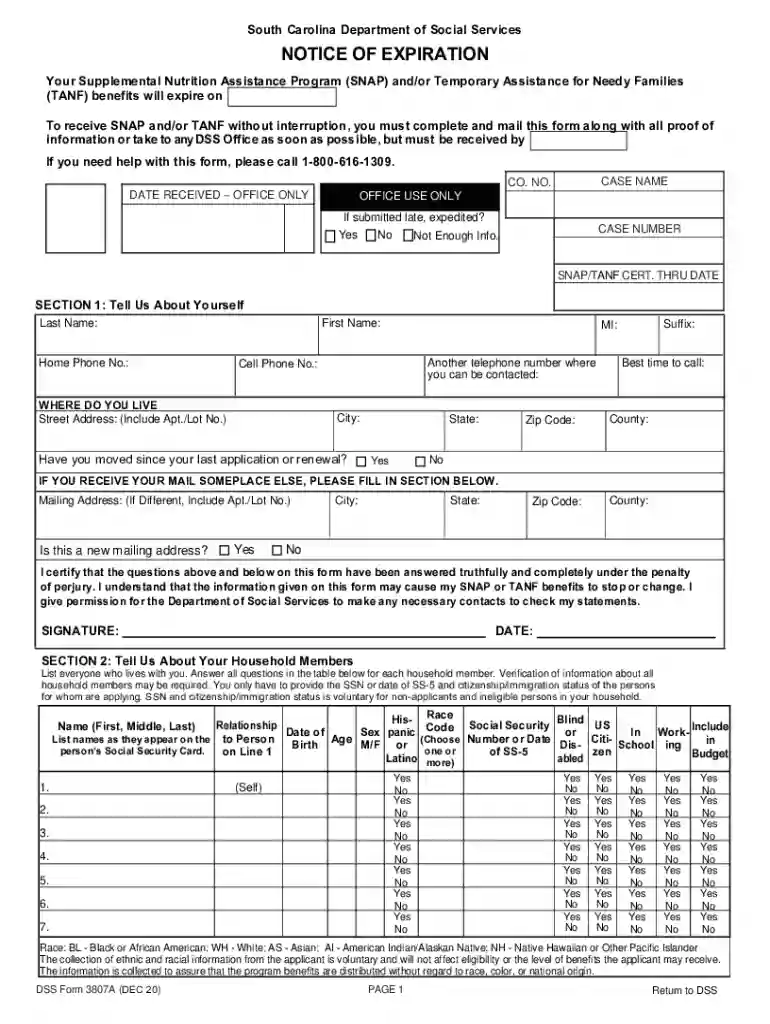
snap recertification online Preview on Page 1

Here's how it works

01. Edit your snap recertification online online
Type text, add images, blackout confidential details, add comments, highlights and more.

02. Sign it in a few clicks
Draw your signature, type it, upload its image, or use your mobile device as a signature pad.

03. Share your form with others
Send ebt renewal online ohio via email, link, or fax. You can also download it, export it or print it out.

How to use or fill out sc ebt recertification online with our platform

Form edit decoration
9.5
Ease of Setup
DocHub User Ratings on G2
9.0
Ease of Use
DocHub User Ratings on G2
  1. Click ‘Get Form’ to open the sc ebt recertification online in the editor.
  2. Begin with Section 1: Tell Us About Yourself. Fill in your last name, first name, and contact information including phone numbers and address. Ensure accuracy as this information is crucial for your application.
  3. Proceed to Section 2: Tell Us About Your Household Members. List all household members, providing necessary details such as age, relationship, and Social Security numbers where applicable.
  4. In Section 3, if applicable, report any new information regarding absent parents for Temporary Assistance for Needy Families (TANF). Complete the required fields accurately.
  5. Move on to Section 4: Tell Us About Your Household Income. Document all sources of income and provide proof if requested. This section is vital for determining eligibility.
  6. Finally, complete Section 5: Tell Us About Your Household Expenses. List all relevant expenses and ensure you attach any necessary documentation to support your claims.

Start filling out your sc ebt recertification online today using our platform for free!

See more sc ebt recertification online versions

We've got more versions of the sc ebt recertification online form. Select the right sc ebt recertification online version from the list and start editing it straight away!
Versions Form popularity Fillable & printable
2020 4.8 Satisfied (32 Votes)
2015 4.4 Satisfied (146 Votes)
2006 4.1 Satisfied (82 Votes)
be ready to get more

Complete this form in 5 minutes or less

Get form

Got questions?

We have answers to the most popular questions from our customers. If you can't find an answer to your question, please contact us.
Contact us
To apply for SNAP or redocHub, users can visit scmapp.sc.gov or dss.sc.gov. For those who are eligible, monthly benefits will be issued at their normal schedule. An emergency supplement will also be provided separately and may appear on an EBT card within 48 hours.
Yes, some states allow you to apply for food stamp recertification online. Check any recertification information you received by mail or email, or call your states SNAP phone number to find out what the process is.
There may be a Supplemental Nutrition Assistance Program (SNAP) Electronic Benefit Transfer (EBT) card scam asking people to signup for instant cash. This is not real. Any social media platform asking you to sign up to receive instant cash is .
To find out the easiest way to renew in your county, call your caseworker, local office, or the South Carolina SNAP hotline: 1-800-616-1309.
Food stamp recertification may require documents like: Government approved ID, including, a license, passport, or Social Security card. Information about all your household members. Proof of income or wages. Proof of any additional income, including Social Security benefits, pension, or disability payments.

Security and compliance

At DocHub, your data security is our priority. We follow HIPAA, SOC2, GDPR, and other standards, so you can work on your documents with confidence.

Learn more
ccpa2
pci-dss
gdpr-compliance
hipaa
soc-compliance