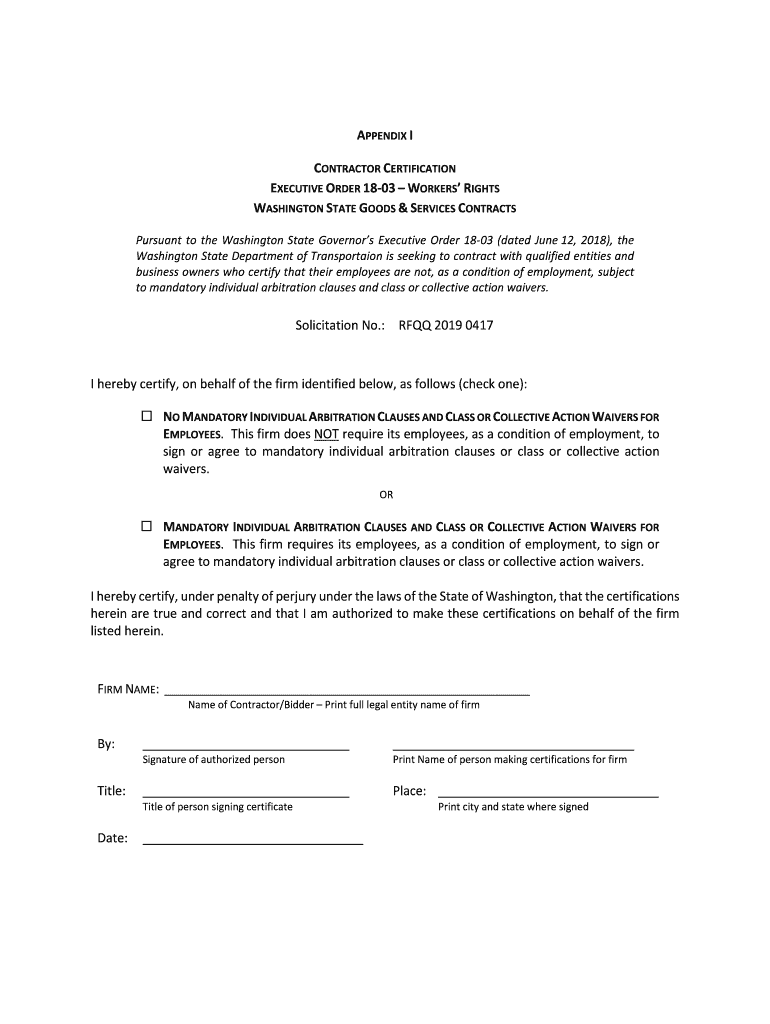
EXECUTIVE ORDER 18-03 WORKERS RIGHTS 2026

Get Form
executive order 18 03 Preview on Page 1

Here's how it works

01. Edit your executive order 18 03 online
Type text, add images, blackout confidential details, add comments, highlights and more.
02. Sign it in a few clicks
Draw your signature, type it, upload its image, or use your mobile device as a signature pad.
03. Share your form with others
Send it via email, link, or fax. You can also download it, export it or print it out.

How to use or fill out EXECUTIVE ORDER 18-03 WORKERS RIGHTS with our platform

Form edit decoration
9.5
Ease of Setup
DocHub User Ratings on G2
9.0
Ease of Use
DocHub User Ratings on G2
  1. Click ‘Get Form’ to open the EXECUTIVE ORDER 18-03 WORKERS RIGHTS document in the editor.
  2. Begin by reviewing the certification statement. You will need to select one of the two options regarding mandatory individual arbitration clauses and class or collective action waivers for employees.
  3. Check the appropriate box that reflects your firm's policy: either confirming no mandatory clauses or indicating that such clauses are required.
  4. In the 'FIRM NAME' field, print the full legal entity name of your firm clearly.
  5. Sign the document in the designated area, ensuring that you include your title and date of signing.
  6. Finally, print your name and indicate the city and state where you are signing. Review all entries for accuracy before submitting.

Start using our platform today to easily complete and manage your documents online for free!

be ready to get more

Complete this form in 5 minutes or less

Get form

Got questions?

We have answers to the most popular questions from our customers. If you can't find an answer to your question, please contact us.
Contact us
Executive Order No. 16 provides that all Affected State Entities are directed to refrain from entering into any new contract or renewing any existing contract with an entity conducting business operations in Russia. The complete text of the Executive Order No. 16 can be found here.
Executive Orders view After the President signs an Executive order, the White House sends it to the Office of the Federal Register (OFR). The OFR numbers each order consecutively as part of a series and publishes it in the daily Federal Register shortly after receipt.
In the United States, an executive order is a directive by the president of the United States that manages operations of the federal government. The legal or constitutional basis for executive orders has multiple sources.
Contractors covered by Executive Order 13658 must ensure that workers receive no less than the minimum wage rates in effect during each calendar year in which a covered multi-year contract is performed. On February 12, 2014, the President signed Executive Order 13658, establishing a Minimum Wage for Contractors.
United States presidents issue executive orders (in addition to other executive actions) to help officers and agencies of the executive branch manage the operations within the federal government itself. Donald Trump signed a total of 220 executive orders during his first term, from January 2017 to January 2021.

Security and compliance

At DocHub, your data security is our priority. We follow HIPAA, SOC2, GDPR, and other standards, so you can work on your documents with confidence.

Learn more
ccpa2
pci-dss
gdpr-compliance
hipaa
soc-compliance

People also ask

Courts may strike down executive orders not only on the grounds that the president lacked authority to issue them but also in cases where the order is found to be unconstitutional in substance.

Related links