Type text, add images, blackout confidential details, add comments, highlights and more.

02. Sign it in a few clicks
Draw your signature, type it, upload its image, or use your mobile device as a signature pad.

03. Share your form with others
Send va form 21 0779 printable via email, link, or fax. You can also download it, export it or print it out.

How to use or fill out VA Form 21-0779 with DocHub
Ease of Setup
DocHub User Ratings on G2
Ease of Use
DocHub User Ratings on G2
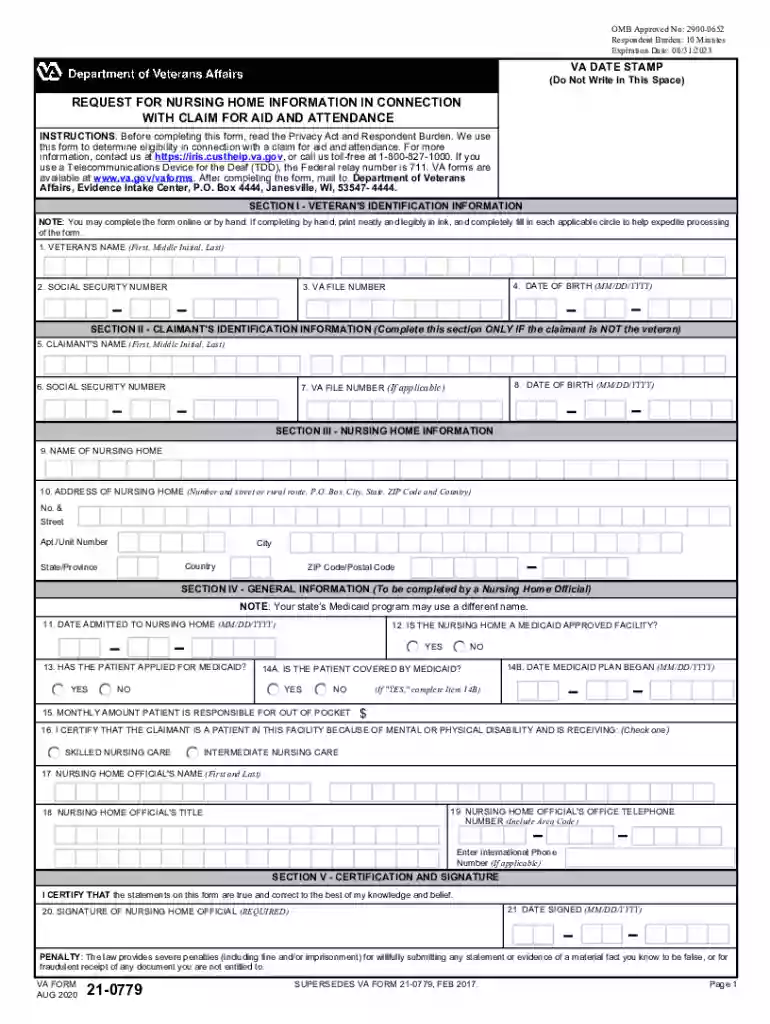
Click ‘Get Form’ to open VA Form 21-0779 in our editor.
Begin with Section I, where you will enter the Veteran's identification information. Fill in the Veteran's name, Social Security number, date of birth, and VA file number accurately.
If the claimant is not the veteran, proceed to Section II. Here, input the Claimant's name, Social Security number, date of birth, and VA file number if applicable.
In Section III, provide details about the nursing home. Enter the name and complete address of the nursing home including street address, city, state, ZIP code, and country.
Section IV requires information from a nursing home official. Fill in the date admitted to the nursing home and answer questions regarding Medicaid status.
Finally, in Section V, ensure that a nursing home official certifies and signs the form with their name and office telephone number before submitting it.
Start using our platform today to fill out your VA Form 21-0779 easily and for free!
VA Form 21-2680VA form 21-0779 PDFVA Form 21-2680 PDFVA form 21-0779 instructionsVA Form 21-2680 for spouseExample of completed VA Form 21-2680VA Form 21P-0969VA Form 21-2680 instructions
Security and compliance
At DocHub, your data security is our priority. We follow HIPAA, SOC2, GDPR, and other standards, so you can work on your documents with confidence.
May 1, 2017 This report was prepared under contract to the Department of Defense (DoD) Environmental Security. Technology Certification Program (ESTCP).Read more
Cookie consent notice
This site uses cookies to enhance site navigation and personalize your experience.
By using this site you agree to our use of cookies as described in our Privacy Notice.
You can modify your selections by visiting our Cookie and Advertising Notice.