Printable government forms online ic 2580-2026

Get Form
printable government forms online ic 2580 Preview on Page 1

Here's how it works

01. Edit your form online
Type text, add images, blackout confidential details, add comments, highlights and more.

02. Sign it in a few clicks
Draw your signature, type it, upload its image, or use your mobile device as a signature pad.

03. Share your form with others
Send it via email, link, or fax. You can also download it, export it or print it out.

How to use or fill out printable government forms online ic 2580 with our platform

Form edit decoration
9.5
Ease of Setup
DocHub User Ratings on G2
9.0
Ease of Use
DocHub User Ratings on G2
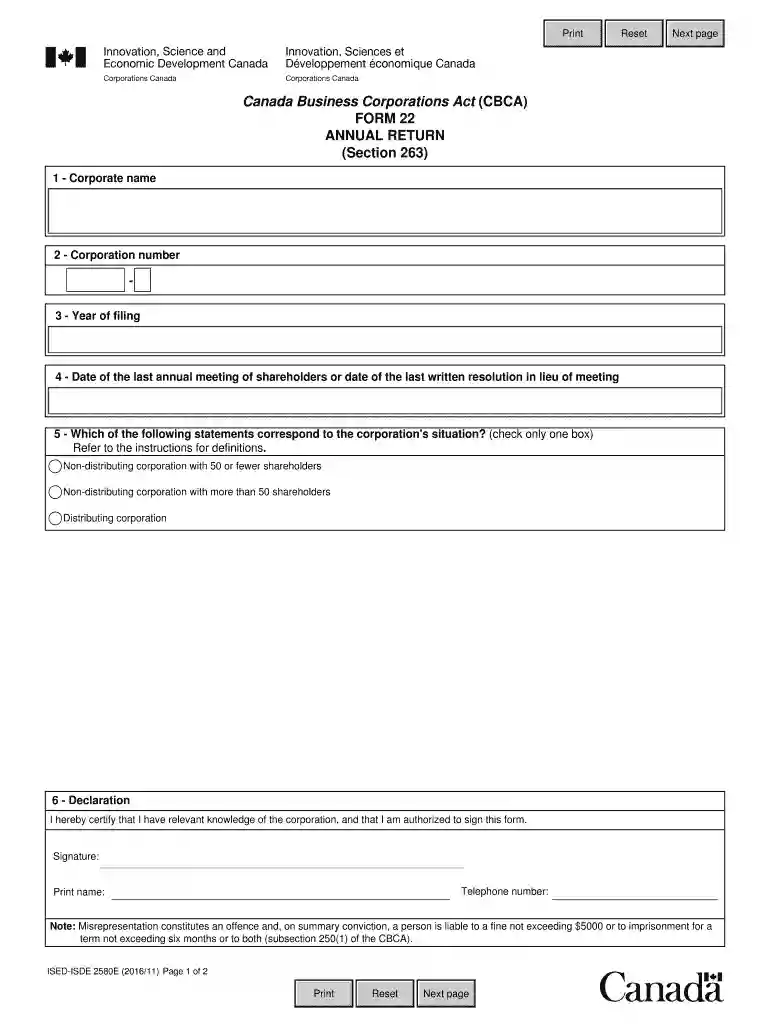
  1. Click ‘Get Form’ to open the IC 2580 Annual Return in the editor.
  2. Begin by entering the corporate name in the designated field. Ensure that it matches the official name registered with Corporations Canada.
  3. Next, input the corporation number, which is a unique identifier assigned to your corporation.
  4. Indicate the year of filing. This should reflect the current year or the year for which you are submitting the return.
  5. Provide the date of the last annual meeting of shareholders or the date of the last written resolution in lieu of a meeting. This is crucial for compliance.
  6. Select one box that corresponds to your corporation's situation: non-distributing with 50 or fewer shareholders, non-distributing with more than 50 shareholders, or distributing corporation.
  7. In the declaration section, certify your knowledge of the corporation and authorize yourself to sign. Fill in your signature, telephone number, and printed name.

Start using our platform today to fill out your IC 2580 form easily and for free!

See more printable government forms online ic 2580 versions

We've got more versions of the printable government forms online ic 2580 form. Select the right printable government forms online ic 2580 version from the list and start editing it straight away!
Versions Form popularity Fillable & printable
2016 4.8 Satisfied (76 Votes)
2013 4 Satisfied (60 Votes)
be ready to get more

Complete this form in 5 minutes or less

Get form

Got questions?

We have answers to the most popular questions from our customers. If you can't find an answer to your question, please contact us.
Contact us
To legally update the name of your for profit organization, youll need to file Federal Articles of Amendment. The application forms allows you to change: Name of your corporation.
A word name can include letters, symbols and numbers. It has to be distinctive and must not cause confusion with other names or trademarks. The name also cannot include prohibited terms. Corporations Canada reviews all proposed corporate word names to ensure they comply.
This is your corporate Annual Return which provides up- to-date information about your corporation. This information is then made available to the public through our website. Investors, consumers, financial institutions and many others rely on this information. You are required to file your Annual Return every year.
Each state has a different form for changing the name of your business. This form is usually called an amendment form or articles of amendment. Using GovDocFiling, you can either note the name change on your tax return next year or send an IRS business name change letter.
How to Change Name Step-By-Step Find your supporting documents. Fill out the name change application form. Contact a fingerprint scanning firm and begin the process (only digital fingerprints are accepted). Surrender existing birth certificates. Submit the application form and pay the $120 application fees.

Security and compliance

At DocHub, your data security is our priority. We follow HIPAA, SOC2, GDPR, and other standards, so you can work on your documents with confidence.

Learn more
ccpa2
pci-dss
gdpr-compliance
hipaa
soc-compliance