Optum provider disclosure form 2026

Get Form
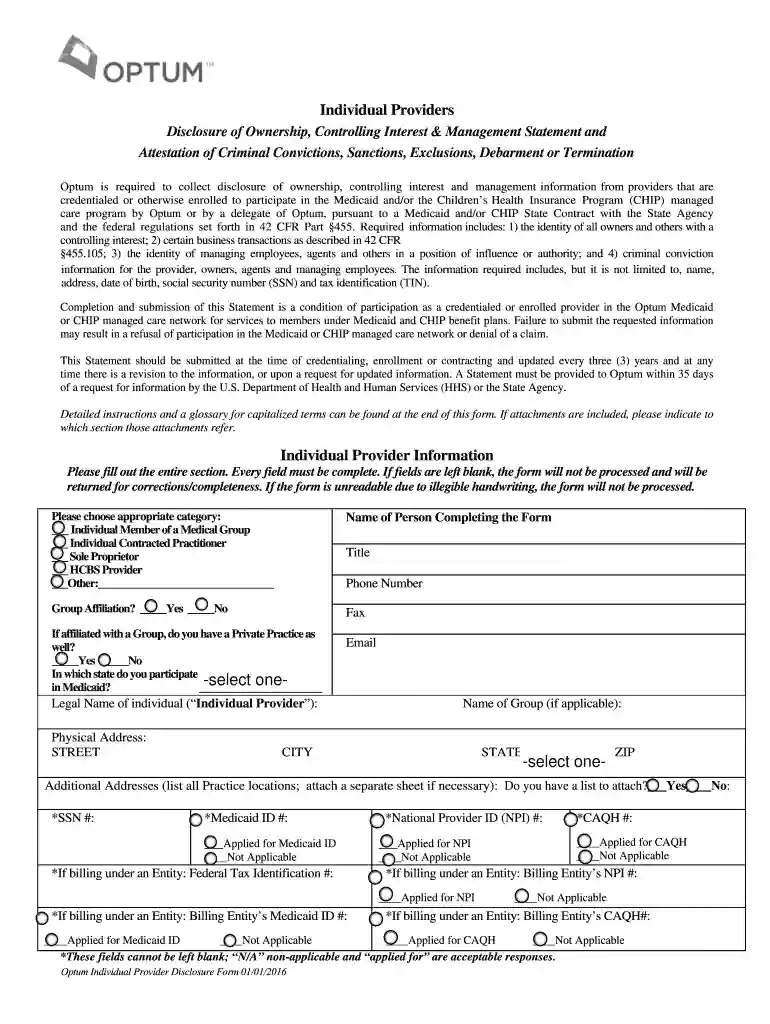
disclosure of ownership form caqh Preview on Page 1

Here's how it works

01. Edit your disclosure of ownership form caqh online
Type text, add images, blackout confidential details, add comments, highlights and more.

02. Sign it in a few clicks
Draw your signature, type it, upload its image, or use your mobile device as a signature pad.

03. Share your form with others
Send optum attestation via email, link, or fax. You can also download it, export it or print it out.

How to use or fill out optum provider disclosure form with our platform

Form edit decoration
9.5
Ease of Setup
DocHub User Ratings on G2
9.0
Ease of Use
DocHub User Ratings on G2
  1. Click ‘Get Form’ to open the Optum Provider Disclosure Form in the editor.
  2. Begin by filling out the 'Individual Provider Information' section. Ensure every field is complete, including your name, contact details, and category selection.
  3. Proceed to Section I and provide ownership information. List all individuals or organizations with a Direct or Indirect Ownership Interest of 5% or more in your practice.
  4. In Section II, identify all individuals and entities with a controlling interest. Include officers, directors, and any business partners.
  5. Continue through Sections III to VIII, providing detailed information about ownership interests in other entities, familial relationships, managing employees, criminal convictions, and significant business transactions as required.
  6. Review all entries for accuracy. Attach any necessary documentation as indicated on the form.
  7. Finally, sign the form at the bottom to certify that all provided information is true and complete before submitting it.

Start using our platform today for free to streamline your document editing and submission process!

See more optum provider disclosure form versions

We've got more versions of the optum provider disclosure form form. Select the right optum provider disclosure form version from the list and start editing it straight away!
Versions Form popularity Fillable & printable
2016 4.8 Satisfied (140 Votes)
2015 4 Satisfied (62 Votes)
be ready to get more

Complete this form in 5 minutes or less

Get form

Got questions?

We have answers to the most popular questions from our customers. If you can't find an answer to your question, please contact us.
Contact us
The multi-tiered recovery solution from Optum is a relationship-oriented approach that reconciles existing errant claims while meeting cost-containment goals.
This form is designed for providers to submit disputes related to claims. It provides necessary instructions and requirements for successful submission. Fill out the requested fields accurately to ensure a smooth resolution process.
Call customer service at the telephone number located on your health plan ID card and ask that we mail or email a Request for Access to Protected Health Information form to you. The form will provide further instructions for completion and where to send it to obtain your records.
Billing for EAP sessions Any session you submit while there are EAP sessions available on the account will be automatically submitted as an EAP using the HJ modifier required by Optum. After all EAP sessions are used, the clients regular insurance benefits will process automatically.
The in-office assessment program is a flexible prospective in-office and telehealth2 provider engagement program. It offers a provider-first model of collaboration, actionable data and interactive technology enabling better risk and quality outcomes for members, providers and health plans.

Security and compliance

At DocHub, your data security is our priority. We follow HIPAA, SOC2, GDPR, and other standards, so you can work on your documents with confidence.

Learn more
ccpa2
pci-dss
gdpr-compliance
hipaa
soc-compliance

People also ask

It helps ensure providers have not been unfairly barred from providing services under any federal health care program. It also helps ensure that Medicaid providers do not have relationships with individuals or entities that have been excluded or terminated from participating in any federal health care program.

Related links