
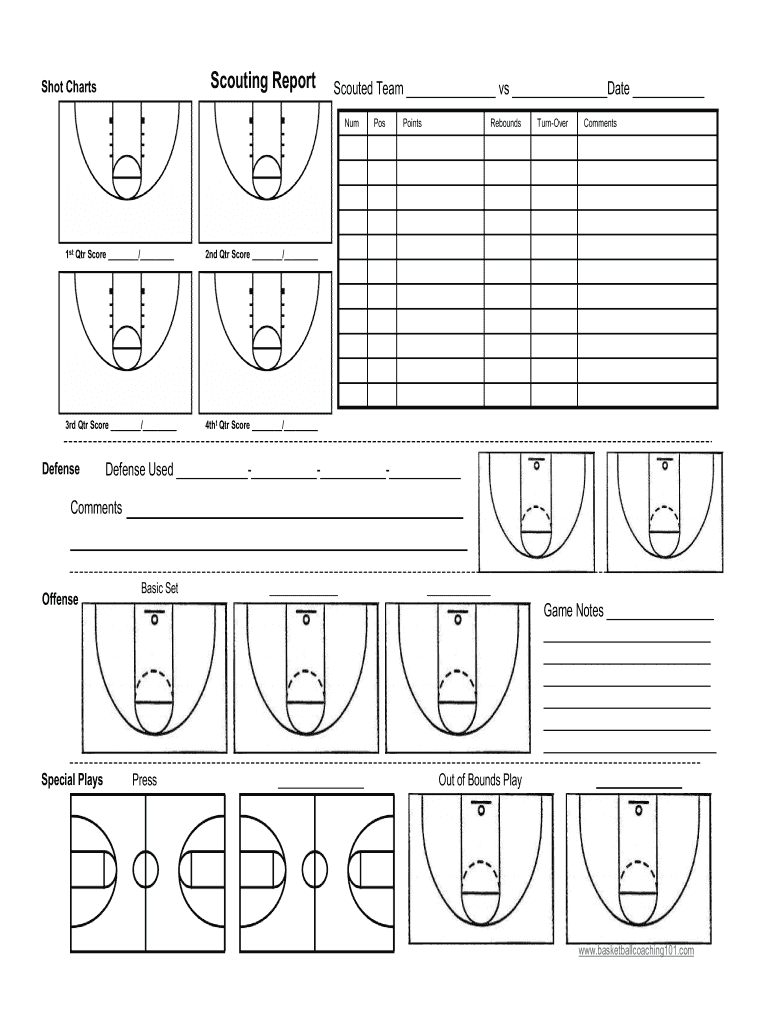







Definition and Meaning of Basketball Scouting Report Template Excel
A basketball scouting report template excel is a structured document designed to analyze player performance and team strategies during games. This template serves as a comprehensive tool for coaches, scouts, and analysts to assess both individual player metrics and team dynamics, allowing for informed decisions in training and game preparation. Typically, these templates include sections for scoring, defense, rebounds, assists, turnovers, and special plays, offering a clear overview of a team's strengths and weaknesses.
Using Excel for this template allows for easy manipulation of data through formulas and charts. For example, one can calculate averages or visualize trends over a season, providing deeper insights into player performance. Implementing this template can streamline the scouting process, making it more efficient and effective for teams at any level.
Key Benefits of Using an Excel Template
- Data Organization: The template standardizes data entry, making it easier to maintain records across games.
- Visual Insights: Excel’s graphing features allow for easy visualization of key statistics, helping to identify patterns and areas for improvement.
- Collaboration: The template can be shared easily among teammates and coaching staff, fostering a collaborative analysis process.
Important Elements of a Basketball Scouting Report Template Excel
When utilizing a basketball scouting report template in Excel, certain key elements should be included to ensure thorough analyses. These include:
- Player Information: This section captures basic details such as name, position, and age.
- Game Statistics: Categories such as points scored, shooting percentages, and rebounds are crucial for performance measurement.
- Defensive Contributions: Metrics like steals, blocks, and defensive rebounds provide insight into each player's impact on the defensive end.
- Game Context: Including details about the opponent and game conditions, such as location and weather, adds context to the statistics.
- Strategic Observations: Notes on plays executed, player positioning, and tactical adjustments should be documented for future reference.
Each of these elements contributes to a holistic view of player performance and tactical effectiveness, which can guide strategic planning for future games.
How to Use the Basketball Scouting Report Template Excel
To effectively utilize a basketball scouting report template in Excel, practitioners should follow these steps:
- Download or Create Template: Start with a pre-made template or design your own based on specific needs.
- Input Basic Data: Enter player and team information, as well as the date of the game for proper tracking.
- Record Statistics During Games: Collect data on your players as the game progresses, noting key performance indicators.
- Analyze After Game: Once the game is over, use the recorded data to analyze performance trends and identify strengths and weaknesses.
- Document Observations and Strategy: Add notes regarding special plays and strategies used during the game for later review and improvement adjustments.
By following this structured approach, coaches can maximize the utility of the scouting report, aiding in player development and team strategy formulation.
Examples of Using the Basketball Scouting Report Template Excel
Practical examples demonstrate the flexibility and utility of the basketball scouting report template excel:
- High School Teams: Coaches can track player stats across a season to identify which players improve and which need additional training sessions.
- College Programs: Scouting reports can be consolidated to compare against upcoming opponents, providing insights into their playing style and weaknesses.
- Professional Teams: Analysts may leverage detailed historical data compiled in Excel to inform draft decisions or trading strategies.
Each use case illustrates the template's versatility, catering to a range of basketball environments while enhancing analytical decision-making.
Steps to Complete the Basketball Scouting Report Template Excel
To ensure thorough completion of a basketball scouting report template in Excel, follow these detailed steps:
- Open the Template: Start by launching Excel and opening your scouting report template.
- Fill in Player Details: Input player names, jersey numbers, and positions in the designated areas.
- Capture Game Metrics: During the game, actively enter data for points, assists, rebounds, turnovers, and other relevant statistics.
- Analyze Data: After the game, utilize Excel functions to compute averages, percentages, and totals to evaluate overall performance.
- Summarize Observations: Complete the template by summarizing key takeaways and strategies observed during the game, ensuring that all insights are documented for future reference.
By adhering to these steps, you can create a comprehensive basketball scouting report that serves as a valuable asset for team performance evaluation and planning.




