form 4 5 5 1 d Preview on Page 1

Form 4 5 5 1 d 2026

Here's how it works

  • 01. Edit your form 4 5 5 1 d online

    Type text, add images, blackout confidential details, add comments, highlights and more.

  • 02. Sign it in a few clicks

    Draw your signature, type it, upload its image, or use your mobile device as a signature pad.

  • 03. Share your form with others

    Send parental form via email, link, or fax. You can also download it, export it or print it out.

How to use or fill out form 4 5 5 1 d with our platform

Form edit decoration
9.5
Ease of Setup
DocHub User Ratings on G2
9.0
Ease of Use
DocHub User Ratings on G2
  1. Click ‘Get Form’ to open it in the editor.
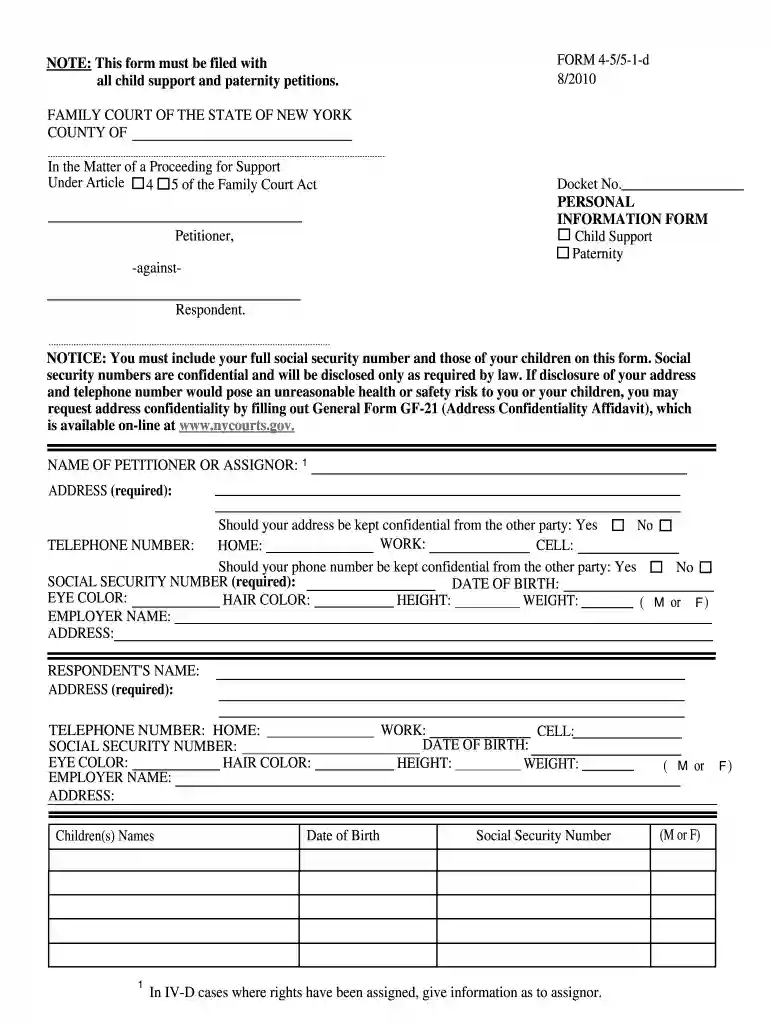
  2. Begin by entering your personal information in the designated fields. Include your full name, address, and contact numbers. Ensure that you indicate whether you wish to keep your address and phone number confidential from the other party.
  3. Fill in your social security number and date of birth. These details are required for processing your petition.
  4. Provide information about the respondent, including their name, address, and social security number. This section is crucial for identifying the other party involved in the case.
  5. List any children involved by entering their names and dates of birth. Make sure to include their social security numbers as well.
  6. If applicable, indicate if you or the respondent have been known by any other names. This may include maiden names or previous marriage names.
  7. Finally, confirm if there are any other court cases involving the respondent by answering 'Yes' or 'No' and providing additional details if necessary.
  8. Sign and date the form at the bottom before submitting it through our platform.

Start filling out form 4 5 5 1 d today for free using our platform!

See more form 4 5 5 1 d versions

We've got more versions of the form 4 5 5 1 d form. Select the right form 4 5 5 1 d version from the list and start editing it straight away!

VersionsForm popularityFillable & printable
20104.8 Satisfied (122 Votes)

be ready to get more

Complete this form in 5 minutes or less

Got questions?

We have answers to the most popular questions from our customers. If you can't find an answer to your question, please contact us.

Go to , click the link under that Start heading. Print the petition to modify your child support order. File the petition with the Petition Room at the Family Court.
Provide Proper Documentation: Include all required evidence, such as: The childs birth certificate or proof of age. Court orders or agreements indicating the end of your support obligation. Proof of payment history.
Filing a Child Support Case Child support cases are usually started in Family Court in the county where the child lives. There is no filing fee in Family Court. After a child support petition is filed, the other side must be served a summons, the petition, and the financial disclosure form.
To legally cancel or modify child support, a petition must be filed in the New York Family Court or Supreme Court. The requesting parent must provide valid legal grounds for cancellation.
A child support termination letter is used to petition the court to temporarily or permanently terminate a parents legally mandated child support obligation. Special circumstances, such as changes in a parents financial situation or a change in custody, may be cited to justify this request.

Security and compliance

At DocHub, your data security is our priority. We follow HIPAA, SOC2, GDPR, and other standards, so you can work on your documents with confidence.

parental responsibility

Child Support Forms (Family Court Act Articles 4, 5-B)

Form 4-1 - Support-petition for an order upon support agreement Form 4-1a Form 4-5/5-1-d - Personal information form Form 4-5a - Undertaking forRead more

Learn more
FORM 4

Sep 8, 2020 This Form 4/A amends the Form 4 filed on behalf of the Reporting Person on September 9, 2020 that included a disposition of 2,420 shares toRead more

Learn more
If you believe that this page should be taken down, please follow our DMCA take down process here