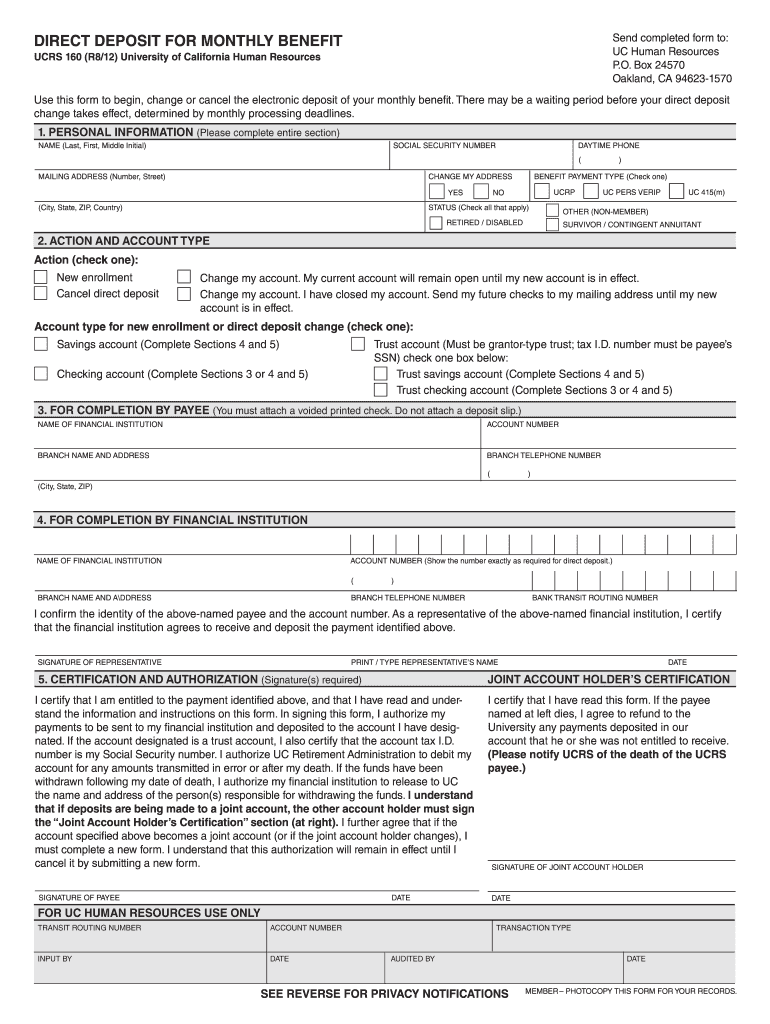
Form ucrs 160 2026

Get Form
contribution form Preview on Page 1

Here's how it works

01. Edit your contribution form online
Type text, add images, blackout confidential details, add comments, highlights and more.
02. Sign it in a few clicks
Draw your signature, type it, upload its image, or use your mobile device as a signature pad.
03. Share your form with others
Send ucrs 160 via email, link, or fax. You can also download it, export it or print it out.

How to use or fill out form ucrs 160 with our platform

Form edit decoration
9.5
Ease of Setup
DocHub User Ratings on G2
9.0
Ease of Use
DocHub User Ratings on G2
  1. Click ‘Get Form’ to open it in the editor.
  2. Begin by filling out the 'PERSONAL INFORMATION' section. Enter your name, Social Security number, daytime phone number, and mailing address. If you are changing your address, check the appropriate box.
  3. In the 'ACTION AND ACCOUNT TYPE' section, select whether you are enrolling for the first time, canceling direct deposit, or changing your account. Choose the type of account for direct deposit.
  4. Complete the 'FOR COMPLETION BY PAYEE' section by providing your financial institution's name, account number, branch details, and telephone number. Remember to attach a voided printed check.
  5. Fill out the 'FOR COMPLETION BY FINANCIAL INSTITUTION' section accurately with required information including bank transit routing number and representative's signature.
  6. Finally, sign and date in the 'CERTIFICATION AND AUTHORIZATION' section to confirm your understanding and authorization of payments to be deposited into your designated account.

Start using our platform today to easily complete form ucrs 160 online for free!

See more form ucrs 160 versions

We've got more versions of the form ucrs 160 form. Select the right form ucrs 160 version from the list and start editing it straight away!
Versions Form popularity Fillable & printable
2012 4.9 Satisfied (40 Votes)
be ready to get more

Complete this form in 5 minutes or less

Get form

Got questions?

We have answers to the most popular questions from our customers. If you can't find an answer to your question, please contact us.
Contact us

Yes, you’ll find many different applications for this on the web. Nonetheless, if you need to eSign your form phone without installing additional software, DocHub is the best choice you can make. This robust editor works on mobile devices just as on desktops. Open our editor in your preferred internet browser, register or log in to your account, and start processing your forms.

If you store your papers in Google Drive, there is no need to download your ucrays on the computer and upload it back to our editor. A much simpler way is to install a browser extension developed by DocHub to simplify this flow. The extension allows editing PDFs right in your internet browser. Alternatively, you may integrate your DocHub and Gmail accounts for more efficient editing.

Security and compliance

At DocHub, your data security is our priority. We follow HIPAA, SOC2, GDPR, and other standards, so you can work on your documents with confidence.

Learn more
ccpa2
pci-dss
gdpr-compliance
hipaa
soc-compliance
be ready to get more

Complete this form in 5 minutes or less

Get form