Nc name change 2026

Get Form
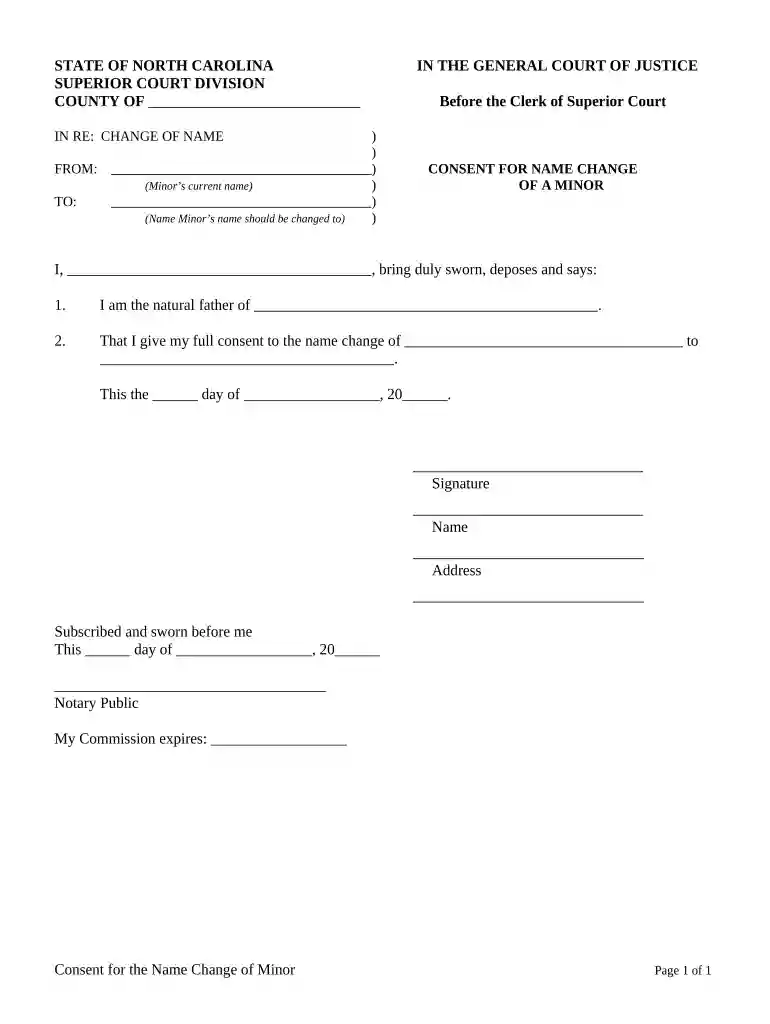
nc name change form Preview on Page 1

Here's how it works

01. Edit your nc name change form online
Type text, add images, blackout confidential details, add comments, highlights and more.

02. Sign it in a few clicks
Draw your signature, type it, upload its image, or use your mobile device as a signature pad.

03. Share your form with others
Send nc name change forms via email, link, or fax. You can also download it, export it or print it out.

How to use or fill out nc name change with our platform

Form edit decoration
9.5
Ease of Setup
DocHub User Ratings on G2
9.0
Ease of Use
DocHub User Ratings on G2
  1. Click ‘Get Form’ to open the nc name change document in the editor.
  2. Begin by entering the minor’s current name in the designated field labeled 'FROM:'.
  3. Next, input the new name that the minor should be changed to in the 'TO:' field.
  4. In the section labeled 'I,', provide your full name as the natural father of the minor.
  5. Indicate your consent by writing your full consent statement in the provided area.
  6. Complete the date fields at the bottom of the form, ensuring accuracy for legal purposes.
  7. Finally, sign and print your name and address where indicated. Ensure you have a notary public witness your signature.

Start using our platform today to easily complete your nc name change form online for free!

be ready to get more

Complete this form in 5 minutes or less

Get form

Got questions?

We have answers to the most popular questions from our customers. If you can't find an answer to your question, please contact us.
Contact us

You need to use only reliable software solutions with strong data protection compliance to sign your documents electronically. DocHub is just the type of service you need! It stores data on Amazon Web Servers and complies with all essential security requirements and eSignature regulations, so it’s a reliable way to eSign your minor name change form or other documents with this tool.

You can easily complete, edit, and even eSign your minor name change form nc utilizing DocHub. Create a new profile and begin your free trial. After that, you may upload the document with the form and easily make all the required edits. No need to print on paper or use a third-party application to sign it, as you can put your electronic signature on your document faster via DocHub.

For most purposes a deed poll will be accepted to change documents, but there are some important exceptions. Birth and marriage certificates cannot be changed. However, your deed poll together with your birth certificate will be sufficient for the passport office to issue you with a passport in the new name.
Use certified copies of marriage and divorce certificates or name change orders as proof to notify these federal and state agencies that you changed your name. Social Security card. Drivers license or state ID card. Tax returns. U.S. passport. Naturalization certificate and certificate of citizenship. Veterans benefits.
How Long Will a Name Change Take? StateTime to Complete NC 3-4 months ND 3-4 months NE 6 weeks NH 3-8 weeks47 more rows

Security and compliance

At DocHub, your data security is our priority. We follow HIPAA, SOC2, GDPR, and other standards, so you can work on your documents with confidence.
Learn more
ccpa2
pci-dss
gdpr-compliance
hipaa
soc-compliance

People also ask

If approved, the judge will issue a court order granting your name change. This document is crucial for updating other legal and official records. Processing times for receiving the court order and a certified copy typically range from 2-3 weeks after filing the Petition.

name change in nc for a child