How to atf license 2026

Get Form
type 54 license Preview on Page 1

Here's how it works

01. Edit your type 54 license online
Type text, add images, blackout confidential details, add comments, highlights and more.

02. Sign it in a few clicks
Draw your signature, type it, upload its image, or use your mobile device as a signature pad.

03. Share your form with others
Send atf type 54 license via email, link, or fax. You can also download it, export it or print it out.

How to use or fill out the ATF License with our platform

Form edit decoration
9.5
Ease of Setup
DocHub User Ratings on G2
9.0
Ease of Use
DocHub User Ratings on G2
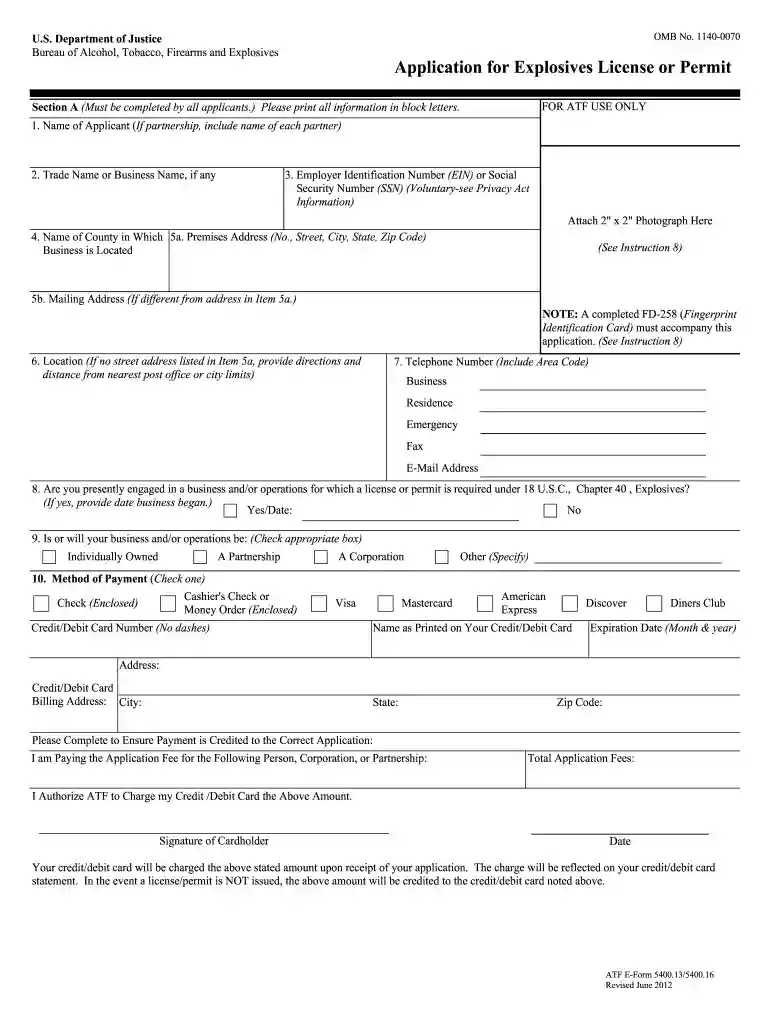
  1. Click ‘Get Form’ to open the ATF License application in the editor.
  2. Begin with Section A, filling in your name, trade name, and Employer Identification Number (EIN) or Social Security Number (SSN). Ensure all information is printed in block letters.
  3. Attach a 2" x 2" photograph as specified. Provide your business address and mailing address if different.
  4. Indicate whether you are currently engaged in a business requiring a license under 18 U.S.C., Chapter 40. Answer yes or no and provide the date your business began if applicable.
  5. Complete the payment method section by selecting your preferred payment option and providing necessary details such as credit card information.
  6. In Section B, list responsible persons associated with your business, including their full names, positions, and contact information.
  7. Finally, review all sections for accuracy before submitting your application. Use our platform’s features to save and export your completed form easily.

Start filling out your ATF License application today for free using our platform!

See more how to atf license versions

We've got more versions of the how to atf license form. Select the right how to atf license version from the list and start editing it straight away!
Versions Form popularity Fillable & printable
2018 4.8 Satisfied (79 Votes)
2018 4.3 Satisfied (56 Votes)
2012 4.4 Satisfied (269 Votes)
2009 4.4 Satisfied (137 Votes)
be ready to get more

Complete this form in 5 minutes or less

Get form

Security and compliance

At DocHub, your data security is our priority. We follow HIPAA, SOC2, GDPR, and other standards, so you can work on your documents with confidence.

Learn more
ccpa2
pci-dss
gdpr-compliance
hipaa
soc-compliance