Gmd 2a 2026

Get Form
gmd 2a Preview on Page 1

Here's how it works

01. Edit your gmd 2a online
Type text, add images, blackout confidential details, add comments, highlights and more.
02. Sign it in a few clicks
Draw your signature, type it, upload its image, or use your mobile device as a signature pad.
03. Share your form with others
Send gmd editor via email, link, or fax. You can also download it, export it or print it out.

How to use or fill out gmd 2a with our platform

Form edit decoration
9.5
Ease of Setup
DocHub User Ratings on G2
9.0
Ease of Use
DocHub User Ratings on G2
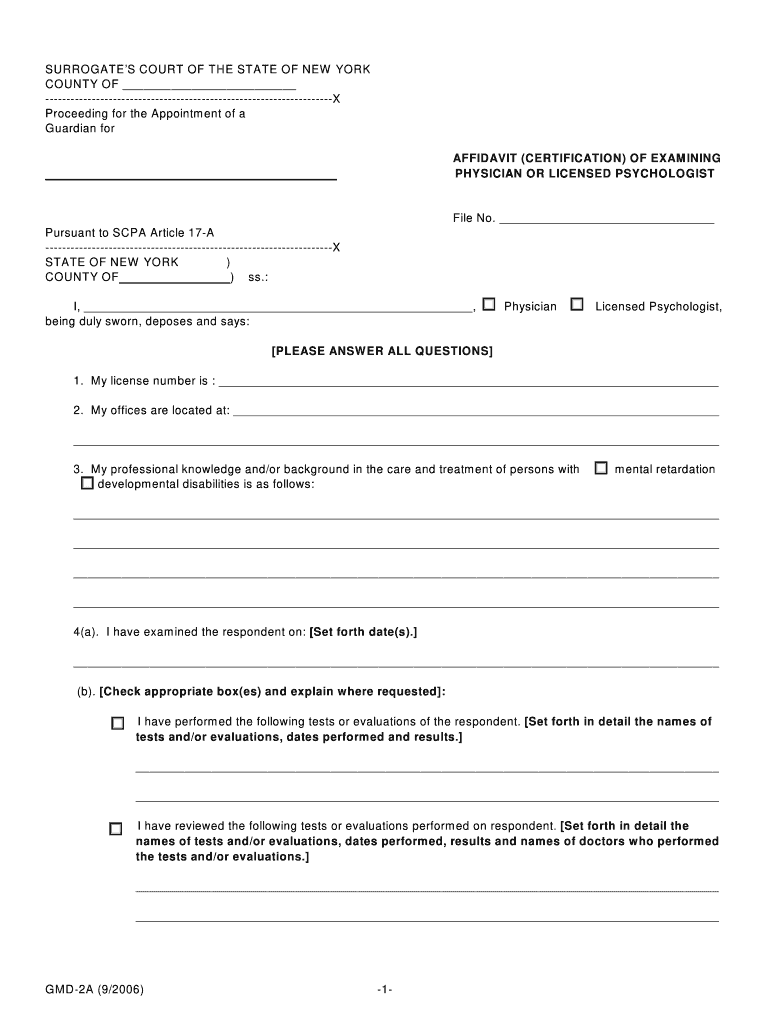
  1. Click ‘Get Form’ to open the gmd 2a document in the editor.
  2. Begin by entering your license number in the designated field. This is crucial for verifying your credentials.
  3. Fill in your office address accurately to ensure proper communication and documentation.
  4. In section three, provide a detailed description of your professional background related to the care of individuals with developmental disabilities.
  5. Document the date(s) you examined the respondent in section four. Be sure to check any applicable boxes and provide detailed results of tests performed.
  6. Describe the mental and physical condition of the respondent thoroughly in section five, ensuring clarity and detail.
  7. Complete sections six through ten by checking appropriate boxes and providing necessary explanations regarding the respondent's capabilities and conditions.
  8. Finally, sign and print your name at the bottom of the form, then have it notarized as required.

Start using our platform today for free to streamline your document editing and form completion!

See more gmd 2a versions

We've got more versions of the gmd 2a form. Select the right gmd 2a version from the list and start editing it straight away!
Versions Form popularity Fillable & printable
2006 4.3 Satisfied (385 Votes)
be ready to get more

Complete this form in 5 minutes or less

Get form

Got questions?

We have answers to the most popular questions from our customers. If you can't find an answer to your question, please contact us.
Contact us

If you frequently work with documents kept in your Google Drive, DocHub is an excellent solution for you to easily and quickly fill out, edit, and sign them. This editor integrates well with Google apps, so you can export your gmd 2a from your Google Drive to the editor without the need of downloading and re-uploading it. Right-click on your file, select Open With → DocHub PDF Sign and Edit. In our editor, add and assign Signature Fields for all people involved, then click on the Menu option above → Send → select how you want to share your paperwork.

If you store your paperwork in Google Drive, there is no need to download your gmd 2a on your computer and upload it back to our editor. A much simpler way is to set up a browser extension created by DocHub to streamline this flow. The extension allows editing PDFs right in your web browser. Alternatively, you may integrate your DocHub and Gmail accounts for more efficient editing.

In New York State, there are two separate types of guardianships Mental Hygiene Law Article 17A guardianships and Mental Hygiene Law Article 81 guardianships. While the concept of guardianship may seem straightforward, it is important to understand the differences between the two types.
The initial guardianship request is filed with the county surrogates office. A Superior Court judge then hears and decides on the case. If incapacitation is determined, the court-appointed guardian must qualify with the county surrogate. Potential guardians can file for a standard guardianship.

Security and compliance

At DocHub, your data security is our priority. We follow HIPAA, SOC2, GDPR, and other standards, so you can work on your documents with confidence.

Learn more
ccpa2
pci-dss
gdpr-compliance
hipaa
soc-compliance
be ready to get more

Complete this form in 5 minutes or less

Get form

People also ask

Legal guardianship means a court grants someone other than a biological parent the right to care for a minor. Custody (most often) generally describes a parent caring for his or her own child.
To obtain guardianship of a child, a person must file a petition in court. A petition is a legal form that allows a person to ask the court for something. Any person 18 years old or older can file a petition in court to become a guardian.
A standby guardian is a person who is given temporary authority to care for another persons minor child, while the parent or legal guardian is still alive. The purpose of naming a standby guardian is to ensure that the child is able to receive immediate care from a trusted person if a specific event happens.
To obtain guardianship of a child, a person must file a petition in court. A petition is a legal form that allows a person to ask the court for something. Any person 18 years old or older can file a petition in court to become a guardian.
1. Natural guardians, 2. Testamentary guardians, and 3. Guardians appointed or declared by the court.

Related links