Type text, add images, blackout confidential details, add comments, highlights and more.

02. Sign it in a few clicks
Draw your signature, type it, upload its image, or use your mobile device as a signature pad.

03. Share your form with others
Send bcbs fep overseas claim form via email, link, or fax. You can also download it, export it or print it out.

How to use or fill out overseas claim form with our platform
Ease of Setup
DocHub User Ratings on G2
Ease of Use
DocHub User Ratings on G2
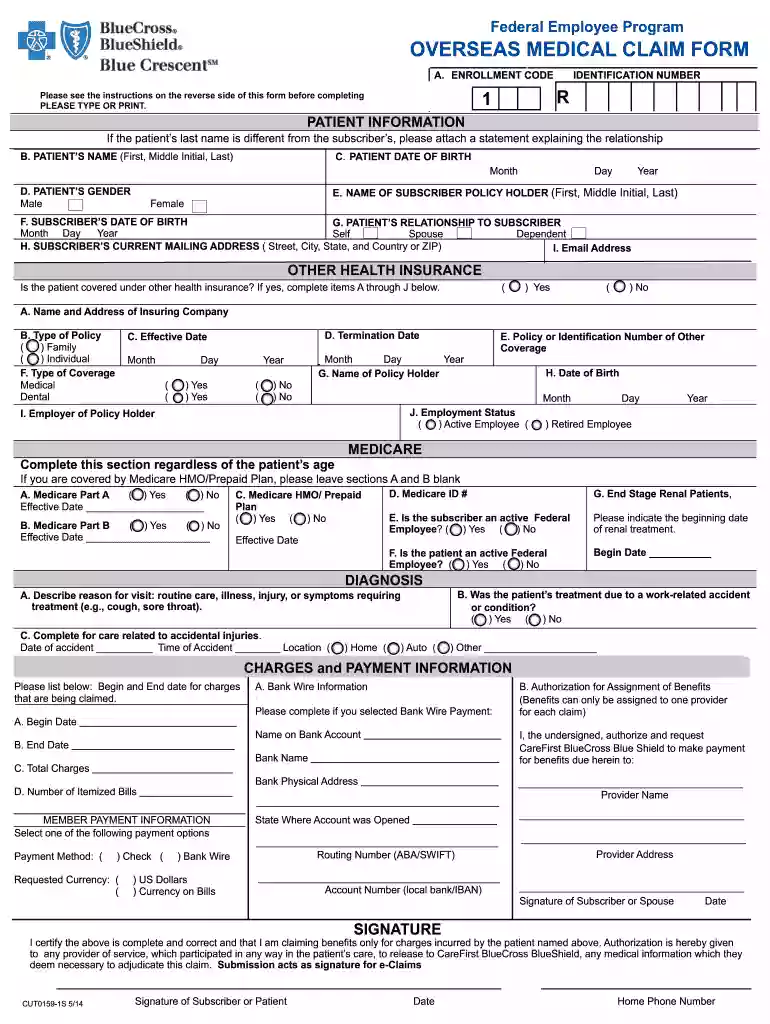
Click ‘Get Form’ to open the Overseas Medical Claim Form in the editor.
Begin by entering your Enrollment Code and Identification Number at the top of the form. Ensure that all information is typed clearly.
Fill in the Patient Information section, including the patient's name, date of birth, gender, and relationship to the subscriber. If applicable, attach a statement if the last name differs from the subscriber's.
Complete the Other Health Insurance section if applicable. Provide details about any other insurance coverage, including policy type and effective dates.
In the Diagnosis section, describe the reason for the visit and indicate if it was due to a work-related accident.
List all charges in the Charges and Payment Information section. Include start and end dates for services being claimed along with total charges.
Select your preferred payment method under Member Payment Information. Fill out Bank Wire Information if you choose that option.
Finally, sign and date the form to certify its accuracy before submitting it along with itemized bills to ensure prompt processing.
Start filling out your Overseas Medical Claim Form today using our platform for free!
We've got more versions of the overseas claim form form. Select the right overseas claim form version from the list and start editing it straight away!
Overseas claim form pdfOverseas claim form onlineRetail prescription Drug Overseas claim formFepblue Overseas claim formTRICARE claim Form overseasTRICARE claim form 2642GeoBlue claim form pdfDD Form 2642 PDF download
Security and compliance
At DocHub, your data security is our priority. We follow HIPAA, SOC2, GDPR, and other standards, so you can work on your documents with confidence.
The International Claim Form must be signed and dated by the subscriber, spouse, or the patient. Disclosure Statement. Any person who knowingly or willfullyRead more
If you receive care under the Foreign Medical Program (FMP), VA has changed how you get reimbursed for your approved service- connected health care claims.Read more
Use Form 8840 to claim the closer connection to a foreign country(ies) exception to the substantial presence test. The exception is described later and inRead more
Cookie consent notice
This site uses cookies to enhance site navigation and personalize your experience.
By using this site you agree to our use of cookies as described in our Privacy Notice.
You can modify your selections by visiting our Cookie and Advertising Notice.