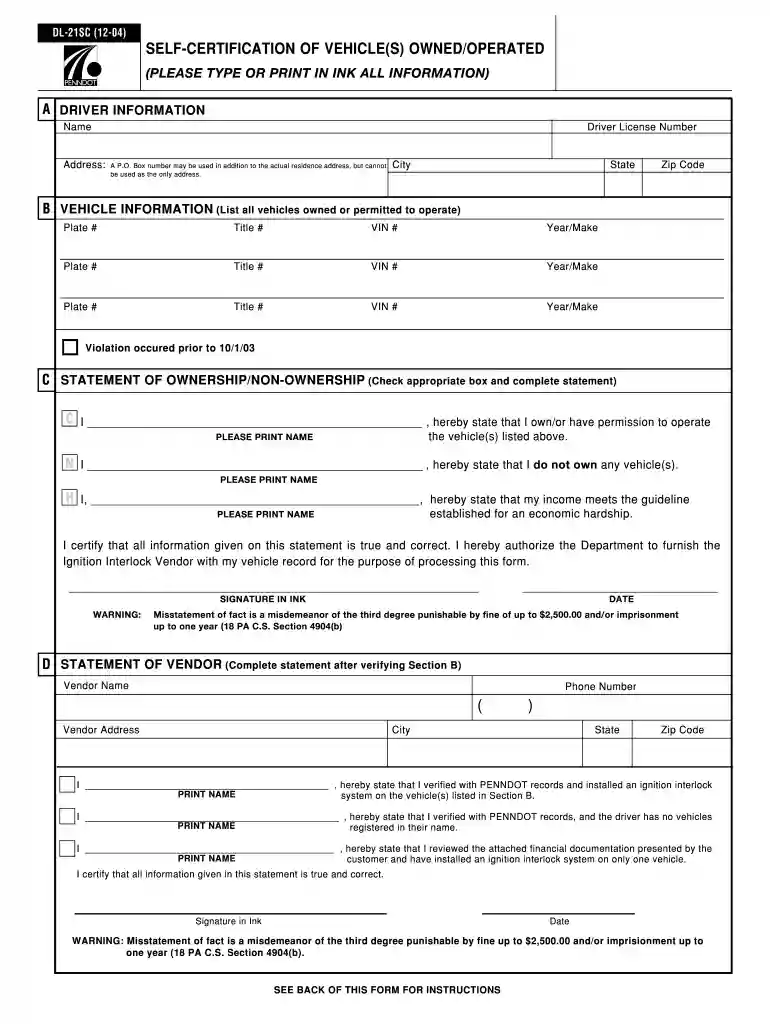
Dl 21sc form 2004-2026

Get Form
dl 21cf Preview on Page 1

Here's how it works

01. Edit your dl 21cf online
Type text, add images, blackout confidential details, add comments, highlights and more.

02. Sign it in a few clicks
Draw your signature, type it, upload its image, or use your mobile device as a signature pad.

03. Share your form with others
Send dl 21sc via email, link, or fax. You can also download it, export it or print it out.

How to use or fill out dl 21sc form 2004 with our platform

Form edit decoration
9.5
Ease of Setup
DocHub User Ratings on G2
9.0
Ease of Use
DocHub User Ratings on G2
  1. Click ‘Get Form’ to open the dl 21sc form 2004 in the editor.
  2. In Section A, enter your full name, driver license number, and address. Ensure that you include both your physical address and any P.O. Box if applicable.
  3. Proceed to Section B where you will list all vehicles you own or have permission to operate. Fill in the plate number, title number, VIN, and year/make for each vehicle.
  4. In Section C, check the appropriate box indicating ownership status. If claiming economic hardship, ensure to attach your income documentation as instructed.
  5. Finally, complete Section D after a vendor verifies your information. Print your name, sign in ink, and date the form before submission.

Start using our platform today for free to streamline your form completion process!

See more dl 21sc form 2004 versions

We've got more versions of the dl 21sc form 2004 form. Select the right dl 21sc form 2004 version from the list and start editing it straight away!
Versions Form popularity Fillable & printable
2018 4.3 Satisfied (59 Votes)
2017 4.7 Satisfied (36 Votes)
2007 4.6 Satisfied (108 Votes)
2004 4 Satisfied (40 Votes)
be ready to get more

Complete this form in 5 minutes or less

Get form

Got questions?

We have answers to the most popular questions from our customers. If you can't find an answer to your question, please contact us.
Contact us

If you regularly deal with documents kept in your Google Drive, DocHub is an excellent option for you to easily and quickly complete, modify, and approve them. This editor integrates properly with Google services, so you can export your dl 21sc form from your Google Drive to the editor without the need of downloading and re-uploading it. Right-click on your document, select Open With → DocHub PDF Sign and Edit. In our editor, add and assign Signature Fields for all people involved, then click on the Menu button above → Send → choose how you want to share your paperwork.

As a comprehensive document editing platform, DocHub is available on mobile devices. Open DocHub in your choice of mobile browser and employ our smart mobile-friendly toolset to fill out your dl21sc.

Pennsylvania law makes the Ignition Interlock requirement mandatory for first-time and repeat DUI offenders with high blood alcohol levels and for individuals who receive an operating privilege suspension as a result of a chemical test refusal violation or conviction for illegally operating a motor vehicle not equipped
DL-21 refers to a Form. It is the form the clerk of a court of record of Pennsylvania sends to the Department of transportation regarding judgment of conviction, acquittal or other disposition of charges under 75 Pa. C.S. (relating to vehicle code) .
New PA DUI Laws 2022. PA House Bill 773 (2022), also known as Deanas Law, was approved by Governor Tom Wolf on July 11, 2022 and became EFFECTIVE NOVEMBER 9, 2022 (120 days from July 11, 2022). 2022 Act 29 increases the grading and penalties of DUI convictions for certain repeat DUI offenders.

People also ask

A Pennsylvania drivers license is valid for four years, expiring on the day after your birthday. PennDOT sends an invitation to renew three months prior to expiration. Residents who are 65 or older have the option of renewing their license every two years, instead of standard four years.
To submit the DL-17 form, you can email it to the specified PennDOT email address provided in your restoration letter. Alternatively, fax the completed form to the designated number listed. You may also opt for online submission if available, or send it via physical mail to PennDOTs driver services office.

dl 21s form