01. Edit your gas billing format for client online
Type text, add images, blackout confidential details, add comments, highlights and more.
02. Sign it in a few clicks
Draw your signature, type it, upload its image, or use your mobile device as a signature pad.
03. Share your form with others
Send gas format via email, link, or fax. You can also download it, export it or print it out.
How to use or fill out gas billing format for client with our platform
Ease of Setup
DocHub User Ratings on G2
Ease of Use
DocHub User Ratings on G2
Click ‘Get Form’ to open the gas billing format in the editor.
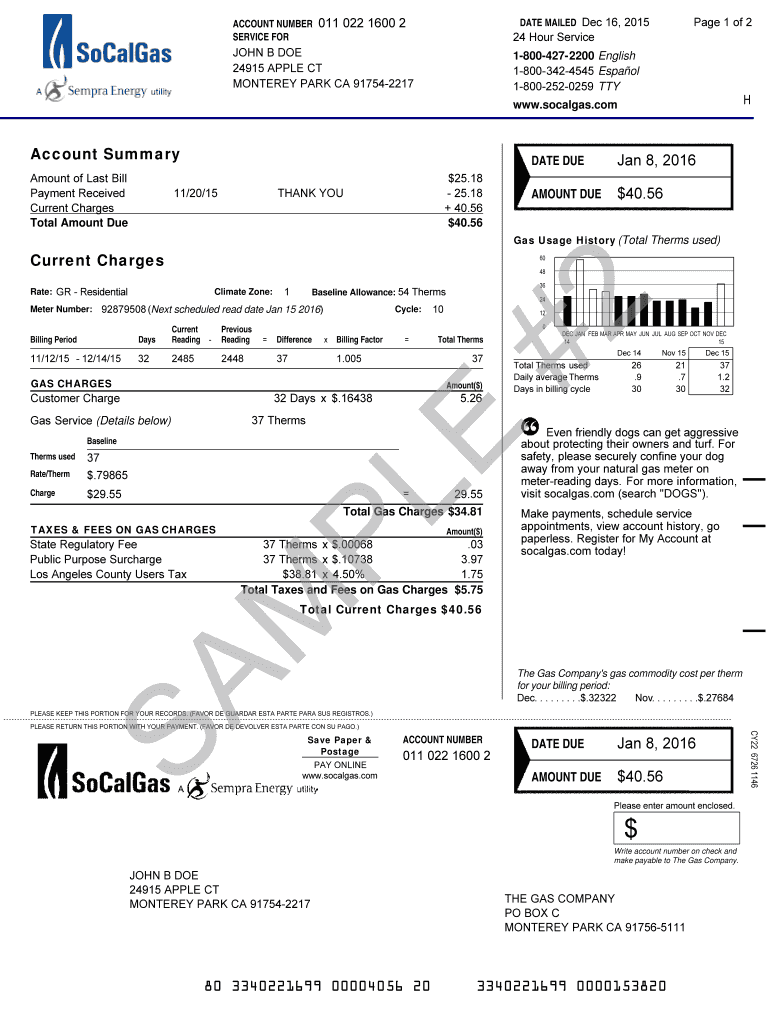
Begin by entering the 'Account Number' at the top of the form. This is essential for identifying your account.
Fill in the 'Date Mailed' field, which indicates when the bill was sent out. Ensure this date is accurate.
In the 'Account Summary' section, input details such as 'Amount of Last Bill', 'Payment Received', and 'Current Charges'. This helps track your payment history.
Next, complete the 'Gas Usage History' section by entering current and previous readings along with total therms used during the billing period.
Finally, review all entries for accuracy before saving or sharing your completed document. Utilize our platform's features to sign or distribute as needed.
Start using our platform today to streamline your gas billing process for free!
Fill out gas billing format for client online It's free
Gas billing format for client wordSimple gas billing format for clientGas billing format for client pdfFree gas billing format for clientGas Bill format PDF free downloadOil and gas format for yahooTransport Billing format for clientChristmas Billing Format for Client
Security and compliance
At DocHub, your data security is our priority. We follow HIPAA, SOC2, GDPR, and other standards, so you can work on your documents with confidence.
gas billing format for client in word fill online printable
Household Energy Data Transfers | Natural Gas/Electric
The billing information should identify the account number, the account name, the service address, the date the meter was read, meter read code, days in theRead more
Designer Financial Analysis and Reports - Knowledge Center
Data must be provided as a CSV file with the data arranged according to Green Button xml format. Click the link to view documentation on how to prepareRead more
Cookie consent notice
This site uses cookies to enhance site navigation and personalize your experience.
By using this site you agree to our use of cookies as described in our Privacy Notice.
You can modify your selections by visiting our Cookie and Advertising Notice.