




Here's how it works



How to use or fill out Free North Dakota Boat Bill of Sale FormPDFWord (.doc) with DocHub

- Click ‘Get Form’ to open it in the editor.
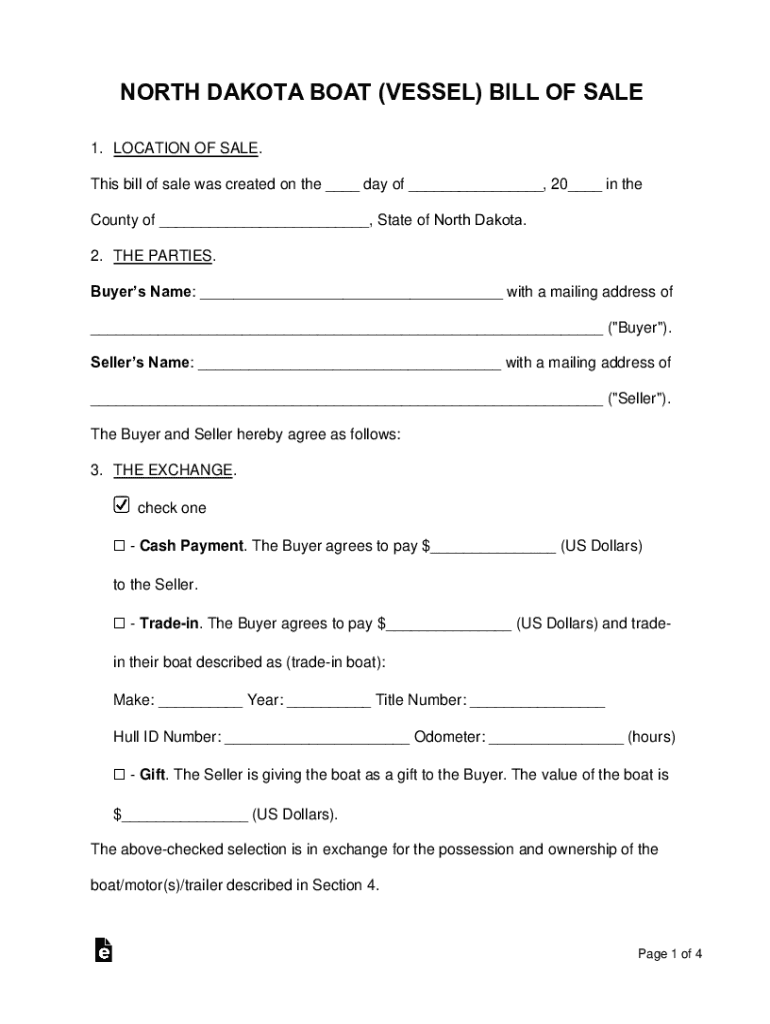
- Begin by filling in the 'Location of Sale' section, including the date and county where the sale is taking place.
- In 'The Parties' section, enter the names and mailing addresses of both the Buyer and Seller.
- Select one option under 'The Exchange' to indicate how payment will be made: Cash Payment, Trade-in, or Gift. Fill in the necessary details based on your selection.
- Provide a detailed description of the boat, motor(s), and trailer in 'Boat/Motor(s)/Trailer Description', ensuring all fields are completed accurately.
- In 'Values', list the agreed-upon prices for each item (boat, motor(s), trailer) and calculate the total.
- Indicate whether taxes are included in the purchase price by checking the appropriate box in 'Taxes'.
- Both Buyer and Seller should sign and date at the bottom of the form under 'Authorization'.
- If required, complete the Notary Acknowledgment section to verify signatures.
Start using our platform today to easily fill out your Free North Dakota Boat Bill of Sale Form for free!
It's free
See more Free North Dakota Boat Bill of Sale FormPDFWord (.doc) versions
| Versions | Form popularity | Fillable & printable |
|---|---|---|
| 2015 | 4.8 Satisfied (137 Votes) |
Got questions?
How can I generate an eSignature on my north dakota boat bill of sale from Google Chrome?
Managing your documentation with DocHub this way is extremely simple once you have downloaded its extension for Google Chrome. Go to the Chrome Web Store and set up DocHub - Sign PDF from Gmail to get it. Give our tool access to your Google account, and then open an email containing north dakota boat bill of sale as an attachment and point to the file with your cursor - the DocHub extension button will automatically show up there. Click on it to open your document in our editor. Make any necessary edits, fill out the blanks, and click Sign to create your legally-binding electronic signature.
How do you edit free boat bill of sale template from Google Drive?
If you store your files in Google Drive, there is no need to download your free boat bill of sale template on the computer and upload it back to our editor. A significantly easier way is to install a browser extension created by DocHub to simplify this flow. The extension allows editing PDFs right in your web browser. Alternatively, you can integrate your DocHub and Gmail accounts for more efficient editing.
What documents do I need to sell a boat in Florida?
How do you write a simple bill of sale for a boat?
What is the best form of payment when selling a boat?
Security and compliance
At DocHub, your data security is our priority. We follow HIPAA, SOC2, GDPR, and other standards, so you can work on your documents with confidence.
Learn more


