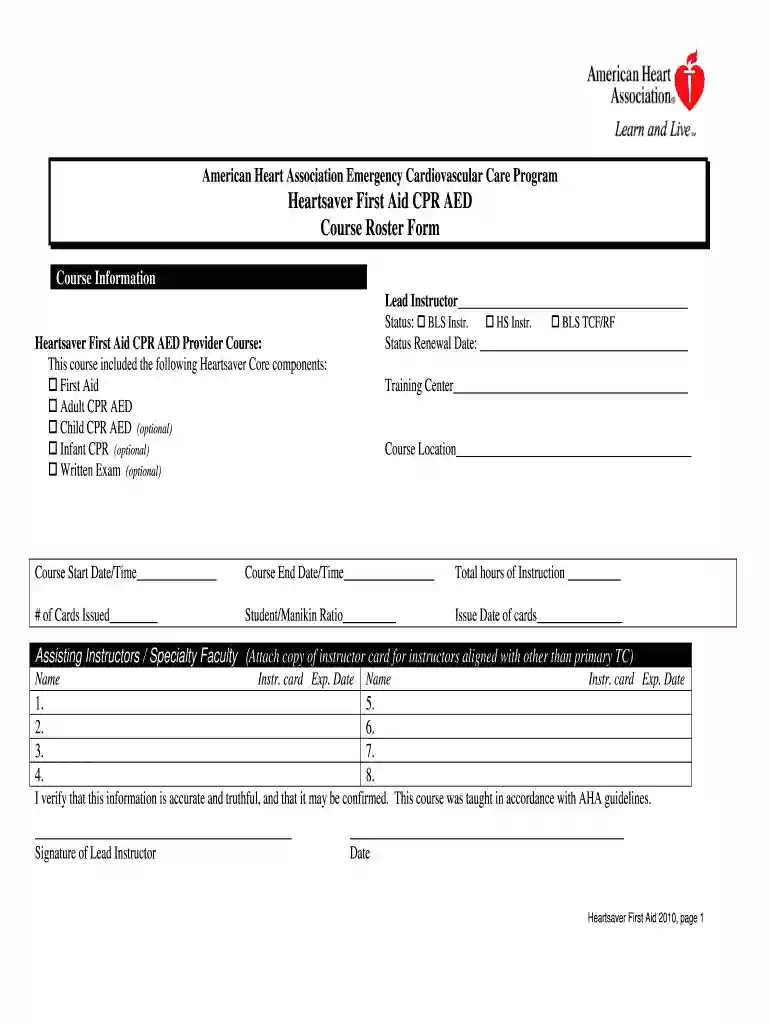
aha roster heartsaver aed Preview on Page 1

Aha heartsaver roster 2026

Here's how it works

  • 01. Edit your aha roster heartsaver aed online

    Type text, add images, blackout confidential details, add comments, highlights and more.

  • 02. Sign it in a few clicks

    Draw your signature, type it, upload its image, or use your mobile device as a signature pad.

  • 03. Share your form with others

    Send heartsaver course roster pdf via email, link, or fax. You can also download it, export it or print it out.

How to use or fill out aha heartsaver roster with our platform

Form edit decoration
9.5
Ease of Setup
DocHub User Ratings on G2
9.0
Ease of Use
DocHub User Ratings on G2
  1. Click ‘Get Form’ to open the aha heartsaver roster in the editor.
  2. Begin by filling in the 'Lead Instructor' field with the instructor's name. Select the appropriate status from the options provided, such as BLS Instructor or HS Instructor.
  3. Enter the 'Status Renewal Date' to ensure compliance with AHA guidelines.
  4. In the 'Heartsaver First Aid CPR AED Provider Course' section, check all applicable components that were included in your course, such as First Aid and Adult CPR AED.
  5. Complete the 'Training Center', 'Course Location', 'Course Start Date/Time', and 'Course End Date/Time' fields accurately.
  6. Fill in the total hours of instruction, number of cards issued, student/manikin ratio, and issue date of cards.
  7. List any assisting instructors along with their instructor card expiration dates. Ensure you attach copies of their cards if they are aligned with a different training center.
  8. Finally, verify all information is accurate and sign as the Lead Instructor, including the date.

Start using our platform today for free to streamline your document editing and form completion!

See more aha roster heartsaver aed versions

We've got more versions of the aha roster heartsaver aed form. Select the right aha roster heartsaver aed version from the list and start editing it straight away!

VersionsForm popularityFillable & printable
20104.9 Satisfied (60 Votes)

be ready to get more

Complete this form in 5 minutes or less

Got questions?

We have answers to the most popular questions from our customers. If you can't find an answer to your question, please contact us.

Managing your documentation with DocHub this way is extremely straightforward after you have downloaded its extension for Google Chrome. Go to the Chrome Web Store and install DocHub - Sign PDF from Gmail to get it. Give our tool access to your Google account, and then open an email with the cpr roster attached and point to the file with your cursor - the DocHub extension button will automatically appear there. Click on it to open your file in our editor. Make any necessary adjustments, complete the blanks, and click Sign to create your legally-binding electronic signature.

Document editing with DocHub is equally convenient on desktop and mobile devices. You just need an internet browser to revise your heartsaver roster on Android. Open our site and sign in to access the instruments you need. Add your file and introduce your intended changes. After that, you can keep your form in your file storage or send it out instantly.

\u25ba Heartsaver Total \u2013 the comprehensive curriculum designed to meet Occupational Safety and Health Administration (OSHA) and other regulatory requirements (i.e., 29 CFR §1910.151). The only optional topics in the Heartsaver Total curriculum are CPR and AED use for Children and CPR for Infants.
Heartsaver CPR AED is a video-based, instructor-led course that teaches adult and child CPR and AED use, infant CPR, and how to relieve choking in adults, children, and infants.
The AHA's Heartsaver First Aid CPR AED course trains participants to provide first aid, CPR, and use an automated external defibrillator (AED) in a safe, timely, and effective manner. Reflects science and education from the American Heart Association Guidelines Update for CPR and Emergency Cardiovascular Care (ECC).

Security and compliance

At DocHub, your data security is our priority. We follow HIPAA, SOC2, GDPR, and other standards, so you can work on your documents with confidence.

People also ask

Basic life support (BLS) includes CPR but is an overall higher level of medical care typically administered by public safety professionals, first responders, paramedics, healthcare providers, and qualified bystanders.
The difference between BLS and CPR is that the BLS class is an advanced CPR AED course. BLS is an abbreviation for Basic Life Support. The BLS CPR AED is a healthcare level CPR. The American Heart Association certification for healthcare providers is titled BLS Provider.
The AHA's Heartsaver First Aid CPR AED course trains participants to provide first aid, CPR, and use an automated external defibrillator (AED) in a safe, timely, and effective manner. Reflects science and education from the American Heart Association Guidelines Update for CPR and Emergency Cardiovascular Care (ECC).
BLS focuses on two-rescuer scenarios and team-based approach resuscitation. Whereas, HeartSaver is focused on one-rescuer community resuscitation. In addition to covering the basics, BLS will also discuss rescue breathing, using advanced airways, and how to use a bag mask device which are not covered in HeartSaver.
The difference between BLS and CPR is that the BLS class is an advanced CPR AED course. BLS is an abbreviation for Basic Life Support. The BLS CPR AED is a healthcare level CPR. The American Heart Association certification for healthcare providers is titled BLS Provider.

aha heartsaver roster

Heartsaver-Course-Roster.pdf

Per AHA guidelines, the information below must be completed on your roster for cards to be issued for your course. All paperwork should be emailed to ahaRead more

Learn more
Basic Life Support or Heartsaver Course Roster

Basic Life Support or Heartsaver Course Roster. Emergency Cardiovascular This course was taught in accordance with AHA guidelines. Signature of LeadRead more

Learn more
If you believe that this page should be taken down, please follow our DMCA take down process here