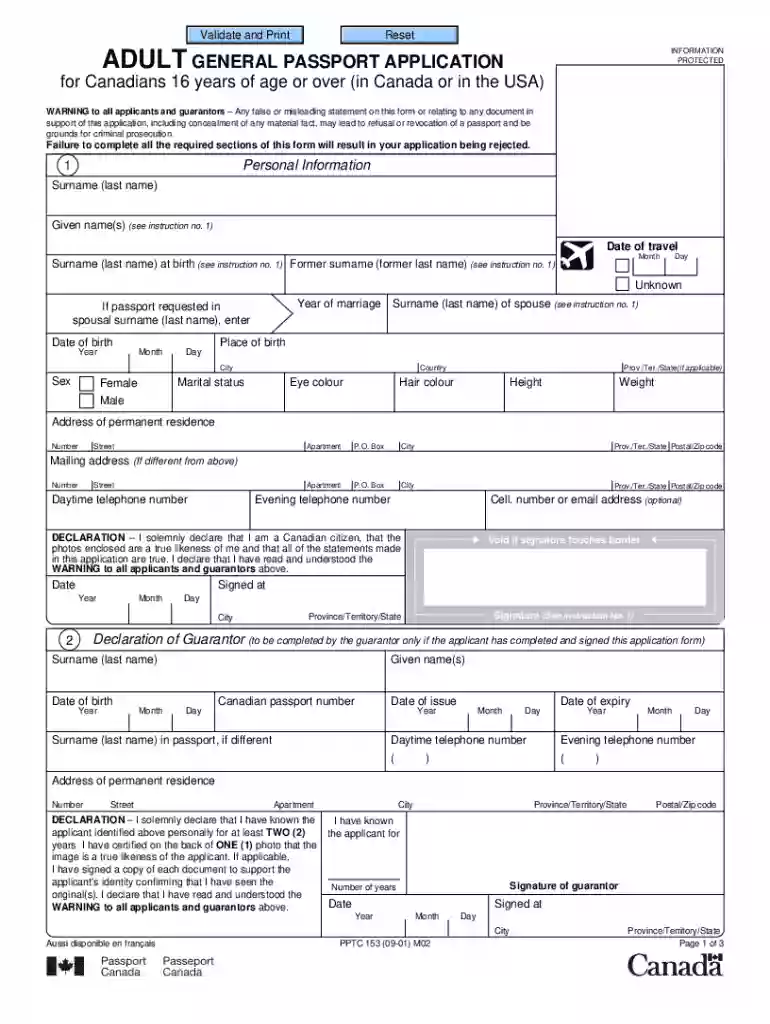
Pptc 153 adult general passport application 2001 form-2026

Get Form
adult general passport application Preview on Page 1

Here's how it works

01. Edit your adult general passport application online
Type text, add images, blackout confidential details, add comments, highlights and more.

02. Sign it in a few clicks
Draw your signature, type it, upload its image, or use your mobile device as a signature pad.

03. Share your form with others
Send adult passport application via email, link, or fax. You can also download it, export it or print it out.

How to use or fill out pptc 153 adult general passport application 2001 form with our platform

Form edit decoration
9.5
Ease of Setup
DocHub User Ratings on G2
9.0
Ease of Use
DocHub User Ratings on G2
  1. Click ‘Get Form’ to open the pptc 153 adult general passport application in the editor.
  2. Begin by filling out your personal information in Section 1. Enter your name as you want it to appear on the passport, along with your surname at birth if applicable. Ensure that your signature is within the designated box.
  3. In Section 2, have your guarantor complete their details. They must confirm they have known you for at least two years and sign the declaration.
  4. For Section 3, include any previous Canadian passports issued within the last five years. If lost or damaged, complete a statutory declaration form.
  5. In Section 4, provide proof of Canadian citizenship by submitting an original document such as a birth certificate or citizenship certificate.
  6. Complete Section 5 by providing documents that support your identity. Ensure these are valid and signed copies if necessary.
  7. Review all sections for completeness before submitting. Use our platform’s features to save and print your completed application.

Start using our platform today to simplify your passport application process!

See more pptc 153 adult general passport application 2001 form versions

We've got more versions of the pptc 153 adult general passport application 2001 form form. Select the right pptc 153 adult general passport application 2001 form version from the list and start editing it straight away!
Versions Form popularity Fillable & printable
2022 4.9 Satisfied (44 Votes)
2022 4.8 Satisfied (84 Votes)
2021 4.3 Satisfied (70 Votes)
2020 4.4 Satisfied (162 Votes)
2018 4 Satisfied (42 Votes)
2017 4.2 Satisfied (89 Votes)
2015 4.4 Satisfied (226 Votes)
2012 4.3 Satisfied (50 Votes)
2001 4.3 Satisfied (189 Votes)
be ready to get more

Complete this form in 5 minutes or less

Get form

Got questions?

We have answers to the most popular questions from our customers. If you can't find an answer to your question, please contact us.
Contact us
City Country To obtain the most recent version of this form, visit our website at Canada.ca/passport. PRIVACY NOTICE STATEMENT Personal information provided on this form is collected by Immigration, Refugees, and Citizenship Canada (IRCC) under the authority of the Canadian Passport Order.
Easy steps to be followed for online application and appointment Register through the Passport Seva Online Portal. Login to the Passport Seva Online Portal with the registered Login Id. Click Apply for Fresh Passport/Re-issue of Passport link. Fill in the required details in the form and submit.
Online: . This link will allow you to confirm that you are eligible to renew your adult passport. Note: You cannot download blank forms. After you have completed your form online, print it and sign inside the white box and date the application form.
An electronic copy of your passport, which is the printed page, cannot be downloaded as a PDF or other file from any Indian government website. To ensure safety, passports are only given as physical books that must be picked up or sent to your home.
All applications must be lodged in person at a participating post office(Opens in a new tab/window) . This means, even if you complete an online form, youll still need to print it and lodge it at a post office.

Security and compliance

At DocHub, your data security is our priority. We follow HIPAA, SOC2, GDPR, and other standards, so you can work on your documents with confidence.

Learn more

People also ask

(i) Applicants are required to do one time registration at and create a USER ID. (ii) Login using the newly created USER ID and fill in the user-friendly application form online on the same portal. (iii) After submitting the form online, take a print out of the application.

current home address in pptc153 exampl3e